Trading costs with agents: what an AI agent really costs to run

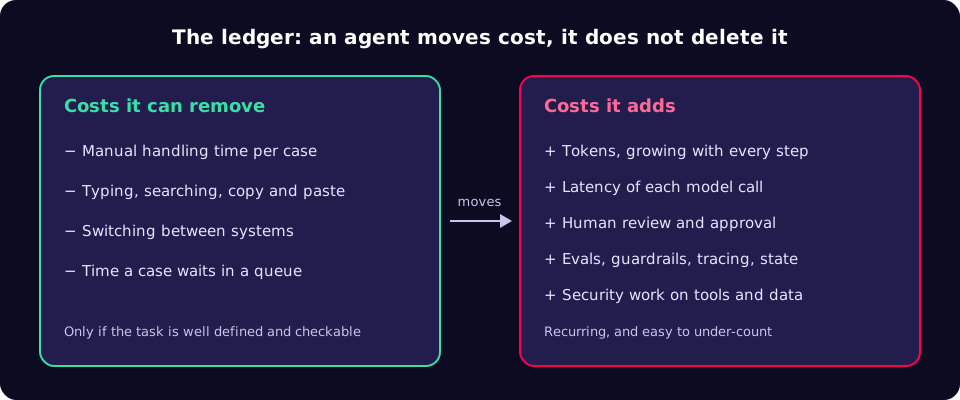
An AI agent does not remove cost from a workflow; it moves it. Manual handling time goes down, while tokens, latency, review effort and engineering work go up, and the token bill grows faster than most teams expect. This guide shows where the costs land, how to estimate them before you build, and how to keep each one bounded.
What you are actually trading
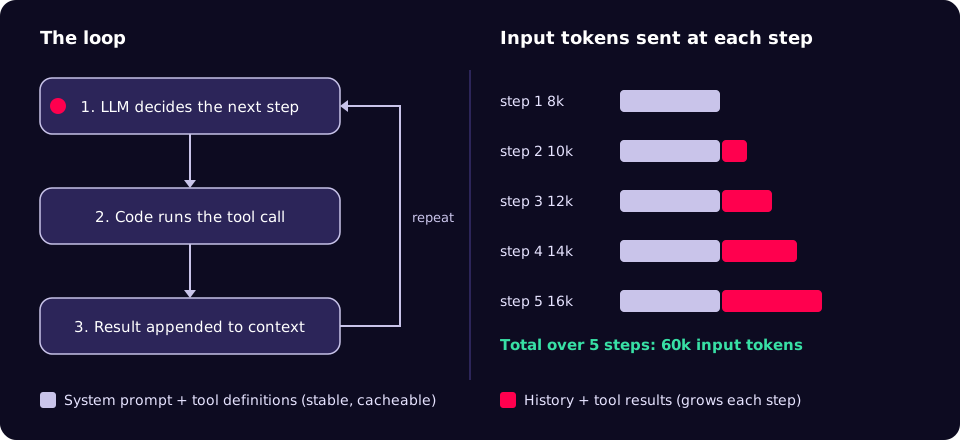
An agent here means a program in which a large language model (LLM) chooses the next action, ordinary code carries it out, and the result goes back to the model until the task is done. HumanLayer's 12-Factor Agents describes that loop in three steps: the LLM determines the next step by outputting structured JSON (a "tool call"), deterministic code executes the tool call, and the result is appended to the context window [1].
The vendors who build these systems are candid about the price. Anthropic's engineering guidance says agentic systems "often trade latency and cost for better task performance", and that "the autonomous nature of agents means higher costs, and the potential for compounding errors" [2]. The Agentic AI Handbook puts it more bluntly: "A production agent is not 'free.' It trades one cost for another", saving time spent typing and searching while adding review, coordination and safety engineering [3].
So the useful question is never "can an agent do this?" It is "which costs does it remove, which does it add, and who pays for each?"
Why the token bill grows faster than the step count
Most chat-style model APIs are stateless: on every call you send the whole conversation again. In an agent loop that means each step re-sends the system prompt, the tool definitions and every earlier tool call and result. Input tokens per call therefore rise step by step, and the total over a run grows with roughly the square of the number of steps.
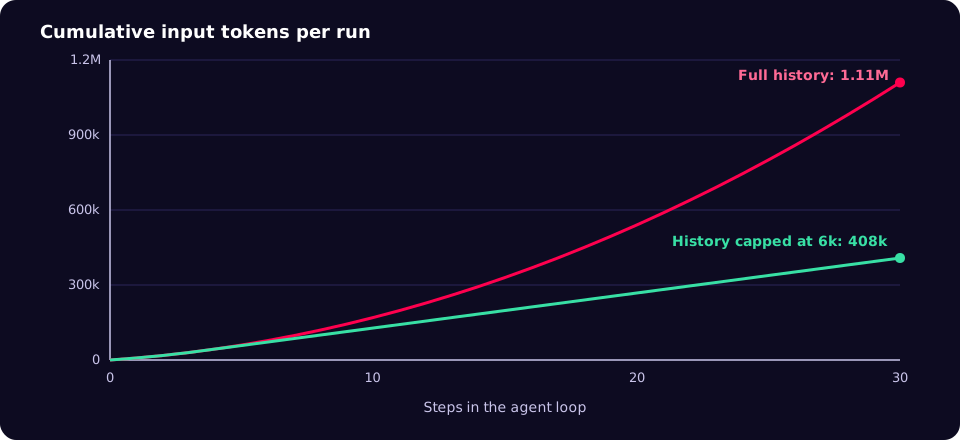
The arithmetic is simple. Say the stable prefix (system prompt plus tool definitions) is P tokens and each step adds a tokens of tool call and result to the history. Call i sends P + a(i − 1) tokens, so a run of n steps sends nP + a·n(n − 1)/2 input tokens in total. With an illustrative P = 8,000 and a = 2,000, a 10-step run sends 170,000 input tokens and a 20-step run sends 540,000. Twice the steps, more than three times the tokens.
Two levers change that curve. The first is prompt caching. On Anthropic's API, cached input is billed at 0.1 times the base input price for most models, with cache writes at 1.25 times base for the default five-minute lifetime and 2 times base for a one-hour lifetime; some newer models have lower read multipliers, and prompts below a model-specific minimum length are not cached at all [4]. Caching makes the stable prefix cheap, but in a long run the history, not the prefix, dominates.
The second lever is compaction: keeping the history short by summarising or dropping old tool output. 12-Factor Agents recommends owning your context window and compacting errors into it rather than letting raw output pile up [1]. In the illustrative example, capping history at 6,000 tokens cuts a 30-step run from about 1.11 million input tokens to 408,000.
Where each cost lands: workflow, agent or person
Anthropic distinguishes workflows, where code follows predefined paths and calls the model at fixed points, from agents, where the model directs its own process. It recommends "finding the simplest solution possible, and only increasing complexity when needed", noting that workflows offer predictability and consistency for well-defined tasks [2]. The table compares the three options for a typical back-office task.
| Cost | Person only | Scripted LLM workflow | Autonomous agent |
|---|---|---|---|
| Handling time per case | High | Low | Low |
| Tokens per case | None | Fixed, predictable | Variable; grows with steps |
| Latency | Hours to days (queues) | Seconds | Seconds to minutes |
| Handles unexpected inputs | Well | Poorly; falls to a person | Often, but can compound errors [2] |
| Review effort | Spot checks | Check outputs | Check outputs and actions taken |
| Engineering to run safely | Low | Moderate | Highest: evals, budgets, tracing, durable state |
The Handbook's guidance on when not to use an agent is a good filter: skip it when the task is faster by hand, when there are no tests or deterministic validation, when "done" is undefined, or when the agent would hold broad privileges and mistakes would be costly [3].
A playbook for pricing an agent before you build it
- Measure today's cost. Record cases per week, minutes per case and error rate for the current process. Without this baseline you cannot tell whether the agent saved anything.
- Define "done" and an objective check. Tests, a schema, a reconciliation total, a linter. The Handbook lists an objective signal as a precondition for using agents at all [3].
- Try a fixed workflow first. If the steps are known, hard-code them and call the model only where judgement is needed [2]. Move to an agent only for the cases the workflow cannot handle.
- Estimate tokens per case. Measure your real prefix size and average tokens added per step, then use the formula above (or the script below) at your expected and worst-case step counts. Multiply by your provider's current list prices.
- Set hard budgets in code. Maximum steps, maximum input tokens and a wall-clock deadline per run. When a budget trips, stop and hand the case to a person with the trace attached.
- Cache and compact. Put stable instructions and tool definitions first so they can be cached [4]; summarise or truncate old tool output so history stays bounded [1].
- Put approvals in the loop, not after it. 12-Factor Agents suggests contacting humans with tool calls, so a request for approval is just another step the run can pause on and resume from [1].
- Make runs durable. Long runs fail half-way. Persist state so a run can resume rather than restart and pay for every step again. Dapr Agents, for example, says its workflow engine "guarantees each agent task executes to completion" and retries failed tasks from where they left off [5]; treat that as a vendor claim and test it under your own failure modes.
- Trace every call. Record tokens, model, tool and outcome per step. The OpenTelemetry GenAI semantic conventions (still marked "Development") define attributes such as
gen_ai.usage.input_tokens,gen_ai.usage.output_tokens,gen_ai.usage.cache_read.input_tokensandgen_ai.tool.name, and operation names such asinvoke_agentandexecute_tool[6]. - Compare after a month. Actual token spend plus review hours plus engineering hours, against the baseline from step 1.
Estimate tokens per run
This script reproduces the numbers above. Replace the sizes with values measured from your own traces.
# agent_tokens.py: total input tokens for a loop that re-sends its history
def loop_input_tokens(prefix: int, per_step: int, steps: int,
                      history_cap: int | None = None) -> int:
    """prefix: stable tokens sent on every call (system prompt, tool definitions)
    per_step: tokens each step adds to the history (tool call + result)
    history_cap: if set, history is compacted so it never exceeds this size
    """
    total = 0
    for i in range(steps):  # i = number of earlier steps in the history
        history = per_step * i
        if history_cap is not None:
            history = min(history, history_cap)
        total += prefix + history
    return total


if __name__ == "__main__":
    for n in (10, 20, 30):
        full = loop_input_tokens(8_000, 2_000, n)
        capped = loop_input_tokens(8_000, 2_000, n, history_cap=6_000)
        print(f"{n:>2} steps: {full:>9,} full  {capped:>9,} compacted")
Output (Python 3.10 or later):
10 steps:   170,000 full    128,000 compacted
20 steps:   540,000 full    268,000 compacted
30 steps: 1,110,000 full    408,000 compacted
Enforce a budget on every run
Call charge() after each model response. The field names match the Anthropic Messages API, where input_tokens counts only uncached input, so the cached fields must be added to get the full figure [4].
import time


class BudgetExceeded(RuntimeError):
    pass


class LoopBudget:
    def __init__(self, max_steps=15, max_input_tokens=300_000, max_seconds=300):
        self.max_steps = max_steps
        self.max_input_tokens = max_input_tokens
        self.deadline = time.monotonic() + max_seconds
        self.steps = 0
        self.input_tokens = 0

    def charge(self, usage):
        self.steps += 1
        self.input_tokens += (usage.input_tokens
                              + (usage.cache_creation_input_tokens or 0)
                              + (usage.cache_read_input_tokens or 0))
        if self.steps >= self.max_steps:
            raise BudgetExceeded(f"step limit {self.max_steps} reached")
        if self.input_tokens >= self.max_input_tokens:
            raise BudgetExceeded(f"{self.input_tokens:,} input tokens used")
        if time.monotonic() > self.deadline:
            raise BudgetExceeded("wall-clock deadline passed")
To cache the stable part of each request, Anthropic's API accepts a top-level cache_control field (or one on individual content blocks); the response's usage then reports cache_creation_input_tokens and cache_read_input_tokens so you can confirm hits [4]:
{
  "model": "your-model-id",
  "max_tokens": 1024,
  "cache_control": { "type": "ephemeral" },
  "system": "Long, stable instructions and policies go here.",
  "messages": [{ "role": "user", "content": "Reconcile account 4471 for October." }]
}
The security cost is part of the price
Tools are what make an agent useful, and they are also its attack surface. Simon Willison's "lethal trifecta" names the dangerous combination: access to private data, exposure to untrusted content, and the ability to communicate externally in a way that could be used to steal that data [7]. An agent that reads customer emails, can query your CRM and can send HTTP requests has all three. The Handbook's advice is to remove at least one leg, for example by blocking outbound calls or keeping raw personal data out of the model's context [3]. That design work, and the reviews that go with it, belongs in the right-hand column of the ledger.
Checklist before an agent goes to production
- Baseline cost of the current process recorded (volume, minutes per case, error rate).
- Objective definition of "done" that code can check.
- Reason written down for why a fixed workflow is not enough.
- Hard limits on steps, input tokens and wall-clock time, with hand-off to a person on breach.
- Stable prefix placed first and cache hits visible in usage data.
- History compaction in place; no raw multi-megabyte tool output in context.
- Approval steps for any write, payment or external message.
- At least one leg of the lethal trifecta removed.
- Per-step traces with token counts, tool names and outcomes.
- Run state persisted so a failure resumes rather than restarts.
Common mistakes
- Pricing the demo, not the distribution. The happy path takes six steps; the awkward 10% of cases take thirty. Because tokens grow with the square of steps, those cases can dominate the bill.
- Counting tokens and nothing else. Review time and engineering time are usually the larger costs, and they recur.
- Reading
input_tokensas the total. With caching on, the uncached figure alone under-reports what the model processed [4]. - No stop condition. An agent that retries a failing tool indefinitely spends money and achieves nothing.
- Agent where a script would do. If the steps never change, you are paying for flexibility you do not use [2].
- Broad credentials "for now". Privileges granted for a pilot tend to survive into production.
What to do this week
- Pick one candidate process and record its baseline: cases per week and median minutes per case.
- Pull ten real traces from any agent you already run and measure prefix size, tokens per step and step count. Run the script with those numbers at the 50th and 95th percentile step counts.
- Add a step limit and a token limit to that agent, wired to a hand-off rather than a silent failure.
- Check whether your stable prefix is actually being cached by looking for non-zero cache read tokens in the usage data.
- List each tool the agent can call and mark which legs of the lethal trifecta it touches.
Agents pay off where the work is repetitive, checkable and expensive for people to do, and where the costs they add are measured and capped. If you want a second pair of eyes on where an agent will and will not earn its keep in your organisation, our AI agents team is happy to talk it through.
References
- HumanLayer, 12-Factor Agents: Principles for building reliable LLM applications (GitHub)
- Anthropic, Building effective agents
- Nikola Balić, The Agentic AI Handbook: Production-Ready Patterns
- Anthropic, Prompt caching (Claude API documentation)
- Dapr Agents (GitHub repository)
- OpenTelemetry, Semantic conventions for generative AI
- Simon Willison, The lethal trifecta for AI agents (16 June 2025)