Redis 生產環境中的高可用性:Sentinel、叢集和 Kubernetes Operator
具有 Sentinel、叢集模式和 Kubernetes Operator 的 Redis HA
 Balinder Walia2026年4月12日28 min read
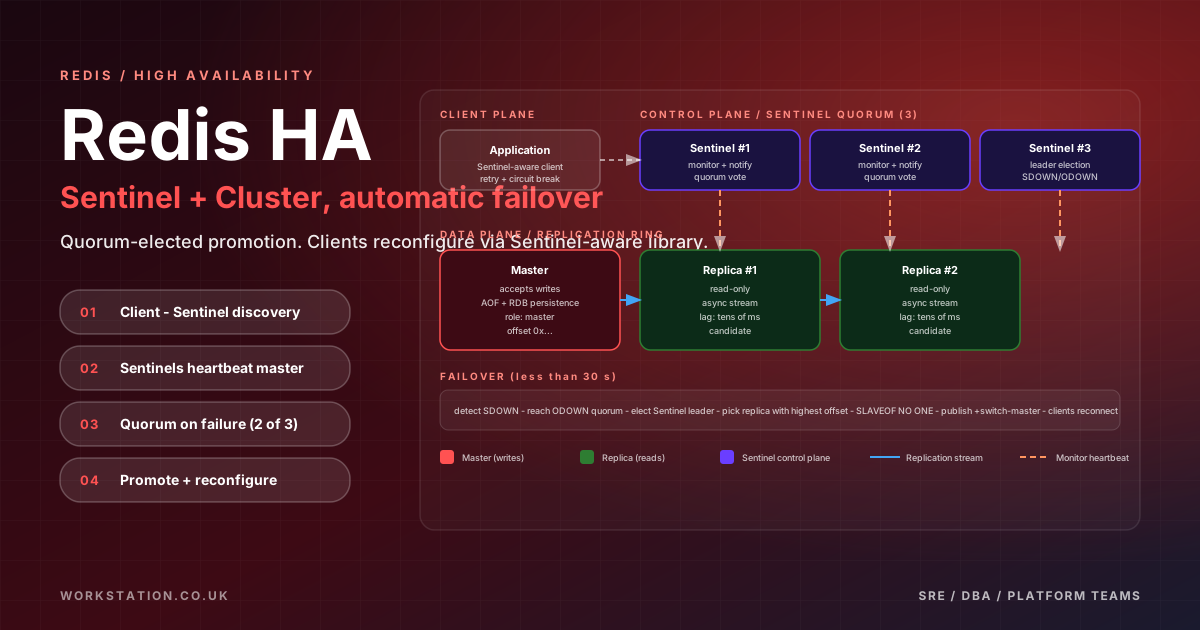
Redis 是現代應用基礎設施的支柱。它充當全球數百萬應用程式的快取、會話儲存、訊息代理、速率限制器、排行榜引擎和實時分析管道。單個 Redis 例項每秒可以處理數十萬次操作,延遲時間亞毫秒,但單個例項也是單點故障。當 Redis 出現故障時,應用程式會遇到級聯故障:快取踩踏淹沒後端資料庫、會話丟失、速率限制器停止工作、實時功能變暗。對於生產系統來說,構建高度可用的 Redis 部署不是可選的 - 這是一項工程要求。
本指南是對 Redis 高可用性的全面、以生產為中心的深入探討。我們將介紹 Redis 複製基礎知識(非同步複製、WAIT 命令和部分重新同步)、用於自動故障轉移和服務發現的 Redis Sentinel、用於透過雜湊槽分佈進行水平擴充套件的 Redis Cluster、Kubernetes 運算子(Spotahome、OpsTree 和 Redis Enterprise)、永續性策略(RDB 快照、AOF 和混合永續性)、AWS ElastiCache 上的雲託管部署、適用於 Redis 的 Azure 快取和 GCP Memorystore、使用 Rancher 和 Longhorn 的裸機 k3s 部署、記憶體管理和逐出策略、TLS 加密和基於 ACL 的訪問控制、HA 配置中的 Pub/Sub 和 Streams 行為、HA 中的 Redis 模組(RedisJSON、RediSearch、RedisTimeSeries)、用於故障轉移彈性的連線池和客戶端配置、備份和恢復策略、使用 Redis 進行監控INFO、Prometheus 匯出器和 Grafana 儀表板、作為 Redis 相容替代方案的 Dragonfly 和 KeyDB、透過管道進行效能調整、Lua 指令碼和記憶體最佳化、常見故障場景和故障排除過程以及容量規劃和擴充套件策略。
Redis 複製基礎知識
Redis 複製是構建所有高可用性架構的基礎。 Redis 主例項接受寫入並將其非同步傳播到一個或多個副本例項。副本維護主資料集的近實時副本並提供讀取查詢服務,從而提供資料冗餘和讀取可擴充套件性。
與 PostgreSQL 基於 WAL 的流式複製不同,Redis 使用基於命令的複製協議。在主伺服器上執行的每個寫入命令都被序列化到複製流中併傳送到連線的副本,副本針對其本地資料集執行相同的命令。這種方法簡單高效,但對一致性有重要影響——由於預設情況下複製是非同步的,因此總是存在一個視窗,其中主伺服器上已確認的寫入尚未到達副本。
非同步複製和 WAIT 命令
預設情況下,Redis 複製是完全非同步的。主伺服器在本地應用後立即確認對客戶端的寫入,而無需等待任何副本確認接收。這提供了最大的寫入吞吐量,但引入了潛在的資料丟失視窗 - 如果主伺服器在寫入到達任何副本之前崩潰,則該寫入就會丟失。
WAIT命令提供同步複製原語。發出寫入後,客戶端可以呼叫WAIT numreplicas timeout進行阻塞,直到指定數量的副本已確認寫入或超時到期。這並不使 Redis 完全同步 -WAIT只保證副本已收到資料,而不保證資料已持久儲存到副本上的磁碟上。然而,它顯著減少了資料丟失視窗。
# Write a critical value and wait for 2 replicas to acknowledge
SET order:12345 '{"status":"confirmed","amount":599.99}'
WAIT 2 5000
# Returns the number of replicas that acknowledged within 5000ms
# Returns 0 if no replica acknowledged (timeout or no replicas connected)有選擇地使用WAIT進行關鍵寫入(金融交易、訂單確認),同時允許非關鍵寫入(快取更新、會話重新整理)非同步進行。每個命令的靈活性避免了完全同步複製的延遲損失。
部分重新同步 (PSYNC)
當副本短暫斷開連線(網路故障、重新啟動)時,它不需要完整的資料集傳輸即可重新加入。 Redis 在主伺服器上維護複製積壓(最近寫入命令的迴圈緩衝區)。當副本重新連線時,它將其複製偏移量傳送到主伺服器。如果偏移量仍在積壓範圍內,則主裝置僅傳送丟失的命令(部分重新同步)。如果偏移量超出積壓範圍,則會觸發完全重新同步,其中涉及生成和傳輸 RDB 快照。
# redis.conf — Replication backlog configuration
repl-backlog-size 256mb          # Size of the replication backlog buffer
repl-backlog-ttl 3600            # Seconds to retain backlog after last replica disconnects
repl-diskless-sync yes           # Transfer RDB via socket instead of disk (faster for full sync)
repl-diskless-sync-delay 5       # Wait 5s for more replicas before starting diskless sync
repl-diskless-sync-period 0      # No periodic full sync
repl-diskless-load on-empty-db   # Replica loads RDB from socket directly into memory
正確調整複製待辦事項的大小至關重要。它應該足夠大以容納在最長的預期副本斷開連線期間生成的所有寫入命令。對於處理 50MB/s 寫入流量的 Redis 例項,256MB 積壓事務涵蓋大約 5 秒的寫入 — 如果您的副本可能離線較長時間,請增加該值。
配置主副本複製
# redis.conf — Master configuration
bind 0.0.0.0
port 6379
protected-mode no
requirepass strong_master_password
masterauth strong_master_password

# Persistence
save 900 1
save 300 10
save 60 10000
appendonly yes
appendfsync everysec
aof-use-rdb-preamble yes

# Replication
repl-backlog-size 256mb
repl-backlog-ttl 3600
repl-diskless-sync yes
min-replicas-to-write 1          # Refuse writes if fewer than 1 replica connected
min-replicas-max-lag 10          # Replica considered disconnected if lag > 10 seconds
# redis.conf — Replica configuration
bind 0.0.0.0
port 6379
protected-mode no
requirepass strong_master_password
masterauth strong_master_password
replicaof master-host 6379
replica-read-only yes
replica-serve-stale-data yes # Serve (possibly stale) data during sync
replica-priority 100 # Lower values get promoted first by Sentinel當主裝置無法保證副本上的資料永續性時,min-replicas-to-write和min-replicas-max-lag設定會阻止主裝置接受寫入。這是一個關鍵的安全網——沒有它,網路分割槽的主伺服器會繼續接受寫入,而當 Sentinel 提升副本時,這些寫入將會丟失。
Redis Sentinel:自動故障轉移和服務發現
Redis Sentinel 是一個分散式系統,可監控 Redis 主例項和副本例項、檢測主例項故障、透過將副本提升為主例項來執行自動故障轉移,並提供服務發現,以便客戶端始終可以找到當前的主例項。 Sentinel 作為一個單獨的程序與 Redis 一起執行,並透過共識協議進行操作 - Sentinel 例項的法定數量必須同意在啟動故障轉移之前無法訪問主伺服器。
哨兵配置
Sentinel 至少需要三個例項才能容忍一個 Sentinel 故障並仍維持法定人數。每個 Sentinel 監控同一個 Redis master,並透過八卦協議與其他 Sentinel 進行通訊,以就 master 的健康狀態達成一致。
# /etc/redis/sentinel.conf — Sentinel instance configuration
port 26379
bind 0.0.0.0
protected-mode no

# Monitor the master named "mymaster" at 10.0.1.10:6379
# The quorum value (2) means 2 Sentinels must agree the master is down
sentinel monitor mymaster 10.0.1.10 6379 2

# Authentication
sentinel auth-pass mymaster strong_master_password

# Timing parameters
sentinel down-after-milliseconds mymaster 5000    # SDOWN after 5s of no PING response
sentinel failover-timeout mymaster 60000          # Max 60s for failover procedure
sentinel parallel-syncs mymaster 1                # Only 1 replica syncs from new master at a time

# Deny script execution for security
sentinel deny-scripts-reconfig yes

# Notification script (called on failover events)
# sentinel notification-script mymaster /opt/redis/notify.sh

# Client reconfiguration script (called when master changes)
# sentinel client-reconfig-script mymaster /opt/redis/reconfig.sh

# Logging
logfile /var/log/redis/sentinel.log
logevel notice

# Enable TLS for Sentinel communication
# tls-port 26379
# port 0
# tls-cert-file /etc/redis/tls/sentinel.crt
# tls-key-file /etc/redis/tls/sentinel.key
# tls-ca-cert-file /etc/redis/tls/ca.crt
# tls-replication yes
# tls-auth-clients optional
Sentinel 的故障檢測分兩個階段進行。首先,當單個 Sentinel 在down-after-milliseconds內未收到對 PING 的有效回覆時,會將主裝置標記為主觀關閉 (SDOWN)。然後,當法定數量的 Sentinels 同意主伺服器無法訪問時,它會被標記為Objectively Down (ODOWN),並且故障轉移過程開始。一個 Sentinel 被選舉為故障轉移領導者,它選擇最佳副本(基於優先順序、複製偏移量和 runid),將其提升為主副本,重新配置剩餘副本以跟隨新主副本,並更新 Sentinel 狀態。
Sentinel 服務發現和客戶端配置
Sentinel 相對於靜態主副本設定的主要優勢是服務發現。客戶端不會連線到固定的 Redis 地址 - 他們向 Sentinel 詢問當前的主地址並訂閱故障轉移通知。每個主要的 Redis 客戶端庫都原生支援 Sentinel。
# Node.js — ioredis with Sentinel support
const Redis = require('ioredis');

const redis = new Redis({
  sentinels: [
    { host: '10.0.1.20', port: 26379 },
    { host: '10.0.1.21', port: 26379 },
    { host: '10.0.1.22', port: 26379 }
  ],
  name: 'mymaster',
  password: 'strong_master_password',
  sentinelPassword: 'sentinel_password',
  db: 0,
  retryStrategy(times) {
    const delay = Math.min(times * 200, 5000);
    return delay;
  },
  reconnectOnError(err) {
    const targetError = 'READONLY';
    if (err.message.includes(targetError)) {
      return true; // Reconnect on READONLY error (failover happened)
    }
    return false;
  },
  maxRetriesPerRequest: 3,
  enableReadyCheck: true,
  connectTimeout: 10000,
  lazyConnect: false
});

redis.on('connect', () => console.log('Connected to Redis master'));
redis.on('error', (err) => console.error('Redis error:', err));
redis.on('+switch-master', (msg) => {
  console.log('Master switched:', msg);
});
# Python — redis-py with Sentinel support
from redis.sentinel import Sentinel
import redis
sentinel = Sentinel(
[('10.0.1.20', 26379), ('10.0.1.21', 26379), ('10.0.1.22', 26379)],
socket_timeout=5,
password='strong_master_password',
sentinel_kwargs={'password': 'sentinel_password'}
)
# Get a connection to the current master (for writes)
master = sentinel.master_for(
'mymaster',
socket_timeout=5,
retry_on_timeout=True,
db=0
)
# Get a connection to a replica (for reads)
replica = sentinel.slave_for(
'mymaster',
socket_timeout=5,
db=0
)
# Usage
master.set('session:user123', '{"logged_in": true}')
result = replica.get('session:user123')
print(result)// Go — go-redis with Sentinel support
package main
import (
"context"
"fmt"
"time"
"github.com/redis/go-redis/v9"
)
func main() {
ctx := context.Background()
rdb := redis.NewFailoverClient(&redis.FailoverOptions{
MasterName: "mymaster",
SentinelAddrs: []string{"10.0.1.20:26379", "10.0.1.21:26379", "10.0.1.22:26379"},
Password: "strong_master_password",
SentinelPassword: "sentinel_password",
DB: 0,
DialTimeout: 10 * time.Second,
ReadTimeout: 5 * time.Second,
WriteTimeout: 5 * time.Second,
PoolSize: 50,
MinIdleConns: 10,
MaxRetries: 3,
MinRetryBackoff: 200 * time.Millisecond,
MaxRetryBackoff: 5 * time.Second,
})
defer rdb.Close()
err := rdb.Set(ctx, "key", "value", 5*time.Minute).Err()
if err != nil {
fmt.Printf("Error: %v
", err)
return
}
val, err := rdb.Get(ctx, "key").Result()
if err != nil {
fmt.Printf("Error: %v
", err)
return
}
fmt.Printf("key = %s
", val)
}Redis 叢集:使用雜湊槽進行水平擴充套件
Sentinel 為單個資料集提供高可用性,而 Redis Cluster 提供 HA 和水平擴充套件。 Redis Cluster 使用雜湊槽機制將資料跨多個主節點進行分割槽 - 鍵空間分為 16,384 個雜湊槽,每個主節點負責這些槽的子集。每個主伺服器都有一個或多個副本用於故障轉移。 該叢集共同提供自動分片、內建故障轉移以及透過新增節點線性擴充套件儲存和吞吐量的能力。
設定 Redis 叢集
# Create a 6-node Redis Cluster (3 masters + 3 replicas)
# Each node needs a redis.conf with cluster-enabled

# redis.conf for each cluster node (adjust port per node)
port 7000
cluster-enabled yes
cluster-config-file nodes-7000.conf
cluster-node-timeout 5000
appendonly yes
appendfsync everysec
aof-use-rdb-preamble yes
requirepass cluster_password
masterauth cluster_password
bind 0.0.0.0
protected-mode no
repl-backlog-size 256mb

# Start all 6 Redis instances
redis-server /etc/redis/7000.conf
redis-server /etc/redis/7001.conf
# ... repeat for all 6 nodes

# Create the cluster
redis-cli --cluster create \
  10.0.1.10:7000 10.0.1.11:7000 10.0.1.12:7000 \
  10.0.1.13:7000 10.0.1.14:7000 10.0.1.15:7000 \
  --cluster-replicas 1 \
  -a cluster_password

# Verify cluster status
redis-cli -c -h 10.0.1.10 -p 7000 -a cluster_password cluster info
redis-cli -c -h 10.0.1.10 -p 7000 -a cluster_password cluster nodes
重新分片和多金鑰操作
重新分片在主節點之間移動雜湊槽,以在新增或刪除節點後重新平衡資料。在重新分片期間,遷移槽中的鍵可能會收到 ASK 重定向,客戶端會透明地處理該重定向。
# Add a new node to the cluster
redis-cli --cluster add-node 10.0.1.16:7000 10.0.1.10:7000 -a cluster_password

# Reshard slots to the new node
redis-cli --cluster reshard 10.0.1.10:7000 \
  --cluster-from all \
  --cluster-to NEW_NODE_ID \
  --cluster-slots 4096 \
  --cluster-yes \
  -a cluster_password

# Rebalance the cluster automatically
redis-cli --cluster rebalance 10.0.1.10:7000 -a cluster_password

# Check cluster slot distribution
redis-cli -c -h 10.0.1.10 -p 7000 -a cluster_password cluster slotsRedis 叢集中的多金鑰操作才有效。使用雜湊標籤確保相關鍵對映到同一插槽:{user:123}.profile和{user:123}.sessions都在user:123上雜湊,保證它們落在同一節點上。這使得 MGET、MSET、事務和 Lua 指令碼能夠跨相關鍵。
# Hash tags ensure these keys are in the same slot
SET {order:5000}.details '{"item":"widget","qty":3}'
SET {order:5000}.payment '{"method":"card","status":"paid"}'
SET {order:5000}.shipping '{"carrier":"fedex","tracking":"FX123"}'

# Multi-key operations work because all keys share the {order:5000} hash tag
MGET {order:5000}.details {order:5000}.payment {order:5000}.shipping

# Transaction across same-slot keys
MULTI
SET {order:5000}.details '{"item":"widget","qty":3,"status":"confirmed"}'
SET {order:5000}.payment '{"method":"card","status":"captured"}'
EXEC
用於 Kubernetes 的 Redis 操作器
在 Kubernetes 中執行 Redis 需要仔細處理持久儲存、網路身份、優雅的故障轉移和配置管理。 Kubernetes 操作員將此操作知識編碼到自定義控制器中,這些控制器透過自定義資源定義 (CRDs) 以宣告方式管理 Redis 叢集。
Spotahome Redis 操作員
Spotahome 運算子(也稱為 redis-operator)是一個成熟的、廣泛使用的運算子,用於在 Kubernetes 中部署基於 Redis Sentinel 的 HA。它透過基於 Sentinel 的故障轉移來管理 Redis 主副本集。
# Install the Spotahome Redis Operator
helm repo add spotahome https://spotahome.github.io/redis-operator
helm install redis-operator spotahome/redis-operator \
  --namespace redis-system --create-namespace

# RedisFailover CRD — 3 Redis instances + 3 Sentinels
apiVersion: databases.spotahome.com/v1
kind: RedisFailover
metadata:
  name: redis-ha
  namespace: production
spec:
  sentinel:
    replicas: 3
    resources:
      requests:
        cpu: 100m
        memory: 128Mi
      limits:
        cpu: 200m
        memory: 256Mi
    customConfig:
      down-after-milliseconds: "5000"
      failover-timeout: "60000"
  redis:
    replicas: 3
    resources:
      requests:
        cpu: "2"
        memory: 8Gi
      limits:
        cpu: "4"
        memory: 16Gi
    storage:
      persistentVolumeClaim:
        metadata:
          name: redis-data
        spec:
          accessModes:
            - ReadWriteOnce
          resources:
            requests:
              storage: 50Gi
          storageClassName: longhorn
    customConfig:
      maxmemory: "6gb"
      maxmemory-policy: "allkeys-lru"
      save: "900 1 300 10 60 10000"
      appendonly: "yes"
      appendfsync: "everysec"
      aof-use-rdb-preamble: "yes"
      repl-backlog-size: "256mb"
    exporter:
      enabled: true
      image: oliver006/redis_exporter:latest
      args:
        - --include-system-metrics
OpsTree Redis 操作器
OpsTree 運算子支援 Redis Sentinel(獨立 HA)和 Redis Cluster(分片 HA)拓撲,使其更適合不同的用例。
# Install the OpsTree Redis Operator
helm repo add ot-helm https://ot-container-kit.github.io/helm-charts/
helm install redis-operator ot-helm/redis-operator \
  --namespace redis-system --create-namespace

# Redis Cluster CRD — 3 masters + 3 replicas
apiVersion: redis.redis.opstreelabs.in/v1beta2
kind: RedisCluster
metadata:
  name: redis-cluster
  namespace: production
spec:
  clusterSize: 3
  clusterVersion: v7
  persistenceEnabled: true
  kubernetesConfig:
    image: redis:7.2-alpine
    imagePullPolicy: IfNotPresent
    resources:
      requests:
        cpu: "2"
        memory: 8Gi
      limits:
        cpu: "4"
        memory: 16Gi
  redisLeader:
    replicas: 3
    redisConfig:
      additionalRedisConfig: |
        maxmemory 6gb
        maxmemory-policy allkeys-lru
        appendonly yes
        appendfsync everysec
  redisFollower:
    replicas: 3
    redisConfig:
      additionalRedisConfig: |
        maxmemory 6gb
        replica-read-only yes
  storage:
    volumeClaimTemplate:
      spec:
        accessModes:
          - ReadWriteOnce
        resources:
          requests:
            storage: 50Gi
        storageClassName: longhorn
  redisExporter:
    enabled: true
    image: quay.io/opstree/redis-exporter:v1.44.0
Redis 企業運營商
Redis Enterprise 為商業 Kubernetes 運營商提供先進功能,包括主動-主動異地複製 (CRDT)、Redis 模組支援、自動分層(RAM + 快閃記憶體)和自動化叢集管理。對於需要企業級 SLA 和支援的組織來說,這是推薦的選項。
# Redis Enterprise Operator CRD
apiVersion: app.redislabs.com/v1
kind: RedisEnterpriseCluster
metadata:
  name: redis-enterprise
  namespace: redis-enterprise
spec:
  nodes: 3
  persistentSpec:
    enabled: true
    storageClassName: longhorn
    volumeSize: 100Gi
  redisEnterpriseNodeResources:
    limits:
      cpu: "8"
      memory: 32Gi
    requests:
      cpu: "4"
      memory: 16Gi
  uiServiceType: ClusterIP
  servicesRiggerSpec:
    databaseServiceType: ClusterIP
---
apiVersion: app.redislabs.com/v1alpha1
kind: RedisEnterpriseDatabase
metadata:
  name: redis-ha-db
  namespace: redis-enterprise
spec:
  memorySize: 10GB
  replication: true
  shardCount: 3
  persistence: aofEverySecond
  tlsMode: enabled
  modulesList:
    - name: search
      version: latest
    - name: json
      version: latest
持久化策略:RDB、AOF 和混合
Redis 提供三種持久機制。選擇正確的策略取決於您的恢復點目標 (RPO)、效能要求和儲存限制。
RDB 快照按配置的時間間隔建立整個資料集的時間點快照。它們結構緊湊,重啟時載入速度快,非常適合備份。但是,快照之間寫入的資料會在崩潰時丟失。 RDB 使用分叉子程序,因此快照建立不會阻塞主 Redis 執行緒,但分叉本身可能會由於寫入時複製記憶體分配而導致大型資料集出現延遲峰值。
AOF(僅附加檔案)記錄對磁碟的每個寫入操作。它提供了比 RDB 更好的耐用性 — 使用appendfsync everysec,您在崩潰時最多會丟失一秒的資料。使用appendfsync always,您不會有任何損失,但會付出巨大的效能代價。 AOF 檔案比 RDB 檔案大,並且重啟時載入速度較慢。
混合永續性(推薦方法)結合了兩者:aof-use-rdb-preamble yes在 AOF 檔案的開頭寫入 RDB 快照,然後是用於後續寫入的 AOF 條目。這提供了快速的啟動時間(RDB 部分)和強大的耐用性(AOF 部分)。
# redis.conf — Hybrid persistence (recommended for production)

# RDB snapshots
save 900 1          # Snapshot if at least 1 write in 900 seconds
save 300 10         # Snapshot if at least 10 writes in 300 seconds
save 60 10000       # Snapshot if at least 10000 writes in 60 seconds
stop-writes-on-bgsave-error yes
rdbcompression yes
rdbchecksum yes
dbfilename dump.rdb
dir /data/redis

# AOF
appendonly yes
appendfilename "appendonly.aof"
appendfsync everysec           # Best balance of durability and performance
auto-aof-rewrite-percentage 100
auto-aof-rewrite-min-size 64mb
aof-use-rdb-preamble yes       # Hybrid: RDB preamble + AOF tail
aof-timestamp-enabled yes      # Enable timestamps for PITR (Redis 7+)

# Recovery options
rdb-del-sync-files no
aof-load-truncated yes
雲管理的 Redis 部署
AWS 適用於 Redis 的 ElastiCache
AWS ElastiCache 提供完全託管的 Redis,具有兩種 HA 模式:禁用叢集模式(單分片,最多 5 個副本,類似 Sentinel 的故障轉移)和啟用叢集模式(最多 500 個分片,每個分片最多 5 個副本,雜湊槽分配)。全域性資料儲存提供跨區域複製以實現災難恢復。
# AWS CLI — Create ElastiCache Redis Cluster Mode Enabled
aws elasticache create-replication-group \
  --replication-group-id redis-ha-prod \
  --replication-group-description "Production Redis HA Cluster" \
  --engine redis \
  --engine-version 7.1 \
  --cache-node-type cache.r7g.2xlarge \
  --num-node-groups 3 \
  --replicas-per-node-group 2 \
  --automatic-failover-enabled \
  --multi-az-enabled \
  --at-rest-encryption-enabled \
  --transit-encryption-enabled \
  --auth-token strong_auth_token \
  --cache-subnet-group-name redis-subnet-group \
  --security-group-ids sg-0123456789abcdef0 \
  --snapshot-retention-limit 7 \
  --snapshot-window "03:00-05:00" \
  --preferred-maintenance-window "sun:05:00-sun:07:00" \
  --cache-parameter-group-name redis-ha-params \
  --log-delivery-configurations '[
    {"LogType":"slow-log","DestinationType":"cloudwatch-logs","DestinationDetails":{"CloudWatchLogsDetails":{"LogGroup":"/aws/elasticache/redis-ha-prod"}}},
    {"LogType":"engine-log","DestinationType":"cloudwatch-logs","DestinationDetails":{"CloudWatchLogsDetails":{"LogGroup":"/aws/elasticache/redis-ha-prod"}}}
  ]'

# Create Global Datastore for cross-region DR
aws elasticache create-global-replication-group \
  --global-replication-group-id-suffix redis-global \
  --primary-replication-group-id redis-ha-prod

# Add secondary region
aws elasticache create-replication-group \
  --replication-group-id redis-ha-dr \
  --replication-group-description "DR Redis in eu-west-2" \
  --global-replication-group-id ldgnf-redis-global \
  --cache-node-type cache.r7g.2xlarge \
  --num-node-groups 3 \
  --replicas-per-node-group 1 \
  --region eu-west-2

# Custom parameter group for HA tuning
aws elasticache create-cache-parameter-group \
  --cache-parameter-group-name redis-ha-params \
  --cache-parameter-group-family redis7 \
  --description "HA-optimised Redis 7 parameters"

aws elasticache modify-cache-parameter-group \
  --cache-parameter-group-name redis-ha-params \
  --parameter-name-values \
    "ParameterName=maxmemory-policy,ParameterValue=allkeys-lru" \
    "ParameterName=timeout,ParameterValue=300" \
    "ParameterName=tcp-keepalive,ParameterValue=60" \
    "ParameterName=activedefrag,ParameterValue=yes"
用於 Redis 的 Azure 快取
適用於 Redis 的Azure 快取提供三層:基本(無複製)、標準(複製)和高階/企業級。高階層支援叢集、異地複製、區域冗餘、VNet 注入和資料永續性。企業層新增了 Redis 模組和主動-主動地理分佈。
# Azure CLI — Create Premium Azure Cache for Redis with clustering
az redis create \
  --resource-group redis-ha-rg \
  --name redis-ha-prod \
  --location westeurope \
  --sku Premium \
  --vm-size P3 \
  --shard-count 3 \
  --replicas-per-master 1 \
  --zones 1 2 3 \
  --minimum-tls-version 1.2 \
  --redis-version 7

# Enable geo-replication (link primary to secondary)
az redis server-link create \
  --name redis-ha-prod \
  --resource-group redis-ha-rg \
  --server-to-link /subscriptions/.../redis-ha-dr \
  --replication-role Secondary

# Configure data persistence
az redis update \
  --name redis-ha-prod \
  --resource-group redis-ha-rg \
  --set redisConfiguration.rdb-backup-enabled=true \
  --set redisConfiguration.rdb-backup-frequency=60 \
  --set redisConfiguration.rdb-storage-connection-string="DefaultEndpointsProtocol=https;..."

# Enable diagnostics
az monitor diagnostic-settings create \
  --name redis-diagnostics \
  --resource /subscriptions/.../redis-ha-prod \
  --workspace /subscriptions/.../log-analytics-workspace \
--metrics '[{"category":"AllMetrics","enabled":true}]'GCP 記憶體儲存
GCP 提供兩個 Memorystore 層:標準(具有自動故障轉移副本的單例項)和Redis 叢集(具有自動擴充套件功能的分片、完全託管叢集)。標準層適用於大多數 HA 使用案例,而 Redis Cluster 則處理需要水平擴充套件的大型資料集。
# GCP — Create Standard tier Memorystore (HA with auto-failover)
gcloud redis instances create redis-ha-prod \
  --size=26 \
  --region=europe-west1 \
  --zone=europe-west1-b \
  --alternative-zone=europe-west1-c \
  --tier=standard \
  --redis-version=redis_7_2 \
  --redis-config="maxmemory-policy=allkeys-lru,activedefrag=yes" \
  --network=projects/my-project/global/networks/vpc-main \
  --transit-encryption-mode=SERVER_AUTHENTICATION \
  --enable-auth \
  --persistence-mode=RDB \
  --rdb-snapshot-period=12h \
  --rdb-snapshot-start-time="2026-04-12T03:00:00Z" \
  --maintenance-window-day=SUNDAY \
  --maintenance-window-hour=4

# GCP — Create Memorystore Redis Cluster
gcloud redis clusters create redis-cluster-prod \
  --region=europe-west1 \
  --shard-count=3 \
  --replica-count=1 \
  --network=projects/my-project/global/networks/vpc-main \
  --transit-encryption-mode=SERVER_AUTHENTICATION
多區域 Redis 部署
多區域 Redis 部署對於災難恢復和減少全球延遲至關重要。該方法因架構而異:Redis Enterprise 使用主動-主動與 CRDT(無衝突複製資料型別)實現真正的多主寫入,而開源 Redis 和雲託管服務則使用主動-被動複製與輔助區域中的只讀副本。
裸機 k3s/帶 Longhorn
的 Rancher對於執行自己的硬體的組織來說,在裸機 k3s 上部署 Redis HA 可以提供對基礎設施的完全控制,消除雲供應商鎖定,並且對於大規模部署來說可以顯著提高成本效益。 k3s 是經過認證的輕量級 Kubernetes 發行版,非常適合邊緣和裸機環境,而 Rancher 則提供了用於多叢集操作的管理平面。
k3s 安裝和 Redis 操作員部署
# Install k3s on the first server node
curl -sfL https://get.k3s.io | K3S_TOKEN=redis-cluster-token \
  INSTALL_K3S_EXEC="server --cluster-init --disable traefik --disable servicelb" sh -

# Join additional server nodes
curl -sfL https://get.k3s.io | K3S_TOKEN=redis-cluster-token \
  K3S_URL=https://10.0.0.1:6443 \
  INSTALL_K3S_EXEC="server" sh -

# Install Longhorn for distributed block storage
helm repo add longhorn https://charts.longhorn.io
helm install longhorn longhorn/longhorn \
  --namespace longhorn-system --create-namespace \
  --set defaultSettings.defaultDataPath=/mnt/longhorn \
  --set defaultSettings.replicaCount=3 \
  --set defaultSettings.storageMinimalAvailablePercentage=15

# Install MetalLB for bare-metal LoadBalancer services
helm repo add metallb https://metallb.github.io/metallb
helm install metallb metallb/metallb --namespace metallb-system --create-namespace

# Configure MetalLB IP address pool
kubectl apply -f - <
Redis HA Helm k3s 的值
# values-redis-ha.yaml — Helm values for Redis HA on k3s/Longhorn
redis:
  replicas: 3
  resources:
    requests:
      cpu: "2"
      memory: 8Gi
    limits:
      cpu: "4"
      memory: 16Gi
  storage:
    persistentVolumeClaim:
      metadata:
        name: redis-data
      spec:
        accessModes:
          - ReadWriteOnce
        resources:
          requests:
            storage: 50Gi
        storageClassName: longhorn
  customConfig:
    maxmemory: "6gb"
    maxmemory-policy: "allkeys-lru"
    save: "900 1 300 10 60 10000"
    appendonly: "yes"
    appendfsync: "everysec"
    aof-use-rdb-preamble: "yes"
    repl-backlog-size: "256mb"
    tcp-keepalive: "60"
    timeout: "300"
    hz: "10"
    activedefrag: "yes"
  exporter:
    enabled: true
    image: oliver006/redis_exporter:latest

sentinel:
  replicas: 3
  resources:
    requests:
      cpu: 100m
      memory: 128Mi
    limits:
      cpu: 200m
      memory: 256Mi
  customConfig:
    down-after-milliseconds: "5000"
    failover-timeout: "60000"
    parallel-syncs: "1"

affinity:
  podAntiAffinity:
    requiredDuringSchedulingIgnoredDuringExecution:
      - labelSelector:
          matchExpressions:
            - key: app.kubernetes.io/component
              operator: In
              values:
                - redis
        topologyKey: kubernetes.io/hostname
記憶體管理和逐出策略
Redis 將所有資料儲存在記憶體中,使記憶體管理成為最關鍵的操作問題。當 Redis 達到配置的maxmemory限制時,它必須決定如何處理傳入的寫入命令。驅逐政策控制這種行為。
# redis.conf — Memory management
maxmemory 6gb
maxmemory-policy allkeys-lru

# Available eviction policies:
# noeviction        — Return errors on writes when memory limit reached
# allkeys-lru       — Evict least recently used keys (general-purpose cache)
# allkeys-lfu       — Evict least frequently used keys (better for skewed access patterns)
# volatile-lru      — Evict LRU keys with TTL set
# volatile-lfu      — Evict LFU keys with TTL set
# volatile-ttl      — Evict keys with shortest TTL first
# allkeys-random    — Evict random keys
# volatile-random   — Evict random keys with TTL set

# Active defragmentation (Redis 4.0+)
activedefrag yes
active-defrag-enabled yes
active-defrag-ignore-bytes 100mb
active-defrag-threshold-lower 10
active-defrag-threshold-upper 100
active-defrag-cycle-min 1
active-defrag-cycle-max 25
active-defrag-max-scan-fields 1000

# Memory usage monitoring
# redis-cli INFO memory
# Key metrics:
#   used_memory           — Total bytes allocated by Redis
#   used_memory_rss       — Resident set size (OS-level memory)
#   mem_fragmentation_ratio — RSS / used_memory (should be close to 1.0)
#   maxmemory             — Configured memory limit
#   evicted_keys          — Total keys evicted due to maxmemory
對於 HA 部署,將maxmemory設定為節點可用 RAM 的大約 75%。剩餘的 25% 用於容納複製輸出緩衝區、AOF 重寫緩衝區、RDB 快照期間的寫時複製記憶體以及作業系統開銷。對於 16 GB 的 Pod,將 maxmemory 設定為 12 GB。 對於 64GB 裸機伺服器,將其設定為 48GB。
TLS 加密和 ACL
生產 Redis 部署必須使用 TLS 加密傳輸中的資料,並使用 Redis 6.0 中引入的 ACL(訪問控制列表)實施細粒度訪問控制。
# redis.conf — TLS configuration
tls-port 6380
port 0                            # Disable non-TLS port entirely
tls-cert-file /etc/redis/tls/redis.crt
tls-key-file /etc/redis/tls/redis.key
tls-ca-cert-file /etc/redis/tls/ca.crt
tls-auth-clients optional         # Require client certificates (mutual TLS)
tls-replication yes               # Encrypt replication traffic
tls-cluster yes                   # Encrypt cluster bus traffic
tls-protocols "TLSv1.3"           # Only allow TLS 1.3

# ACL configuration (Redis 6.0+)
# user  on|off [>password] [~pattern] [+command|-command] [&channel]
user default off                  # Disable the default user
user admin on >strong_admin_pass ~* +@all
user appuser on >app_pass ~app:* ~session:* ~cache:* +@read +@write +@connection -@admin -@dangerous
user readonly on >readonly_pass ~* +@read +@connection -@write -@admin
user replicator on >repl_pass +psync +replconf +ping

# Load ACL from external file
aclfile /etc/redis/users.acl Pub/Sub 和流
Redis Pub/Sub 和 Streams 在 HA 配置中的行為有所不同。瞭解這些差異對於構建可靠的事件驅動系統至關重要。
Pub/Sub訊息是即發即忘的 — 它們不會持久、不會複製、也不會緩衝。在基於 Sentinel 的 HA 設定中,連線到主伺服器的訂閱者可以正常接收訊息,但在故障轉移期間,新的主伺服器不知道以前的訂閱。客戶端重新連線後必須重新訂閱。使用 Redis 叢集,Pub/Sub 訊息會廣播到叢集中的所有節點,因此連線到任何節點的訂閱者都會收到已釋出的訊息(儘管這會產生節點間流量)。
Redis 流是持久、複製的資料結構,可在 HA 環境中提供可靠的訊息傳遞。流條目透過正常的複製機制複製到副本,在故障轉移中倖存下來,並透過至少一次傳遞語義支援消費者組。對於 HA 訊息傳遞,Streams 應始終優先於 Pub/Sub。
# Redis Streams with consumer groups — HA-safe message processing

# Create a stream and consumer group
XGROUP CREATE events:orders orders-processors $ MKSTREAM

# Produce events
XADD events:orders * action "order_placed" order_id "12345" amount "599.99"
XADD events:orders * action "order_placed" order_id "12346" amount "149.99"

# Consume events (in consumer group — at-least-once delivery)
XREADGROUP GROUP orders-processors worker-1 COUNT 10 BLOCK 5000 STREAMS events:orders >

# Acknowledge processed events
XACK events:orders orders-processors 1681234567890-0

# Check pending messages (unacknowledged)
XPENDING events:orders orders-processors - + 10

# Claim abandoned messages (from a dead consumer)
XAUTOCLAIM events:orders orders-processors worker-2 60000 0-0 COUNT 10

# Trim stream to prevent unbounded growth
XTRIM events:orders MAXLEN ~ 100000Redis 模組
Redis 模組透過專門的資料結構和功能擴充套件了 Redis。三個最流行的 — RedisJSON、RediSearch 和 RedisTimeSeries — 可與複製和 Sentinel 配合使用,但在 HA 部署中具有特定的注意事項。
# redis.conf — Loading modules
loadmodule /opt/redis-stack/lib/rejson.so
loadmodule /opt/redis-stack/lib/redisearch.so
loadmodule /opt/redis-stack/lib/redistimeseries.so

# Modules are replicated to replicas via the command stream
# Ensure the same modules are installed on all nodes (master + replicas)

# RedisJSON — store and query JSON documents
JSON.SET user:1001 $ '{"name":"Alice","email":"alice@example.com","orders":42}'
JSON.GET user:1001 $.name

# RediSearch — full-text search with indexing
FT.CREATE idx:users ON JSON PREFIX 1 user: SCHEMA $.name AS name TEXT $.email AS email TAG $.orders AS orders NUMERIC
FT.SEARCH idx:users "@name:Alice"

# RedisTimeSeries — time-series data
TS.CREATE metrics:cpu:node1 RETENTION 86400000 LABELS host node1 metric cpu
TS.ADD metrics:cpu:node1 * 73.5
TS.RANGE metrics:cpu:node1 - + AGGREGATION avg 60000
在 HA 中執行 Redis 堆疊(模組捆綁包)時,確保所有節點(主節點和副本節點)安裝了相同的模組版本。模組命令透過標準複製流複製,因此副本必須能夠執行它們。故障轉移後,RediSearch 索引存在於升級的副本上並立即為查詢提供服務。
HA
的連線池和客戶端配置正確的連線池對於 Redis HA 效能和彈性至關重要。連線池減少了建立 TCP 連線的開銷,提供自動重試邏輯,並實現優雅的故障轉移處理。
# Node.js — ioredis connection pool with cluster mode
const Redis = require('ioredis');

// Cluster mode connection
const cluster = new Redis.Cluster(
  [
    { host: '10.0.1.10', port: 7000 },
    { host: '10.0.1.11', port: 7000 },
    { host: '10.0.1.12', port: 7000 }
  ],
  {
    redisOptions: {
      password: 'cluster_password',
      connectTimeout: 10000,
      maxRetriesPerRequest: 3
    },
    scaleReads: 'slave',           // Route reads to replicas
    clusterRetryStrategy(times) {
      return Math.min(times * 200, 5000);
    },
    slotsRefreshTimeout: 2000,
    slotsRefreshInterval: 5000,
    enableOfflineQueue: true,
    enableReadyCheck: true,
    natMap: {}                     // For NAT/port-forwarded environments
  }
);

cluster.on('error', (err) => console.error('Cluster error:', err));
cluster.on('node error', (err, address) => {
  console.error(`Node ${address} error:`, err);
});
# Python — redis-py connection pool with cluster mode
from redis.cluster import RedisCluster
from redis.backoff import ExponentialBackoff
from redis.retry import Retry
retry = Retry(ExponentialBackoff(cap=5, base=0.1), retries=5)
rc = RedisCluster(
startup_nodes=[
{"host": "10.0.1.10", "port": 7000},
{"host": "10.0.1.11", "port": 7000},
{"host": "10.0.1.12", "port": 7000}
],
password="cluster_password",
decode_responses=True,
read_from_replicas=True,
retry=retry,
retry_on_timeout=True,
socket_timeout=5,
socket_connect_timeout=5,
max_connections=50,
health_check_interval=30
)
rc.set("key", "value")
print(rc.get("key"))// Go — go-redis cluster client with connection pooling
package main
import (
"context"
"time"
"github.com/redis/go-redis/v9"
)
func NewRedisCluster() *redis.ClusterClient {
return redis.NewClusterClient(&redis.ClusterOptions{
Addrs: []string{
"10.0.1.10:7000",
"10.0.1.11:7000",
"10.0.1.12:7000",
},
Password: "cluster_password",
ReadOnly: true,
RouteRandomly: true,
RouteByLatency: false,
PoolSize: 50,
MinIdleConns: 10,
DialTimeout: 10 * time.Second,
ReadTimeout: 5 * time.Second,
WriteTimeout: 5 * time.Second,
PoolTimeout: 10 * time.Second,
MaxRetries: 5,
MinRetryBackoff: 200 * time.Millisecond,
MaxRetryBackoff: 5 * time.Second,
})
}備份和恢復策略
即使使用 HA 複製,定期備份對於災難恢復、合規性和防止邏輯錯誤(意外 FLUSHALL、不良應用程式寫入)也至關重要。 Redis 備份基於 RDB 快照和 AOF 檔案。
#!/bin/bash
# redis-backup.sh — Automated Redis backup script

REDIS_HOST="10.0.1.10"
REDIS_PORT="6379"
REDIS_PASS="strong_master_password"
BACKUP_DIR="/backups/redis"
S3_BUCKET="s3://redis-backups-prod"
RETENTION_DAYS=30
DATE=$(date +%Y%m%d_%H%M%S)

mkdir -p "$BACKUP_DIR"

# Trigger RDB snapshot on the master
redis-cli -h "$REDIS_HOST" -p "$REDIS_PORT" -a "$REDIS_PASS" BGSAVE

# Wait for background save to complete
while [ "$(redis-cli -h $REDIS_HOST -p $REDIS_PORT -a $REDIS_PASS LASTSAVE)" = "$(redis-cli -h $REDIS_HOST -p $REDIS_PORT -a $REDIS_PASS LASTSAVE)" ]; do
  sleep 1
done
sleep 2

# Copy the RDB file
RDB_FILE=$(redis-cli -h "$REDIS_HOST" -p "$REDIS_PORT" -a "$REDIS_PASS" CONFIG GET dir | tail -1)
cp "${RDB_FILE}/dump.rdb" "${BACKUP_DIR}/dump_${DATE}.rdb"

# Compress and upload to S3
gzip "${BACKUP_DIR}/dump_${DATE}.rdb"
aws s3 cp "${BACKUP_DIR}/dump_${DATE}.rdb.gz" "${S3_BUCKET}/daily/dump_${DATE}.rdb.gz" \
  --storage-class STANDARD_IA

# Cleanup old local backups
find "$BACKUP_DIR" -name "dump_*.rdb.gz" -mtime +$RETENTION_DAYS -delete

# Verify backup integrity
redis-check-rdb "${BACKUP_DIR}/dump_${DATE}.rdb.gz" && \
  echo "Backup verified: dump_${DATE}.rdb.gz" || \
  echo "ERROR: Backup verification failed!"

echo "Backup complete: ${BACKUP_DIR}/dump_${DATE}.rdb.gz"
# Restore from RDB backup
# 1. Stop Redis
systemctl stop redis
# 2. Replace the RDB file
gunzip /backups/redis/dump_20260412_030000.rdb.gz
cp /backups/redis/dump_20260412_030000.rdb /data/redis/dump.rdb
chown redis:redis /data/redis/dump.rdb
# 3. Disable AOF temporarily (if enabled) to prevent AOF overriding RDB on startup
redis-cli -a password CONFIG SET appendonly no
# 4. Start Redis (loads RDB)
systemctl start redis
# 5. Re-enable AOF and rewrite it from the loaded data
redis-cli -a password CONFIG SET appendonly yes
redis-cli -a password BGREWRITEAOF監控
全面監控是 Redis HA 卓越運營的基礎。 Redis 透過INFO命令公開豐富的內部指標,Prometheus Redis 匯出器將其轉換為 Grafana 儀表板和警報的時間序列指標。
# Key Redis INFO sections for HA monitoring
redis-cli -a password INFO replication
# role:master
# connected_slaves:2
# slave0:ip=10.0.1.11,port=6379,state=online,offset=1234567,lag=0
# slave1:ip=10.0.1.12,port=6379,state=online,offset=1234560,lag=1
# master_replid:abc123...
# master_repl_offset:1234567
# repl_backlog_size:268435456
# repl_backlog_first_byte_offset:1000000

redis-cli -a password INFO memory
# used_memory:6442450944
# used_memory_human:6.00G
# used_memory_rss:6879707136
# mem_fragmentation_ratio:1.07
# maxmemory:6442450944
# maxmemory_policy:allkeys-lru
# evicted_keys:12345

redis-cli -a password INFO stats
# total_connections_received:50000
# total_commands_processed:12345678
# instantaneous_ops_per_sec:85432
# keyspace_hits:11000000
# keyspace_misses:1345678
# expired_keys:500000
# evicted_keys:12345

redis-cli -a password INFO clients
# connected_clients:150
# blocked_clients:0
# maxclients:10000
# Prometheus Redis Exporter deployment
apiVersion: apps/v1
kind: Deployment
metadata:
name: redis-exporter
namespace: monitoring
spec:
replicas: 1
selector:
matchLabels:
app: redis-exporter
template:
metadata:
labels:
app: redis-exporter
annotations:
prometheus.io/scrape: "true"
prometheus.io/port: "9121"
spec:
containers:
- name: redis-exporter
image: oliver006/redis_exporter:latest
args:
- --redis.addr=redis://redis-ha-master:6379
- --redis.password=$(REDIS_PASSWORD)
- --include-system-metrics
- --is-cluster
env:
- name: REDIS_PASSWORD
valueFrom:
secretKeyRef:
name: redis-secret
key: password
ports:
- containerPort: 9121
name: metrics
resources:
requests:
cpu: 100m
memory: 128Mi
limits:
cpu: 200m
memory: 256Mi# PrometheusRule for Redis HA alerts
apiVersion: monitoring.coreos.com/v1
kind: PrometheusRule
metadata:
name: redis-ha-alerts
namespace: monitoring
spec:
groups:
- name: redis-availability
rules:
- alert: RedisDown
expr: redis_up == 0
for: 1m
labels:
severity: critical
annotations:
summary: "Redis instance {{ $labels.instance }} is down"
- alert: RedisReplicaDisconnected
expr: redis_connected_slaves < 2
for: 2m
labels:
severity: warning
annotations:
summary: "Redis master has fewer than 2 connected replicas"
- alert: RedisReplicationLagHigh
expr: redis_replication_lag > 5
for: 3m
labels:
severity: warning
annotations:
summary: "Redis replication lag exceeds 5 seconds on {{ $labels.instance }}"
- alert: RedisMemoryUsageHigh
expr: redis_memory_used_bytes / redis_memory_max_bytes > 0.9
for: 5m
labels:
severity: warning
annotations:
summary: "Redis memory usage above 90% on {{ $labels.instance }}"
- alert: RedisEvictionsHigh
expr: rate(redis_evicted_keys_total[5m]) > 100
for: 5m
labels:
severity: warning
annotations:
summary: "Redis evicting keys at >100/s on {{ $labels.instance }}"
- alert: RedisKeyspaceHitRateLow
expr: redis_keyspace_hits_total / (redis_keyspace_hits_total + redis_keyspace_misses_total) < 0.8
for: 10m
labels:
severity: info
annotations:
summary: "Redis cache hit rate below 80% on {{ $labels.instance }}"
- alert: RedisSentinelDown
expr: redis_sentinel_master_status != 1
for: 1m
labels:
severity: critical
annotations:
summary: "Redis Sentinel reports master unhealthy"
- name: redis-performance
rules:
- alert: RedisSlowlogGrowing
expr: increase(redis_slowlog_length[5m]) > 10
for: 5m
labels:
severity: warning
annotations:
summary: "Redis slow log growing rapidly on {{ $labels.instance }}"
- alert: RedisConnectionsNearLimit
expr: redis_connected_clients / redis_config_maxclients > 0.8
for: 5m
labels:
severity: warning
annotations:
summary: "Redis connected clients above 80% of maxclients"Dragonfly 和 KeyDB:Redis 相容替代品
雖然 Redis 是占主導地位的記憶體資料儲存,但兩種與 Redis 相容的替代方案已經針對特定用例獲得了關注。
蜻蜓
Dragonfly 是一款現代多執行緒 Redis 替代品,旨在成為直接替代品,同時利用所有可用的 CPU 核心。 傳統的 Redis 是用於命令處理的單執行緒 - Dragonfly 使用具有多個執行緒的無共享架構,以在多核機器上實現顯著更高的吞吐量。它支援Redis協議、大多數Redis命令,並且可以在不更改應用程式的情況下替換Redis。
# Run Dragonfly as a Redis replacement
docker run -d --name dragonfly \
  -p 6379:6379 \
  -v /data/dragonfly:/data \
  docker.dragonflydb.io/dragonflydb/dragonfly \
  --maxmemory 12gb \
  --proactor_threads 8 \
  --dbfilename dump.rdb \
  --requirepass strong_password

# Dragonfly in Kubernetes
apiVersion: apps/v1
kind: StatefulSet
metadata:
  name: dragonfly
  namespace: production
spec:
  replicas: 1
  selector:
    matchLabels:
      app: dragonfly
  template:
    metadata:
      labels:
        app: dragonfly
    spec:
      containers:
        - name: dragonfly
          image: docker.dragonflydb.io/dragonflydb/dragonfly:latest
          args:
            - --maxmemory=12gb
            - --proactor_threads=8
            - --requirepass=strong_password
            - --snapshot_cron=*/30 * * * *
          ports:
            - containerPort: 6379
          resources:
            requests:
              cpu: "4"
              memory: 16Gi
            limits:
              cpu: "8"
              memory: 16Gi
          volumeMounts:
            - name: data
              mountPath: /data
  volumeClaimTemplates:
    - metadata:
        name: data
      spec:
        accessModes: ["ReadWriteOnce"]
        storageClassName: longhorn
        resources:
          requests:
            storage: 100Gi
Dragonfly 的主要優勢:多執行緒(與單執行緒 Redis 相比,8 核上的吞吐量為 25 倍)、更好的記憶體效率(使用 Dash 雜湊表而不是 Redis 字典)、無需 fork() 開銷的內建快照以及對大型資料集的本機支援。然而,截至 2026 年,Dragonfly 的複製支援仍在成熟——它支援主副本複製,但尚未具有與 Sentinel 等效的自動故障轉移系統。對於 HA,請使用 Kubernetes 執行狀況檢查和 StatefulSet 重啟策略,或部署在具有應用程式級故障轉移的負載均衡器後面。
金鑰資料庫
KeyDB 是由 Snap(Snapchat 背後的公司)維護的 Redis 的多執行緒分支。它與Redis完全相容,並增加了多執行緒、主動-主動複製(多主)、FLASH儲存分層和子金鑰過期功能。 KeyDB 的主動-主動複製對於 HA 來說特別有趣——兩個 KeyDB 例項可以同時接受寫入並相互複製,從而提供零停機故障轉移。
# keydb.conf — Multi-threaded configuration with active replication
server-threads 4                  # Use 4 threads for command processing
bind 0.0.0.0
port 6379
requirepass strong_password
masterauth strong_password

# Active-active replication (multi-master)
active-replica yes
replicaof peer-host 6379          # Bidirectional replication

# On the peer node, configure the reverse:
# replicaof this-host 6379

# FLASH storage tiering (for datasets larger than RAM)
# storage-provider flash /mnt/flash-storage 100
# maxmemory 16gb
# Will keep hot data in RAM and spill cold data to SSD

# SubKey expiration (unique to KeyDB)
# Allows setting TTL on hash fields, not just top-level keys
# EXPIREMEMBER myhash field1 3600KeyDB 是一個不錯的選擇。
效能調整
流水線
流水線將多個命令批處理到單個網路往返中,從而顯著減少批次操作的延遲。客戶端不是在傳送下一個命令之前等待每個響應,而是立即傳送所有命令並一起讀取所有響應。
# Python — Pipelining with redis-py
import redis
import time

r = redis.Redis(host='10.0.1.10', port=6379, password='password', decode_responses=True)

# Without pipelining: 1000 round-trips
start = time.time()
for i in range(1000):
    r.set(f'key:{i}', f'value:{i}')
print(f'Without pipeline: {time.time() - start:.3f}s')

# With pipelining: 1 round-trip for 1000 commands
start = time.time()
pipe = r.pipeline(transaction=False)
for i in range(1000):
    pipe.set(f'key:{i}', f'value:{i}')
pipe.execute()
print(f'With pipeline: {time.time() - start:.3f}s')
# Typically 5-10x faster
Lua 指令碼
Lua 指令碼在 Redis 伺服器上自動執行,消除了複雜操作的往返,並保證指令碼操作之間不會執行其他命令。在 Redis Cluster 中,確保 Lua 指令碼訪問的所有鍵都位於使用雜湊標籤的同一雜湊槽中。
# Lua script for atomic rate limiting
# KEYS[1] = rate limit key
# ARGV[1] = max requests
# ARGV[2] = window in seconds
local current = redis.call('INCR', KEYS[1])
if current == 1 then
    redis.call('EXPIRE', KEYS[1], ARGV[2])
end
if current > tonumber(ARGV[1]) then
    return 0  -- Rate limited
end
return 1  -- Allowed

# Load and execute
redis-cli -a password EVAL "\
  local current = redis.call('INCR', KEYS[1]) \
  if current == 1 then redis.call('EXPIRE', KEYS[1], ARGV[2]) end \
  if current > tonumber(ARGV[1]) then return 0 end \
  return 1" 1 ratelimit:user:123 100 60
記憶體最佳化
# redis.conf — Memory optimisation settings

# Use ziplist encoding for small hashes, lists, sorted sets
hash-max-listpack-entries 128
hash-max-listpack-value 64
list-max-listpack-size -2          # 8KB per node
zset-max-listpack-entries 128
zset-max-listpack-value 64
set-max-intset-entries 512

# Lazy freeing (avoid blocking on large key deletion)
lazyfree-lazy-eviction yes
lazyfree-lazy-expire yes
lazyfree-lazy-server-del yes
lazyfree-lazy-user-del yes
lazyfree-lazy-user-flush yes

# jemalloc tuning
# MALLOC_CONF="background_thread:true,dirty_decay_ms:5000,muzzy_decay_ms:5000"

# Analyse memory usage
redis-cli -a password MEMORY DOCTOR
redis-cli -a password MEMORY STATS
redis-cli -a password --bigkeys
redis-cli -a password --memkeys
常見故障場景和
故障排除場景 1:主裝置故障,Sentinel 提升副本
# Diagnosis
redis-cli -p 26379 SENTINEL master mymaster
# Check: flags should show 's_down' or 'o_down' if master is unreachable

redis-cli -p 26379 SENTINEL get-master-addr-by-name mymaster
# Returns the current master address (should be the promoted replica)

# Check Sentinel logs for failover events
tail -f /var/log/redis/sentinel.log
# Look for: +sdown, +odown, +try-failover, +elected-leader,
#           +failover-state-select-slave, +selected-slave,
#           +failover-state-send-slaveof-noone, +failover-end
場景 2:具有兩個主器件的裂腦
# Diagnosis: check if min-replicas-to-write is configured
redis-cli -a password CONFIG GET min-replicas-to-write
redis-cli -a password CONFIG GET min-replicas-max-lag

# Prevention: configure min-replicas on all masters
redis-cli -a password CONFIG SET min-replicas-to-write 1
redis-cli -a password CONFIG SET min-replicas-max-lag 10

# If split-brain occurred: identify the stale master
# Compare replication offsets — the master with the higher offset has more data
redis-cli -h master1-ip -a password INFO replication | grep master_repl_offset
redis-cli -h master2-ip -a password INFO replication | grep master_repl_offset

# Force the stale master to become a replica
redis-cli -h stale-master-ip -a password REPLICAOF correct-master-ip 6379
場景 3:網路分割槽
後完全重新同步風暴# Diagnosis: check replication backlog
redis-cli -a password INFO replication | grep repl_backlog
# If repl_backlog_first_byte_offset is ahead of replica's offset, full sync triggers
# Prevention: increase backlog size
redis-cli -a password CONFIG SET repl-backlog-size 512mb
# Monitor for full syncs
redis-cli -a password INFO stats | grep sync_full
redis-cli -a password INFO stats | grep sync_partial_ok
redis-cli -a password INFO stats | grep sync_partial_err場景 4:記憶體耗盡和 OOM 終止
# Diagnosis
redis-cli -a password INFO memory
# Check: used_memory vs maxmemory, mem_fragmentation_ratio

redis-cli -a password MEMORY DOCTOR
# Returns advice on memory issues

# Prevention: set proper maxmemory and eviction
redis-cli -a password CONFIG SET maxmemory 12gb
redis-cli -a password CONFIG SET maxmemory-policy allkeys-lru

# Find large keys consuming memory
redis-cli -a password --bigkeys
redis-cli -a password --memkeys --memkeys-samples 100

# Emergency: manually evict keys
redis-cli -a password SCAN 0 COUNT 1000 TYPE string
# Identify and DEL unnecessary large keys
場景 5:慢速命令阻止複製
# Diagnosis: check slowlog
redis-cli -a password SLOWLOG GET 20
redis-cli -a password SLOWLOG LEN

# Check for blocking commands
redis-cli -a password CLIENT LIST | grep -E 'cmd=(keys|sort|smembers)'

# Prevention: configure slowlog threshold
redis-cli -a password CONFIG SET slowlog-log-slower-than 10000   # 10ms
redis-cli -a password CONFIG SET slowlog-max-len 256

# Rename dangerous commands
rename-command KEYS ""              # Disable KEYS entirely
rename-command FLUSHALL ""          # Disable FLUSHALL
rename-command FLUSHDB ""           # Disable FLUSHDB
rename-command DEBUG ""             # Disable DEBUG
容量規劃和擴充套件策略
Redis HA 的容量規劃涉及估計主節點和副本節點的記憶體需求、網路頻寬以及 CPU 利用率。需要規劃的關鍵指標是資料集大小、每秒運算元、平均鍵/值大小和複製開銷。
# Capacity estimation formulas

# Memory per node:
#   Base dataset size (use redis-cli DBSIZE and MEMORY USAGE on a sample)
#   + Replication output buffer: ~64MB per replica
#   + AOF rewrite buffer: ~64MB during rewrites
#   + Copy-on-write overhead during BGSAVE: up to 2x during heavy writes
#   + Client output buffers: ~1KB per client
#   + OS overhead: ~1-2GB
#   Rule of thumb: maxmemory = 75% of available RAM

# Network bandwidth:
#   Replication: write_throughput_bytes * num_replicas
#   Client traffic: ops_per_sec * avg_response_size
#   Full sync: dataset_size (one-time during replica bootstrap or failover)

# Example sizing for 20GB dataset, 100K ops/sec:
#   RAM per node: 20GB data + 4GB buffers + 2GB OS = 26GB -> 32GB node (75% = 24GB maxmemory)
#   CPU: 1 core handles ~100K ops/sec for simple commands (GET/SET)
#   Network: 100K ops * 1KB avg = 100MB/s client + 50MB/s replication = 150MB/s per master

# Scaling decision tree:
#   Need more read throughput? -> Add replicas (up to 5 per master)
#   Need more write throughput? -> Redis Cluster (add shards)
#   Need more memory? -> Redis Cluster (distribute dataset across shards)
#   Need lower latency? -> Reduce network hops (co-locate, use unix sockets)
#   Need global distribution? -> Multi-region replication or Redis Enterprise Active-Active
與 Redis 叢集的水平擴充套件
# Add shards to an existing Redis Cluster

# 1. Start new Redis nodes
redis-server /etc/redis/new-master.conf
redis-server /etc/redis/new-replica.conf

# 2. Add the new master to the cluster
redis-cli --cluster add-node new-master:7000 existing-node:7000 -a password

# 3. Add the new replica to follow the new master
redis-cli --cluster add-node new-replica:7000 existing-node:7000 \
  --cluster-slave --cluster-master-id NEW_MASTER_ID -a password

# 4. Reshard slots to the new master
redis-cli --cluster reshard existing-node:7000 \
  --cluster-from all --cluster-to NEW_MASTER_ID \
  --cluster-slots 4096 --cluster-yes -a password

# 5. Verify the new slot distribution
redis-cli -c -h existing-node -p 7000 -a password CLUSTER SLOTS

# Remove a shard (scale down)
# 1. Reshard all slots away from the node
redis-cli --cluster reshard existing-node:7000 \
  --cluster-from REMOVING_NODE_ID --cluster-to TARGET_NODE_ID \
  --cluster-slots 5461 --cluster-yes -a password

# 2. Remove the empty node
redis-cli --cluster del-node existing-node:7000 REMOVING_NODE_ID -a password
垂直擴充套件注意事項
# When to scale vertically vs horizontally:

# Scale UP (bigger instances) when:
#   - Dataset fits in single-node memory
#   - Workload uses multi-key operations (MGET, SUNION, Lua across keys)
#   - Operational simplicity is more important than cost efficiency
#   - Using Redis modules that don't support Cluster mode well

# Scale OUT (more shards) when:
#   - Dataset exceeds single-node memory
#   - Write throughput exceeds single-thread capacity (~200K ops/sec)
#   - You need per-shard isolation for multi-tenant workloads
#   - Cost per GB of RAM is a concern (many smaller nodes vs few large ones)

# Cloud instance recommendations:
# AWS:   cache.r7g.xlarge (4 vCPU, 26GB) to cache.r7g.16xlarge (64 vCPU, 419GB)
# Azure: P1 (6GB) to P5 (120GB) per shard
# GCP:   5GB to 300GB per instance (Memorystore Standard)

# Bare metal:
#   CPU: 2-4 cores dedicated to Redis (single-threaded, but background tasks use extra cores)
#   RAM: 32-128GB per node (NVMe for swap-as-last-resort)
#   Network: 10Gbps minimum, 25Gbps for large datasets
#   Storage: NVMe SSD for AOF/RDB persistence (IOPS matters for fsync)
結論
Redis 高可用性不是單一的配置選擇 - 它是一個全面的系統設計,涵蓋複製拓撲、故障檢測、自動故障轉移、客戶端配置、永續性策略、記憶體管理、安全、監控和操作程式。 正確的 HA 架構取決於您的具體要求。
對於大多數應用程式,Redis Sentinel具有三個 Sentinel 例項(監視一個主例項和兩個副本),提供了經過驗證、經過實戰檢驗的 HA 解決方案,可在 30 秒內自動進行故障轉移。當您需要水平擴充套件超出單個主裝置的吞吐量或記憶體容量時,Redis Cluster可以將資料集分佈在多個分片上,同時維護每個分片的內建故障轉移。對於 Kubernetes 環境,Spotahome和OpsTree等運營商將操作最佳實踐編碼到宣告性 CRD 中,而Redis Enterprise提供功能最豐富的選項,包括主動-主動異地複製和模組支援。
雲託管服務 —AWS ElastiCache、適用於 Redis的Azure 快取和GCP Memorystore— 消除了執行 Redis 基礎設施的運營負擔,但靈活性降低,大規模成本更高。對於擁有裸機基礎設施的組織,k3s 與 Rancher 和 Longhorn提供了完全開源、獨立於雲的替代方案,可提供企業級 HA,而無需鎖定供應商。
Dragonfly和KeyDB等替代品值得針對特定用例進行評估 - Dragonfly 用於大型計算機上的原始多執行緒吞吐量,KeyDB 用於主動-主動多主複製。兩者都相容 Redis,並且可以在許多情況下作為直接替代品。
無論您選擇哪種架構,操作基礎都保持不變:配置適當的永續性(混合 RDB + AOF)、強制執行min-replicas-to-write以防止裂腦資料丟失、調整寫入量的複製積壓、使用 TLS 加密所有流量、使用 ACL 強制執行最低許可權訪問、使用 Prometheus 和 Grafana 監控複製延遲和記憶體使用情況、將 RDB 快照備份到持久的異地儲存,以及 —最重要的是——定期測試您的故障轉移。從未經過測試的故障轉移系統是行不通的系統。每月執行故障轉移演習,使用混沌工程工具注入故障,並測量實際恢復時間。您從系統測試中獲得的信心是將能夠在生產事故中倖存下來的 Redis 部署與將伺服器故障轉變為全公司範圍中斷的部署的區別所在。