PostgreSQL 本機高可用性:Patroni、流複製和生產故障轉移策略
PostgreSQL 具有 Patroni、流複製和 HAProxy 的本機 HA
 Balinder Walia2026年4月12日19 min read
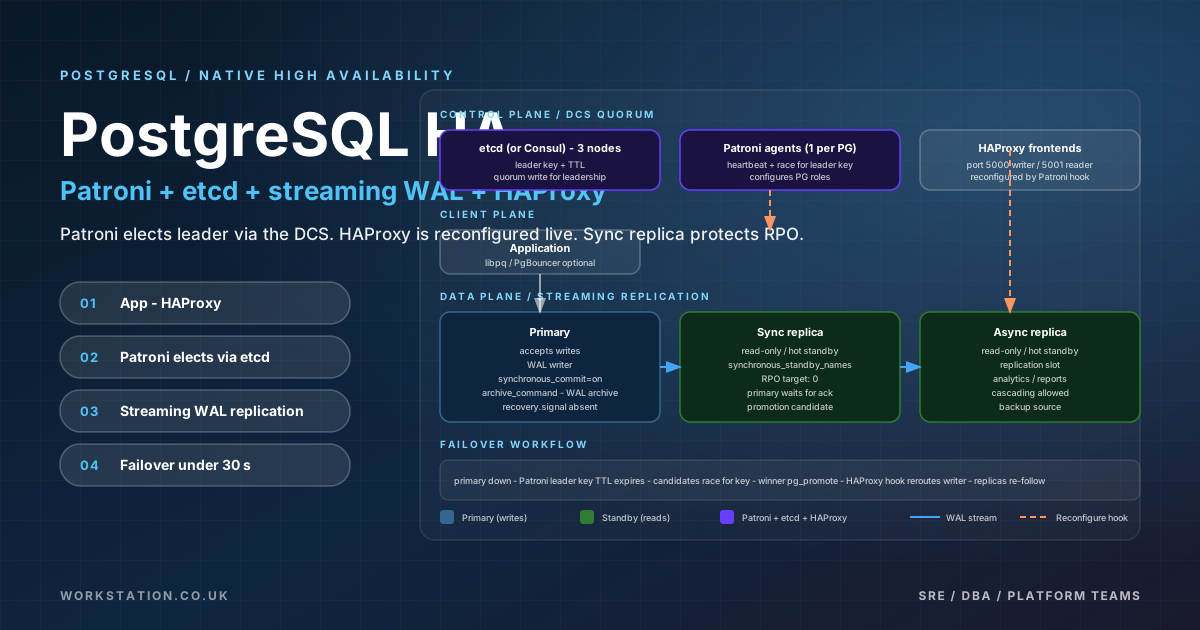
執行單個 PostgreSQL 例項非常簡單,直到第一次計劃外中斷提醒您資料庫的價值取決於其可用性。磁碟故障、核心恐慌、網路分割槽和拙劣的升級並不是理論上的風險——它們是在足夠長的時間內執行的確定性。 PostgreSQL 不附帶內建的自動故障轉移,但它確實提供了構建高可用叢集所需的所有複製原語。 Patroni 是 Zalando 維護的開源 HA 框架,它將這些原語編排到生產級故障轉移系統中,該系統已經在全球數千個 PostgreSQL 叢集中進行了大規模的測試。
本文是深入的工程指南。我們將介紹 PostgreSQL 流複製(同步和非同步)、Patroni 架構和配置、作為分散式配置儲存的 etcd、用於具有讀寫分離的連線路由的 HAProxy、用於連線池的 PgBouncer、WAL 歸檔和時間點恢復、用於選擇性資料同步的邏輯複製、用於初始備用配置的 pg_basebackup、作為 Patroni 替代方案的 repmgr、AWS、Azure 的雲特定部署模式以及GCP、使用 Rancher 和 Longhorn 進行裸機 k3s 部署、使用 pg_stat_replication 和 Prometheus/Grafana 進行監控、切換與故障轉移程式、裂腦預防、生產調整以及用於故障轉移驗證的混沌工程。
PostgreSQL 流複製基礎知識
流複製是 PostgreSQL 高可用性的支柱。它的工作原理是連續將預寫日誌 (WAL) 記錄從主伺服器傳送到一臺或多臺備用伺服器。備用資料庫實時應用這些 WAL 記錄,維護主資料庫幾乎相同的資料副本。該機制在 PostgreSQL 9.0 中引入,並在後續版本中進行了完善。
流式複製有兩種模式:非同步和同步。在非同步模式下,主伺服器在提交事務之前不會等待備用伺服器確認收到 WAL 記錄。這提供了最大的寫入效能,但引入了潛在資料丟失的視窗 - 如果主資料庫在備用資料庫收到最新的 WAL 之前發生故障,那麼這些事務就會丟失。在同步模式下,主伺服器會等待至少一個備用伺服器來確認 WAL 記錄已寫入持久儲存,然後再報告事務已提交。這消除了資料丟失,但代價是增加了提交延遲,因為每次寫入都必須往返於備用資料庫。
同步和非同步複製之間的選擇不是二元的。 PostgreSQL 在會話級別支援synchronous_commit,因此對延遲敏感的工作負載可以選擇非同步提交,而關鍵財務事務則在同一叢集內使用同步提交。
配置主節點以進行復制
主伺服器必須配置為生成足以進行復制的級別的 WAL 記錄並允許備用連線。以下postgresql.conf設定至關重要。
# postgresql.conf on the primary
wal_level = replica                    # minimum for streaming replication
max_wal_senders = 10                   # max concurrent replication connections
max_replication_slots = 10             # prevent WAL removal before standby consumption
wal_keep_size = 2GB                    # retain WAL as fallback if slots are unused
hot_standby = on                       # allow read queries on standbys
synchronous_commit = on                # 'on' for sync, 'off' for pure async
synchronous_standby_names = 'ANY 1 (standby1, standby2)'  # sync replication targets
archive_mode = on                      # enable WAL archiving for PITR
archive_command = 'test ! -f /archive/%f && cp %p /archive/%f'
listening_addresses = '*'
port = 5432複製連線的身份驗證在pg_hba.conf中處理。複製連線使用專用連線型別。
# pg_hba.conf — replication entries
# TYPE   DATABASE        USER            ADDRESS              METHOD
host     replication     replicator      10.0.1.0/24          scram-sha-256
host     replication     replicator      10.0.2.0/24          scram-sha-256
host     all             all             10.0.0.0/16          scram-sha-256
在主伺服器上建立複製使用者。
CREATE ROLE replicator WITH REPLICATION LOGIN PASSWORD 'strong_replication_password';使用 pg_basebackup
配置備用pg_basebackup實用程式建立主資料庫資料目錄的物理副本,該副本成為新備用資料庫的起點。它以原子方式處理基本備份和 WAL 流,因此生成的副本是一致的。
# On the standby server
pg_basebackup -h primary-host -U replicator -D /var/lib/postgresql/16/main \
  -Fp -Xs -P -R

# -Fp: plain format
# -Xs: stream WAL during backup
# -P:  show progress
# -R: create standby.signal and configure primary_conninfo in postgresql.auto.conf-R標誌至關重要 - 它將primary_conninfo寫入postgresql.auto.conf並建立standby.signal,這告訴 PostgreSQL 在待機模式下啟動。在PostgreSQL 12及更高版本中,recovery.conf被這兩種機制取代。
# postgresql.auto.conf (generated by pg_basebackup -R)
primary_conninfo = 'host=primary-host port=5432 user=replicator password=strong_replication_password application_name=standby1'
primary_slot_name = 'standby1_slot'
在啟動備用資料庫之前在主資料庫上建立複製槽,以防止 WAL 在備用資料庫消耗它之前被清理。
SELECT pg_create_physical_replication_slot('standby1_slot');
SELECT pg_create_physical_replication_slot('standby2_slot');
Patroni:自動化 HA 編排
流複製為您提供資料冗餘,但它不會為您提供自動故障轉移。如果主資料庫崩潰,某人(操作員或自動化系統)必須將備用資料庫升級為主資料庫,重新配置剩餘的備用資料庫以遵循新的主資料庫,並更新連線路由。 Patroni 使這一切自動化。
Patroni 是一個 Python 守護程序,與每個 PostgreSQL 例項一起執行。它使用分散式配置儲存(DCS)——通常是 etcd,但也有 ZooKeeper 或 Consul——來協調領導者選舉和叢集狀態。每個 Patroni 節點不斷地將其健康狀態寫入 DCS。當領導者(主節點)未能在配置的 TTL 內更新其 DCS 金鑰時,Patroni 將在健康的備用節點中發起領導者選舉。獲勝者將升級為主節點,其餘節點將自身重新配置為新主節點的備用節點 — 所有這些都是自動完成的,通常在 10-30 秒內完成。
Patroni YAML 配置
Patroni 透過 YAML 檔案進行配置,該檔案定義 DCS 連線、PostgreSQL 引數、複製行為和引導設定。以下是主節點的生產級配置。
# /etc/patroni/patroni.yml — Node 1 (Primary)
scope: pg-ha-cluster
namespace: /postgresql-ha/
name: node1

restapi:
  listen: 0.0.0.0:8008
  connect_address: 10.0.1.10:8008

etcd3:
  hosts:
    - 10.0.2.10:2379
    - 10.0.2.11:2379
    - 10.0.2.12:2379

bootstrap:
  dcs:
    ttl: 30
    loop_wait: 10
    retry_timeout: 10
    maximum_lag_on_failover: 1048576  # 1MB — only promote standbys within this lag
    synchronous_mode: true
    synchronous_mode_strict: false
    postgresql:
      use_pg_rewind: true
      use_slots: true
      parameters:
        wal_level: replica
        hot_standby: 'on'
        max_connections: 200
        max_wal_senders: 10
        max_replication_slots: 10
        wal_keep_size: 2GB
        synchronous_commit: 'on'
        archive_mode: 'on'
        archive_command: 'test ! -f /archive/%f && cp %p /archive/%f'
        archive_timeout: 60
        wal_log_hints: 'on'
        shared_preload_libraries: 'pg_stat_statements'
        track_commit_timestamp: 'on'
      pg_hba:
        - host replication replicator 10.0.0.0/16 scram-sha-256
        - host all all 10.0.0.0/16 scram-sha-256
        - host all all 0.0.0.0/0 scram-sha-256

  initdb:
    - encoding: UTF8
    - data-checksums

  users:
    admin:
      password: 'admin_secure_password'
      options:
        - createrole
        - createdb
    replicator:
      password: 'repl_secure_password'
      options:
        - replication

postgresql:
  listen: 0.0.0.0:5432
  connect_address: 10.0.1.10:5432
  data_dir: /var/lib/postgresql/16/main
  bin_dir: /usr/lib/postgresql/16/bin
  config_dir: /var/lib/postgresql/16/main
  pgpass: /tmp/pgpass0
  authentication:
    superuser:
      username: postgres
      password: 'postgres_secure_password'
    replication:
      username: replicator
      password: 'repl_secure_password'
    rewind:
      username: postgres
      password: 'postgres_secure_password'
  parameters:
    unix_socket_directories: '/var/run/postgresql'
  create_replica_methods:
    - basebackup
  basebackup:
    max-rate: 100M
    checkpoint: fast

tags:
  nofailover: false
  noloadbalance: false
  clonefrom: false
nosync: false備用節點使用相同的配置及其自己的name、connect_address和listen值。 Patroni 處理剩下的事情——它根據 DCS 狀態檢測節點是否應該成為領導者或副本,並相應地配置 PostgreSQL。
etcd 作為分散式配置儲存
etcd 是 Patroni 叢集的神經系統。它儲存當前領導者身份、叢集拓撲、所需配置以及每個節點的健康狀態。 三節點 etcd 叢集是生產環境的最低要求,可以在維持仲裁的同時容忍一個節點故障。
# Install and configure etcd on three dedicated nodes
# /etc/etcd/etcd.conf.yml — Node etcd1 (10.0.2.10)
name: etcd1
data-dir: /var/lib/etcd
listen-client-urls: http://0.0.0.0:2379
listen-peer-urls: http://0.0.0.0:2380
advertise-client-urls: http://10.0.2.10:2379
initial-advertise-peer-urls: http://10.0.2.10:2380
initial-cluster: etcd1=http://10.0.2.10:2380,etcd2=http://10.0.2.11:2380,etcd3=http://10.0.2.12:2380
initial-cluster-state: new
initial-cluster-token: patroni-etcd-cluster

# Start etcd
systemctl enable --now etcd

# Verify cluster health
etcdctl endpoint health --cluster \
  --endpoints=http://10.0.2.10:2379,http://10.0.2.11:2379,http://10.0.2.12:2379
對於生產部署,在 etcd 對等點之間以及 etcd 和 Patroni 客戶端之間啟用 TLS。未加密的 etcd 流量會將叢集憑據和配置暴露給網路級攻擊者。
HAProxy 用於連線路由
Patroni 在每個節點(預設埠 8008)上公開一個 REST API,報告該節點是當前領導者還是副本。 HAProxy 使用這些健康檢查端點來路由流量:寫入到領導者,讀取到健康副本。這使您可以自動進行讀寫分離,而無需進行任何應用程式級別的更改。
# /etc/haproxy/haproxy.cfg
global
    maxconn 2000
    log /dev/log local0
    stats socket /var/run/haproxy.sock mode 660 level admin

defaults
    mode tcp
    log global
    retries 3
    timeout client 30m
    timeout connect 4s
    timeout server 30m
    timeout check 5s
    maxconn 1000

listen pg_write
    bind *:5000
    option httpchk GET /primary
    http-check expect status 200
    default-server inter 3s fall 3 rise 2 on-marked-down shutdown-sessions
    server node1 10.0.1.10:5432 check port 8008
    server node2 10.0.1.11:5432 check port 8008
    server node3 10.0.1.12:5432 check port 8008

listen pg_read
    bind *:5001
    balance roundrobin
    option httpchk GET /replica
    http-check expect status 200
    default-server inter 3s fall 3 rise 2 on-marked-down shutdown-sessions
    server node1 10.0.1.10:5432 check port 8008
    server node2 10.0.1.11:5432 check port 8008
    server node3 10.0.1.12:5432 check port 8008

listen stats
    bind *:7000
    mode http
    stats enable
    stats uri /
stats refresh 10s/primary端點僅在當前 Patroni 領導者上返回 HTTP 200。/replica端點在正常待機狀態下返回 200。發生故障轉移時,新的主節點開始在/primary上返回 200,並且 HAProxy 自動重定向寫入流量 — 通常在單個執行狀況檢查間隔(3 秒)內。on-marked-down shutdown-sessions指令立即終止與發生故障的主節點的現有連線,強制客戶端重新連線到新的主節點。
用於連線池的 PgBouncer
PostgreSQL 為每個客戶端連線建立一個新的後端程序。在規模上(數百或數千個微服務,每個微服務維護連線池),程序建立和記憶體消耗的開銷變得很大。 PgBouncer 位於應用程式和 PostgreSQL 之間,維護伺服器端連線池並將客戶端連線複用到它們上。
# /etc/pgbouncer/pgbouncer.ini
[databases]
* = host=127.0.0.1 port=5432 dbname=appdb

[pgbouncer]
listen_addr = 0.0.0.0
listen_port = 6432
auth_type = scram-sha-256
auth_file = /etc/pgbouncer/userlist.txt

pool_mode = transaction
max_client_conn = 1000
default_pool_size = 50
min_pool_size = 10
reserve_pool_size = 10
reserve_pool_timeout = 3
server_lifetime = 3600
server_idle_timeout = 600
server_connect_timeout = 5
server_login_retry = 3

log_connections = 1
log_disconnections = 1
stats_period = 60
與 Patroni 一起使用時,PgBouncer 通常位於每個 PostgreSQL 節點或 HAProxy 節點上。transaction池模式是大多數工作負載的最佳選擇 - 它在事務期間分配伺服器連線,並在事務之間將其返回到池。這比session模式高效得多,session 模式為整個客戶端會話保留連線。
WAL 歸檔和時間點恢復
流複製可以防止伺服器故障,但不能防止邏輯錯誤 - 意外的DROP TABLE或錯誤的應用程式遷移會立即複製到所有備用資料庫。 WAL 歸檔與時間點恢復 (PITR) 相結合,讓您可以恢復到錯誤發生之前的任何時刻。
WAL 歸檔將完整的 WAL 段複製到持久歸檔 — 通常是 S3 儲存桶、NFS 安裝或專用備份伺服器。pgBackRest和WAL-G等工具透過壓縮、加密和並行傳輸高效處理歸檔。
# pgBackRest configuration — /etc/pgbackrest/pgbackrest.conf
[global]
repo1-type=s3
repo1-s3-bucket=pg-wal-archive
repo1-s3-endpoint=s3.eu-west-1.amazonaws.com
repo1-s3-region=eu-west-1
repo1-s3-key=AKIAIOSFODNN7EXAMPLE
repo1-s3-key-secret=wJalrXUtnFEMI/K7MDENG/bPxRfiCYEXAMPLEKEY
repo1-path=/pgbackrest
repo1-retention-full=4
repo1-retention-diff=7
repo1-cipher-type=aes-256-cbc
repo1-cipher-pass=strong_encryption_passphrase
compress-type=zst
compress-level=3
process-max=4

[pg-ha-cluster]
pg1-path=/var/lib/postgresql/16/main
pg1-port=5432

# In postgresql.conf
archive_command = 'pgbackrest --stanza=pg-ha-cluster archive-push %p'
restore_command = 'pgbackrest --stanza=pg-ha-cluster archive-get %f "%p"'
要執行時間點恢復,請指定目標時間戳。
# Restore to a specific point in time
pgbackrest --stanza=pg-ha-cluster --type=time \
  --target="2026-04-12 11:25:00" \
  --target-action=promote \
  restore
用於選擇性資料同步的邏輯複製
流複製建立整個資料庫叢集的精確物理副本,而邏輯複製則在表級別執行,在獨立的 PostgreSQL 例項之間複製單個表或資料子集。這對於零停機主要版本升級、僅需要特定表的跨區域只讀副本、資料倉儲饋送和多租戶資料分發非常有用。
# On the publisher (source database)
wal_level = logical  # must be 'logical' — higher than 'replica'

CREATE PUBLICATION app_pub FOR TABLE orders, customers, products;

# On the subscriber (target database)
CREATE SUBSCRIPTION app_sub
  CONNECTION 'host=publisher-host port=5432 dbname=appdb user=replicator password=pass'
  PUBLICATION app_pub;
邏輯複製可以與流複製一起執行。一種常見模式是使用流複製實現 HA(快速物理故障轉移),使用邏輯複製實現僅需要表子集的跨區域分析副本。
多區域流式複製
對於災難恢復和全域性讀取效能,PostgreSQL 叢集可以跨越多個區域。標準模式是區域內同步複製(本地故障轉移時零資料丟失)和跨區域非同步複製(以避免每次寫入時的跨區域延遲損失)。每個區域都有自己的 HAProxy 用於本地讀取路由。
故障轉移和切換過程
瞭解故障轉移和切換之間的區別至關重要。故障轉移是由當前主節點故障觸發的計劃外升級。切換是有計劃的、優雅的角色更改 — 通常在維護之前執行。帕特羅尼都支援。
計劃切換
# List cluster members
patronictlctl -c /etc/patroni/patroni.yml list

# Perform switchover to a specific node
patronictlctl -c /etc/patroni/patroni.yml switchover \
  --master node1 --candidate node2 --force

# Or use the Patroni REST API
curl -s http://10.0.1.10:8008/switchover -XPOST \
  -d '{"leader": "node1", "candidate": "node2"}'
在切換期間,Patroni 將當前主資料庫降級為備用資料庫,提升目標候選資料庫,並重新配置所有其他備用資料庫以遵循新的主資料庫。該過程需要 5-15 秒。 HAProxy 透過健康檢查檢測變化並自動重定向流量。
自動故障轉移序列
當主伺服器意外發生故障時,Patroni 會遵循精確的順序來恢復服務。下圖說明了這些步驟。
腦裂預防
裂腦(兩個節點同時認為自己是主節點)是任何 HA 系統中最危險的故障模式。 Patroni 透過多種機制防止腦裂:
- 基於 DCS 的領導者鎖:任何時候只有一個節點可以持有 etcd 中的領導者金鑰。金鑰有一個 TTL,領導者必須不斷更新它。如果網路分割槽將領導者與 etcd 隔離,則金鑰將過期,並且領導者將自身降級。
- 看門狗:Patroni 可以配置 Linux 看門狗器件 (
/dev/watchdog)。如果 Patroni 失去對 DCS 的訪問並且無法確認它應該保持領導者狀態,看門狗將重新啟動或關閉節點電源 - 這是一種硬隔離機制,可保證舊的主節點不會繼續接受寫入。 - pg_rewind:當前一個主節點重新上線時,它可能具有從未複製的 WAL 記錄。
pg_rewind將時間線倒回到分歧點,允許節點作為備用節點重新加入,而無需完整的基礎備份。 Patroni 的use_pg_rewind: true設定可自動執行此操作。
# Enable watchdog in Patroni config
bootstrap:
  dcs:
    postgresql:
      use_pg_rewind: true
      parameters:
        wal_log_hints: 'on'  # required for pg_rewind

# Watchdog configuration
watchdog:
  mode: required        # 'off', 'automatic', or 'required'
  device: /dev/watchdog
  safety_margin: 5      # seconds before TTL expiry to trigger watchdog
repmgr 作為 Patroni
的替代品revmgr是 PostgreSQL 的另一種流行的 HA 工具。它提供備用管理、自動故障轉移和切換功能。 然而,它採用了與 Patroni 根本不同的方法。 repmgr 使用見證節點和守護程序 (repmgrd) 進行故障檢測,而不是分散式共識儲存。這使得部署更簡單,但在複雜的網路分割槽場景中更容易受到裂腦的影響。
# repmgr.conf on the primary
node_id=1
node_name='node1'
conninfo='host=10.0.1.10 user=repmgr dbname=repmgr connect_timeout=2'
data_directory='/var/lib/postgresql/16/main'
failover=automatic
promote_command='repmgr standby promote -f /etc/repmgr.conf --log-to-file'
follow_command='repmgr standby follow -f /etc/repmgr.conf --log-to-file --upstream-node-id=%n'
monitoring_history=yes
monitor_interval_secs=5
reconnect_attempts=6
reconnect_interval=10
對於新部署,Patroni 是推薦選擇,因為它具有更強的裂腦預防保證和更活躍的開發社群。對於更簡單的設定或已經投資該工具的組織來說,repmgr 仍然是一個合理的選擇。
雲部署模式
AWS 部署:EC2、EBS 和 Route53
在 AWS 上,將每個 PostgreSQL + Patroni 節點部署在具有 EBS gp3 或 io2 卷的 EC2 例項上。跨多個可用區使用單獨的例項來實現高可用性。 etcd 節點也應該跨越可用區。
# Terraform sketch for PostgreSQL HA on AWS
resource "aws_instance" "pg_node" {
  count                = 3
  ami                  = "ami-0abcdef1234567890"  # Ubuntu 22.04
  instance_type        = "r6g.2xlarge"             # 8 vCPU, 64GB RAM
  subnet_id            = aws_subnet.private[count.index].id
  vpc_security_group_ids = [aws_security_group.pg_sg.id]
  availability_zone    = element(["eu-west-1a", "eu-west-1b", "eu-west-1c"], count.index)

  root_block_device {
    volume_size = 50
    volume_type = "gp3"
  }

  tags = {
    Name = "pg-node-${count.index + 1}"
    Role = "patroni"
  }
}

resource "aws_ebs_volume" "pg_data" {
  count             = 3
  availability_zone = element(["eu-west-1a", "eu-west-1b", "eu-west-1c"], count.index)
  size              = 500
  type              = "gp3"
  iops              = 6000
  throughput        = 250
  encrypted         = true

  tags = {
    Name = "pg-data-${count.index + 1}"
  }
}

resource "aws_route53_health_check" "pg_primary" {
  count             = 3
  ip_address        = aws_instance.pg_node[count.index].private_ip
  port              = 8008
  type              = "HTTP"
  resource_path     = "/primary"
  failure_threshold = 3
  request_interval  = 10
}
如果您更喜歡 AWS 託管解決方案,請使用網路負載均衡器 (NLB) 而不是 HAProxy。 NLB 可以使用針對 Patroni REST API 的目標組執行狀況檢查將流量路由到當前主節點。
Azure 部署:虛擬機器、託管磁碟和 Azure LB
在 Azure 上,將 Standard_E8s_v5 VM(記憶體最佳化)與高階 SSD 託管磁碟用於資料卷。跨可用區部署。 Azure 負載均衡器提供了相當於 HAProxy 的功能,並針對 Patroni REST API 進行執行狀況探測。
# Azure CLI — create PostgreSQL VM with Managed Disk
az vm create \
  --resource-group pg-ha-rg \
  --name pg-node-1 \
  --image Canonical:0001-com-ubuntu-server-jammy:22_04-lts:latest \
  --size Standard_E8s_v5 \
  --zone 1 \
  --vnet-name pg-vnet \
  --subnet pg-subnet \
  --nsg pg-nsg \
  --admin-username pgadmin \
  --ssh-key-value ~/.ssh/id_rsa.pub

az disk create \
  --resource-group pg-ha-rg \
  --name pg-data-1 \
  --size-gb 512 \
  --sku Premium_LRS \
  --zone 1

az vm disk attach \
  --resource-group pg-ha-rg \
  --vm-name pg-node-1 \
  --name pg-data-1

# Azure Load Balancer health probe for Patroni
az network lb probe create \
  --resource-group pg-ha-rg \
  --lb-name pg-lb \
  --name patroni-primary-probe \
  --protocol Http \
  --port 8008 \
  --path /primary \
  --interval 5 \
  --threshold 3
GCP 部署:計算引擎和雲負載平衡
在 GCP 上,將 n2-highmem-8 例項(8 vCPU、64GB RAM)與 SSD 永久磁碟結合使用。在一個區域內跨區域分佈。使用內部 TCP/UDP 負載平衡器和 Patroni 執行狀況檢查。
# GCP — create instance and persistent disk
gcloud compute instances create pg-node-1 \
  --zone=europe-west1-b \
  --machine-type=n2-highmem-8 \
  --image-family=ubuntu-2204-lts \
  --image-project=ubuntu-os-cloud \
  --boot-disk-size=50GB \
  --network=pg-network \
  --subnet=pg-subnet

gcloud compute disks create pg-data-1 \
  --zone=europe-west1-b \
  --size=500GB \
  --type=pd-ssd

gcloud compute instances attach-disk pg-node-1 \
  --disk=pg-data-1 \
  --zone=europe-west1-b

# Health check for Patroni primary endpoint
gcloud compute health-checks create http patroni-primary-check \
  --port=8008 \
  --request-path=/primary \
  --check-interval=5s \
  --timeout=5s \
  --unhealthy-threshold=3 \
  --healthy-threshold=2
裸機 k3s 部署與 Rancher 和 Longhorn
對於執行自己的硬體的組織來說,使用 k3s、Rancher 和 Longhorn 在裸機上部署 PostgreSQL HA 可提供完全開源、獨立於雲的基礎設施。 k3s 是輕量級 Kubernetes 發行版,可在裸機伺服器上高效執行,而無需完整 Kubernetes 發行版的開銷。
k3s 和 Longhorn 設定
# Install k3s on the first server node
curl -sfL https://get.k3s.io | K3S_TOKEN=my-cluster-token \
  INSTALL_K3S_EXEC="server --cluster-init --disable traefik --disable servicelb" sh -

# Join additional server nodes
curl -sfL https://get.k3s.io | K3S_TOKEN=my-cluster-token \
  K3S_URL=https://10.0.0.1:6443 \
  INSTALL_K3S_EXEC="server" sh -

# Install Longhorn for distributed block storage
helm repo add longhorn https://charts.longhorn.io
helm install longhorn longhorn/longhorn \
  --namespace longhorn-system --create-namespace \
  --set defaultSettings.defaultDataPath=/mnt/longhorn \
  --set defaultSettings.replicaCount=3 \
  --set defaultSettings.storageMinimalAvailablePercentage=15

# Deploy PostgreSQL with Patroni using the Zalando Postgres Operator
helm repo add postgres-operator-charts https://opensource.zalando.com/postgres-operator/charts/postgres-operator
helm install postgres-operator postgres-operator-charts/postgres-operator \
  --namespace postgres-system --create-namespace
# PostgreSQL cluster manifest for the Zalando Postgres Operator
apiVersion: acid.zalan.do/v1
kind: postgresql
metadata:
name: pg-ha-cluster
namespace: production
spec:
teamId: "platform"
numberOfInstances: 3
volume:
size: 500Gi
storageClass: longhorn
users:
appuser:
- superuser
- createdb
replicator: []
databases:
appdb: appuser
postgresql:
version: "16"
parameters:
shared_buffers: "16GB"
effective_cache_size: "48GB"
work_mem: "256MB"
maintenance_work_mem: "2GB"
max_connections: "200"
max_wal_senders: "10"
wal_level: replica
synchronous_commit: "on"
wal_keep_size: "2GB"
archive_mode: "on"
track_commit_timestamp: "on"
patroni:
ttl: 30
loop_wait: 10
retry_timeout: 10
maximum_lag_on_failover: 1048576
synchronous_mode: true
resources:
requests:
cpu: "4"
memory: 32Gi
limits:
cpu: "8"
memory: 64Gi適用於 HAProxy VIP
# /etc/keepalived/keepalived.conf on lb1
vrrp_script chk_haproxy {
    script "killall -0 haproxy"
    interval 2
    weight 2
}

vrrp_instance VI_PG {
    state MASTER
    interface eth0
    virtual_router_id 52
    priority 100
    advert_int 1
    authentication {
        auth_type PASS
        auth_pass pgha_vip_pass
    }
    virtual_ipaddress {
        10.0.0.100/24
    }
    track_script {
        chk_haproxy
    }
}
監控 PostgreSQL 複製
監控複製執行狀況在生產中是不可協商的。 PostgreSQL 為此提供了多個內建檢視,Prometheus 和 Grafana 提供了您所需的長期可見性和警報。
內建監控查詢
-- Check replication status on the primary
SELECT
    client_addr,
    application_name,
    state,
    sync_state,
    sent_lsn,
    write_lsn,
    flush_lsn,
    replay_lsn,
    (sent_lsn - replay_lsn) AS replication_lag_bytes,
    write_lag,
    flush_lag,
    replay_lag
FROM pg_stat_replication;

-- Check replication slot status
SELECT
    slot_name,
    slot_type,
    active,
    wal_status,
    pg_size_pretty(pg_wal_lsn_diff(pg_current_wal_lsn(), restart_lsn)) AS slot_lag
FROM pg_replication_slots;

-- Check standby recovery status (run on standby)
SELECT
    pg_is_in_recovery() AS is_standby,
    pg_last_wal_receive_lsn() AS last_received,
    pg_last_wal_replay_lsn() AS last_replayed,
    pg_last_xact_replay_timestamp() AS last_replayed_timestamp,
    EXTRACT(EPOCH FROM (now() - pg_last_xact_replay_timestamp()))::int AS replay_lag_seconds;

-- Monitor WAL generation rate
SELECT
    pg_size_pretty(pg_wal_lsn_diff(pg_current_wal_lsn(), '0/0')) AS total_wal_generated,
    pg_size_pretty(sum(size)) AS wal_directory_size
FROM pg_ls_waldir();

-- Check for long-running queries that could block replication
SELECT
    pid,
    now() - pg_stat_activity.query_start AS duration,
    query,
    state
FROM pg_stat_activity
WHERE (now() - pg_stat_activity.query_start) > interval '5 minutes'
  AND state != 'idle'
ORDER BY duration DESC;
Prometheus 和 Grafana 堆疊
postgres_exporter以 Prometheus 格式公開 PostgreSQL 指標。與patoni_exporter結合使用,您可以全面瞭解資料庫效能和 HA 叢集狀態。
# Deploy postgres_exporter as a sidecar or standalone
helm repo add prometheus-community https://prometheus-community.github.io/helm-charts

# Custom queries for postgres_exporter
# /etc/postgres_exporter/queries.yaml
pg_replication_lag:
  query: |
    SELECT
      CASE WHEN pg_is_in_recovery() THEN
        EXTRACT(EPOCH FROM (now() - pg_last_xact_replay_timestamp()))::float
      ELSE 0 END AS lag_seconds
  master: true
  metrics:
    - lag_seconds:
        usage: "GAUGE"
        description: "Replication lag in seconds"

pg_replication_slots:
  query: |
    SELECT
      slot_name,
      active::int AS active,
      pg_wal_lsn_diff(pg_current_wal_lsn(), restart_lsn)::float AS slot_lag_bytes
    FROM pg_replication_slots
  master: true
  metrics:
    - slot_name:
        usage: "LABEL"
    - active:
        usage: "GAUGE"
        description: "Whether the slot is active"
    - slot_lag_bytes:
        usage: "GAUGE"
        description: "Slot lag in bytes"
# PrometheusRule for PostgreSQL HA alerts
apiVersion: monitoring.coreos.com/v1
kind: PrometheusRule
metadata:
name: postgresql-ha-alerts
namespace: monitoring
spec:
groups:
- name: postgresql-replication
rules:
- alert: PostgreSQLReplicationLagHigh
expr: pg_replication_lag_seconds > 30
for: 5m
labels:
severity: warning
annotations:
summary: "PostgreSQL replication lag exceeds 30s on {{ $labels.instance }}"
- alert: PostgreSQLReplicationSlotInactive
expr: pg_replication_slots_active == 0
for: 5m
labels:
severity: critical
annotations:
summary: "Replication slot {{ $labels.slot_name }} is inactive"
- alert: PostgreSQLReplicationSlotLagHigh
expr: pg_replication_slots_slot_lag_bytes > 1073741824
for: 10m
labels:
severity: warning
annotations:
summary: "Replication slot lag exceeds 1GB on {{ $labels.slot_name }}"
- alert: PatroniClusterUnhealthy
expr: patroni_cluster_members_count < 3
for: 2m
labels:
severity: critical
annotations:
summary: "Patroni cluster has fewer than 3 members"生產調諧引數
PostgreSQL 的預設配置比較保守,針對小型共享託管環境進行了調整。生產 HA 叢集需要仔細調整複製、記憶體和 WAL 引數。下表總結了具有 NVMe 儲存的 64GB RAM 伺服器的最重要設定。
# postgresql.conf — Production HA tuning

# === Replication ===
wal_level = replica
max_wal_senders = 10
max_replication_slots = 10
wal_keep_size = 4GB
synchronous_commit = on
synchronous_standby_names = 'ANY 1 (standby1, standby2)'
track_commit_timestamp = on
wal_log_hints = on

# === WAL ===
min_wal_size = 1GB
max_wal_size = 8GB
wal_buffers = 64MB
wal_compression = zstd
archive_mode = on
archive_timeout = 300
checkpoint_completion_target = 0.9
checkpoint_timeout = 15min

# === Memory ===
shared_buffers = 16GB              # 25% of RAM
effective_cache_size = 48GB        # 75% of RAM
work_mem = 256MB                   # per-operation sort/hash memory
maintenance_work_mem = 2GB         # for VACUUM, CREATE INDEX
huge_pages = try

# === Connections ===
max_connections = 200              # use PgBouncer for higher client counts
superuser_reserved_connections = 5

# === Query Performance ===
random_page_cost = 1.1             # SSD storage
effective_io_concurrency = 200     # NVMe SSD
default_statistics_target = 500
jit = on

# === Logging ===
log_min_duration_statement = 500   # log queries > 500ms
log_checkpoints = on
log_connections = on
log_disconnections = on
log_lock_waits = on
log_temp_files = 0
log_autovacuum_min_duration = 0

# === Autovacuum ===
autovacuum_max_workers = 4
autovacuum_naptime = 30s
autovacuum_vacuum_cost_limit = 2000
autovacuum_vacuum_scale_factor = 0.05
autovacuum_analyze_scale_factor = 0.02
調整 Patroni DCS 引數
Patroni 的ttl、loop_wait和retry_timeout引數之間的關係直接影響故障轉移速度和誤報風險。較短的 TTL 意味著更快的故障轉移檢測,但會增加短暫網路故障期間不必要的故障轉移的風險。
# Conservative (production default)
ttl: 30
loop_wait: 10
retry_timeout: 10
# Failover detection: ~30-40 seconds

# Aggressive (low-latency failover)
ttl: 15
loop_wait: 5
retry_timeout: 5
# Failover detection: ~15-20 seconds
# Warning: Higher risk of false failovers in unstable networks
混沌工程和故障轉移測試
未經測試的故障轉移系統是無法工作的系統。 混沌工程應用受控故障來驗證您的 HA 設定在實際故障條件下是否正常執行。每個 Patroni 叢集都應該進行定期的故障轉移演習。
故障轉移測試手冊
# 1. Verify cluster health before testing
patronictlctl -c /etc/patroni/patroni.yml list
+----------+---------+---------+----+-----------+
| Member   | Host    | Role    | TL | Lag in MB |
+----------+---------+---------+----+-----------+
| node1    | 10.0.1.10| Leader |  5 |           |
| node2    | 10.0.1.11| Replica |  5 |         0 |
| node3    | 10.0.1.12| Replica |  5 |         0 |
+----------+---------+---------+----+-----------+

# 2. Simulate primary crash (on node1)
sudo systemctl stop patroni
# Or more aggressive: sudo kill -9 $(pgrep -f patroni)

# 3. Monitor failover (from any node with patronictl)
watch -n 1 'patronictl -c /etc/patroni/patroni.yml list'

# 4. Verify new leader is elected (within 30-45 seconds)
# Expected: node2 or node3 promoted to Leader

# 5. Test write availability through HAProxy
PGPASSWORD=app_password psql -h haproxy-host -p 5000 -U appuser -d appdb \
  -c "INSERT INTO health_check (ts) VALUES (now()) RETURNING *;"

# 6. Restart the former primary
sudo systemctl start patroni
# Patroni will use pg_rewind to rejoin as a replica

# 7. Verify the former primary rejoins as replica
patronictlctl -c /etc/patroni/patroni.yml list
網路分割槽測試
# Simulate network partition on the primary using iptables
# Block all traffic to etcd from the primary
sudo iptables -A OUTPUT -d 10.0.2.10 -j DROP
sudo iptables -A OUTPUT -d 10.0.2.11 -j DROP
sudo iptables -A OUTPUT -d 10.0.2.12 -j DROP

# Expected behaviour:
# 1. Primary loses DCS access
# 2. Leader key TTL expires
# 3. Primary demotes itself (with watchdog, node may reboot)
# 4. Standby acquires leader lock and promotes
# 5. After clearing iptables rules, former primary rejoins as replica

# Clean up
sudo iptables -D OUTPUT -d 10.0.2.10 -j DROP
sudo iptables -D OUTPUT -d 10.0.2.11 -j DROP
sudo iptables -D OUTPUT -d 10.0.2.12 -j DROP
使用 Toxiproxy
自動混沌測試# Run Toxiproxy alongside your Patroni cluster
# Create proxies for etcd and replication connections
toxiproxy-cli create etcd_proxy -l 0.0.0.0:12379 -u 10.0.2.10:2379
toxiproxy-cli create pg_repl_proxy -l 0.0.0.0:15432 -u 10.0.1.10:5432
# Add latency to etcd connections (simulates degraded network)
toxiproxy-cli toxic add etcd_proxy -t latency -a latency=500 -a jitter=200
# Add bandwidth limit to replication (simulates WAN replication)
toxiproxy-cli toxic add pg_repl_proxy -t bandwidth -a rate=1024
# Completely sever the connection (simulates network partition)
toxiproxy-cli toxic add etcd_proxy -t timeout -a timeout=0
# Monitor Patroni behaviour and verify correct failover
watch -n 2 'curl -s http://10.0.1.10:8008/patroni | python3 -m json.tool'連續驗證指令碼
#!/bin/bash
# continuous_ha_check.sh — Run during chaos tests to measure availability

HAPROXY_HOST="10.0.0.100"
WRITE_PORT=5000
READ_PORT=5001
DATABASE="appdb"
USER="appuser"
LOGFILE="/var/log/ha_test_$(date +%Y%m%d_%H%M%S).log"

write_count=0
write_fail=0
read_count=0
read_fail=0

while true; do
    ts=$(date '+%Y-%m-%d %H:%M:%S.%3N')

    # Test write path
    if PGPASSWORD=app_password psql -h $HAPROXY_HOST -p $WRITE_PORT \
       -U $USER -d $DATABASE -c "SELECT 1" &>/dev/null; then
        ((write_count++))
    else
        ((write_fail++))
        echo "$ts WRITE_FAIL total_fails=$write_fail" >> $LOGFILE
    fi

    # Test read path
    if PGPASSWORD=app_password psql -h $HAPROXY_HOST -p $READ_PORT \
       -U $USER -d $DATABASE -c "SELECT 1" &>/dev/null; then
        ((read_count++))
    else
        ((read_fail++))
        echo "$ts READ_FAIL total_fails=$read_fail" >> $LOGFILE
    fi

    total=$((write_count + write_fail))
    if (( total % 100 == 0 )); then
        write_avail=$(echo "scale=2; $write_count * 100 / $total" | bc)
        read_total=$((read_count + read_fail))
        read_avail=$(echo "scale=2; $read_count * 100 / $read_total" | bc)
        echo "$ts Writes: ${write_avail}% ($write_count/$total) Reads: ${read_avail}% ($read_count/$read_total)"
    fi

    sleep 0.5
done
高階:級聯複製和延遲待機
對於大型叢集,級聯複製可減少主節點上的負載。並非所有備用資料庫都直接從主資料庫進行復制,而是某些備用資料庫從其他備用資料庫進行復制。這將建立一個樹形拓撲,其中主資料庫為兩個備用資料庫提供資料,而這些備用資料庫為其他下游備用資料庫提供資料。
# postgresql.auto.conf on a cascading standby
primary_conninfo = 'host=standby1-host port=5432 user=replicator application_name=cascade1'
primary_slot_name = 'cascade1_slot'A延遲待機故意應用帶有時間延遲的 WAL 記錄 — 通常為 1-4 小時。這可以防止立即複製到同步備用資料庫的邏輯錯誤(意外刪除、錯誤遷移)。如果發生災難,您可以停止延遲備用上的 WAL 重放並恢復錯誤之前的資料。
# postgresql.conf on delayed standby
recovery_min_apply_delay = '1h'
連線字串策略
連線到 Patroni 管理的叢集的應用程式應始終透過 HAProxy 進行連線,或將 PostgreSQL 的內建多主機連線字串與target_session_attrs結合使用。這提供了客戶端故障轉移,而不依賴於負載均衡器。
# Multi-host connection string with target_session_attrs
# The client tries each host in order and connects to the one matching the target attribute
postgresql://appuser:password@node1:5432,node2:5432,node3:5432/appdb?target_session_attrs=read-write&sslmode=require

# For read-only connections
postgresql://appuser:password@node1:5432,node2:5432,node3:5432/appdb?target_session_attrs=prefer-standby&sslmode=require
此方法非常適合無法輕鬆重新配置為指向 HAProxy VIP 的應用程式。 PostgreSQL 客戶端庫 (libpq) 透明地處理故障轉移。
安全強化
生產 PostgreSQL HA 叢集必須在傳輸和靜態時強制執行加密、使用強身份驗證並限制網路暴露。
# Enable TLS in postgresql.conf
ssl = on
ssl_cert_file = '/etc/postgresql/certs/server.crt'
ssl_key_file = '/etc/postgresql/certs/server.key'
ssl_ca_file = '/etc/postgresql/certs/ca.crt'
ssl_min_protocol_version = 'TLSv1.3'

# Require TLS for all connections in pg_hba.conf
hostssl replication replicator 10.0.0.0/16 scram-sha-256
hostssl all         all        10.0.0.0/16 scram-sha-256

# etcd TLS
# In Patroni config
etcd3:
  hosts:
    - 10.0.2.10:2379
    - 10.0.2.11:2379
    - 10.0.2.12:2379
  protocol: https
  cacert: /etc/patroni/certs/etcd-ca.crt
  cert: /etc/patroni/certs/etcd-client.crt
  key: /etc/patroni/certs/etcd-client.key
HA 叢集的備份策略
Patroni 叢集的全面備份策略應包括連續 WAL 歸檔、定期完整備份以及完整備份之間的差異或增量備份。 pgBackRest 是生產 PostgreSQL 備份管理的推薦工具。
# Schedule backups via cron
# Full backup weekly (Sunday 2 AM)
0 2 * * 0 pgbackrest --stanza=pg-ha-cluster --type=full backup

# Differential backup daily (2 AM, Mon-Sat)
0 2 * * 1-6 pgbackrest --stanza=pg-ha-cluster --type=diff backup

# Verify backup integrity
pgbackrest --stanza=pg-ha-cluster --set=latest info

# Verify backup can be restored (dry run)
pgbackrest --stanza=pg-ha-cluster --set=latest verify

# List all backups
pgbackrest --stanza=pg-ha-cluster info
            full backup: 20260412-020000F
                timestamp: 2026-04-12 02:00:00 +0000
                wal start/stop: 000000050000000000000040 / 000000050000000000000042
                database size: 150GB, backup size: 150GB
                repository size: 45GB (compressed)
            diff backup: 20260412-020000F_20260413-020000D
                timestamp: 2026-04-13 02:00:00 +0000
                database size: 151GB, backup size: 2.1GB
                repository size: 650MB (compressed)
操作手冊摘要
每個執行 Patroni 叢集的團隊都應維護一份涵蓋以下場景的操作手冊。記錄並測試過的程式可將壓力大的停機轉變為常規操作。
# === Quick Reference Commands ===

# Cluster status
patronictlctl -c /etc/patroni/patroni.yml list
patronictlctl -c /etc/patroni/patroni.yml history

# Planned switchover
patronictlctl -c /etc/patroni/patroni.yml switchover --master node1 --candidate node2

# Restart PostgreSQL on a specific node (rolling restart)
patronictlctl -c /etc/patroni/patroni.yml restart pg-ha-cluster node2

# Reload PostgreSQL configuration without restart
patronictlctl -c /etc/patroni/patroni.yml reload pg-ha-cluster

# Pause automatic failover (during maintenance)
patronictlctl -c /etc/patroni/patroni.yml pause

# Resume automatic failover
patronictlctl -c /etc/patroni/patroni.yml resume

# Edit DCS configuration (applies to all nodes)
patronictlctl -c /etc/patroni/patroni.yml edit-config

# Reinitialise a failed replica
patronictlctl -c /etc/patroni/patroni.yml reinit pg-ha-cluster node3

# Check Patroni REST API directly
curl -s http://10.0.1.10:8008/patroni | python3 -m json.tool
curl -s http://10.0.1.10:8008/cluster | python3 -m json.tool
效能基準測試
在投入生產之前,對您的 HA 叢集進行基準測試,以確定基準效能並驗證同步複製延遲對於您的工作負載來說是可以接受的。
# Benchmark with pgbench — initialise test data
pgbench -i -s 100 -h haproxy-host -p 5000 -U appuser appdb

# Run write-heavy benchmark (measures sync replication impact)
pgbench -h haproxy-host -p 5000 -U appuser -c 32 -j 8 -T 300 appdb
# Compare with async: temporarily set synchronous_commit = off

# Run read-only benchmark through read replica port
pgbench -h haproxy-host -p 5001 -U appuser -c 64 -j 16 -T 300 -S appdb

# Measure failover impact on transactions
# Run pgbench in background, then trigger a failover
pgbench -h haproxy-host -p 5000 -U appuser -c 8 -j 4 -T 600 appdb &
sleep 60 && patronictl switchover --master node1 --candidate node2 --force
結論
PostgreSQL 與 Patroni 的本機高可用性不是單一工具解決方案 - 它是流式複製、分散式共識、連線路由、連線池、WAL 歸檔、監控和操作規則的整合系統。每層都解決特定的故障模式:流複製處理資料冗餘,Patroni 處理自動故障轉移協調,etcd 提供領導者選舉所需的分散式共識,而無需腦裂,HAProxy 將連線路由到正確的領導者,PgBouncer 大規模管理連線開銷,使用 pgBackRest 的 WAL 歸檔提供針對邏輯錯誤和災難恢復的最後一道防線。
部署模式因環境而異 - AWS 具有 NLB 和 Route53、Azure 具有可用區和 Azure 負載均衡器、GCP 具有區域託管例項組,或裸機具有 k3s、Longhorn 和 Keepalived - 但核心架構保持不變。由 Patroni 管理的三個或更多 PostgreSQL 節點,由三節點 etcd 叢集支援,前端是跟隨 Patroni 執行狀況檢查端點的負載均衡器。
您可以做出的最重要的投資不是配置,而是測試。每月執行一次故障轉移演習。注入網路分割槽。意外終止程序。測量恢復時間和資料丟失。構建實時顯示覆制滯後、WAL 生成率、連線池飽和度和 DCS 執行狀況的儀表板。您從系統測試中獲得的信心是將能夠在第一次真正的中斷中倖存下來的叢集與將伺服器故障轉變為影響業務的事件的叢集的區別所在。
PostgreSQL 為您提供所有複製原語。 Patroni 為您提供編排。 etcd 為您提供共識。您的工作是將它們正確連線在一起,根據您的工作負載調整它們,並不斷驗證它們。本指南為您提供了藍圖 - 現在可以充滿信心地構建、測試和操作。