PostgreSQL 高可用性和關鍵資料 PGO:企業 Kubernetes 部署
企業 PostgreSQL HA 與 Kubernetes 上的 Crunchy Data PGO
 Balinder Walia2026年4月12日16 min read
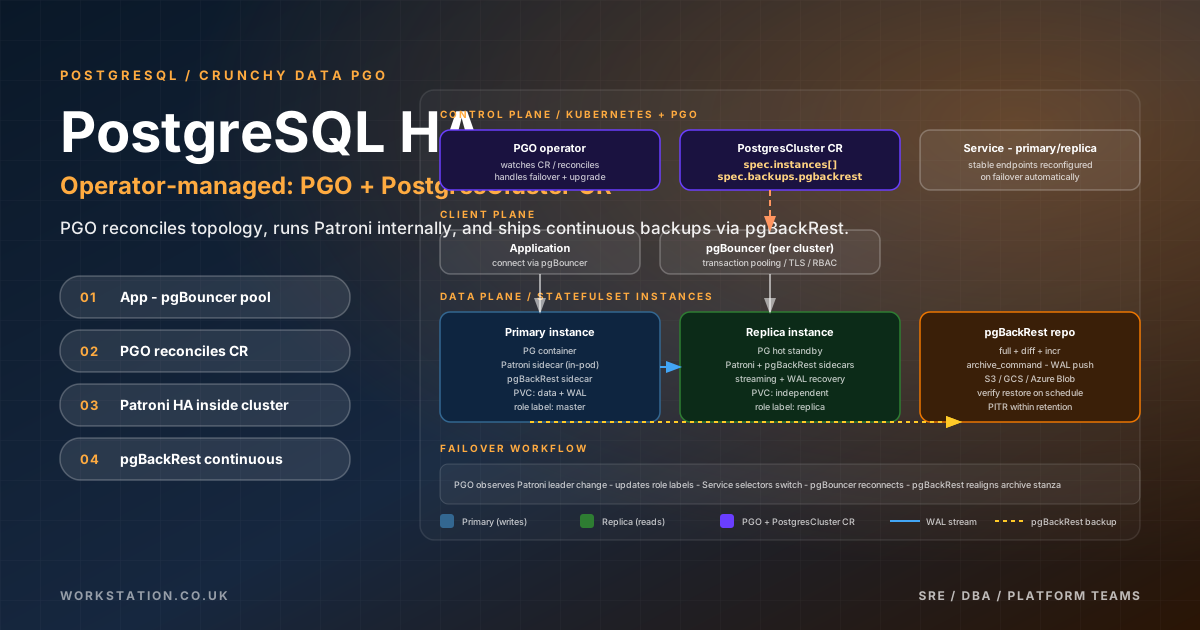
在 Kubernetes 上執行 PostgreSQL 需要的不僅僅是具有持久卷的 StatefulSet。您需要自動故障轉移、持續備份和時間點恢復、連線池、TLS 加密、監控以及跨雲提供商和裸機一致部署的能力。 Crunchy Data PGO (Postgres Operator) v5 透過單個 Kubernetes 原生自定義資源 —PostgresClusterCRD — 提供所有這些功能,並由經過考驗的元件提供支援:用於基於共識的 HA 的 Patroni、用於企業備份的 pgBackRest、用於連線池的 PgBouncer 以及用於與 Prometheus 相容的可觀察性的 pgMonitor。
本指南涵蓋了將 PGO 管理的 PostgreSQL 叢集從初始部署到跨 AWS EKS、Azure AKS、GCP GKE 和裸機 k3s 與 Rancher 進行生產級操作所需的一切。每個部分都包含具體的 YAML、Helm 值以及您可以適應您的環境的操作程式。
脆脆資料 PGO v5 架構
PGO v5 是對 Crunchy Postgres Operator 的完全重寫。它用單個PostgresCluster資源取代了以前的 pgcluster/pgreplica/pgpolicy CRD,該資源以宣告方式描述了 PostgreSQL 部署的各個方面。操作員監視此資源的更改,並協調底層 Kubernetes 物件(StatefulSet、服務、ConfigMap、Secret、作業)以匹配所需的狀態。
該架構建立在四個支柱之上。Patroni在每個 PostgreSQL Pod 中作為 sidecar 執行,並使用 Kubernetes 原生分散式共識來管理領導者選舉、複製拓撲和自動故障轉移。pgBackRest處理完整備份、差異備份和增量備份以及到物件儲存(S3、GCS、Azure Blob)或本地 PVC 的連續 WAL 歸檔。PgBouncer提供輕量級連線池,可保護 PostgreSQL 免受連線風暴的影響。pgMonitor透過 Prometheus 匯出器 sidecar 公開 PostgreSQL 指標,以便與現有的可觀測性堆疊整合。
操作器本身是無狀態的 - 所有持久狀態都存在於 PostgreSQL 叢集及其備份儲存庫中。 這意味著您可以升級或重新啟動 Operator,而不會影響正在執行的資料庫。運算子協調迴圈是冪等的:多次應用相同的PostgresCluster規範會生成相同的 Kubernetes 物件集。
安裝 PGO v5
PGO v5 可以透過 Helm 或直接 kubectl 清單安裝。 Helm 方法是生產的首選方法,因為它與 GitOps 工作流程乾淨地整合並提供版本控制的升級。
# Add the Crunchy Data Helm repository
helm repo add crunchydata https://charts.crunchydata.com
helm repo update

# Install PGO into its own namespace
helm install pgo crunchydata/pgo \
  --namespace postgres-operator \
  --create-namespace \
  --set controllerImages.cluster=registry.crunchydata.com/crunchydata/postgres-operator:ubi8-5.7.2-0 \
  --set relatedImages.postgres_16=registry.crunchydata.com/crunchydata/crunchy-postgres:ubi8-16.6-1 \
  --set relatedImages.pgbackrest=registry.crunchydata.com/crunchydata/crunchy-pgbackrest:ubi8-2.54.1-0 \
  --set relatedImages.pgbouncer=registry.crunchydata.com/crunchydata/crunchy-pgbouncer:ubi8-1.23.1-0 \
--set relatedImages.pgexporter=registry.crunchydata.com/crunchydata/crunchy-postgres-exporter:ubi8-0.16.0-0對於氣隙環境,將所需的映像映象到內部登錄檔並相應地更新relatedImages值。 PGO 只會提取 Helm 值或PostgresCluster規範中指定的映像 - 它永遠不會在執行時訪問外部登錄檔,除非明確配置這樣做。
# Verify the operator is running
kubectl get pods -n postgres-operator
NAME                                READY   STATUS    RESTARTS   AGE
pgo-controller-manager-7d8f9b6c4-xk2pt   1/1     Running   0          45s
PostgresCluster CRD 規格
PostgresClusterCRD 是整個 PostgreSQL 部署的單一宣告性介面。下面是一個生產就緒的規範,演示了關鍵部分。本指南的後續部分將詳細討論每個部分。
apiVersion: postgres-operator.crunchydata.com/v1beta1
kind: PostgresCluster
metadata:
  name: production-db
  namespace: databases
spec:
  postgresVersion: 16
  image: registry.crunchydata.com/crunchydata/crunchy-postgres:ubi8-16.6-1

  instances:
    - name: pgha1
      replicas: 3
      resources:
        requests:
          cpu: "2"
          memory: 8Gi
        limits:
          cpu: "4"
          memory: 16Gi
      dataVolumeClaimSpec:
        storageClassName: gp3-csi
        accessModes: ["ReadWriteOnce"]
        resources:
          requests:
            storage: 100Gi
      walVolumeClaimSpec:
        storageClassName: gp3-csi
        accessModes: ["ReadWriteOnce"]
        resources:
          requests:
            storage: 20Gi
      affinity:
        podAntiAffinity:
          requiredDuringSchedulingIgnoredDuringExecution:
            - topologyKey: kubernetes.io/hostname
              labelSelector:
                matchLabels:
                  postgres-operator.crunchydata.com/cluster: production-db
      tolerations:
        - key: "workload"
          operator: "Equal"
          value: "database"
          effect: "NoSchedule"

  backups:
    pgbackrest:
      image: registry.crunchydata.com/crunchydata/crunchy-pgbackrest:ubi8-2.54.1-0
      configuration:
        - secret:
            name: pgbackrest-s3-creds
      global:
        repo1-retention-full: "7"
        repo1-retention-diff: "14"
        repo1-path: /pgbackrest/production-db/repo1
        repo1-s3-uri-style: path
      repos:
        - name: repo1
          schedules:
            full: "0 2 * * 0"         # Sunday 2am
            differential: "0 2 * * 1-6" # Mon-Sat 2am
            incremental: "0 */4 * * *"  # Every 4 hours
          s3:
            bucket: mycompany-pg-backups
            endpoint: s3.eu-west-1.amazonaws.com
            region: eu-west-1

  proxy:
    pgBouncer:
      image: registry.crunchydata.com/crunchydata/crunchy-pgbouncer:ubi8-1.23.1-0
      replicas: 2
      resources:
        requests:
          cpu: 500m
          memory: 256Mi
        limits:
          cpu: "1"
          memory: 512Mi
      config:
        global:
          pool_mode: transaction
          max_client_conn: "1000"
          default_pool_size: "25"
          min_pool_size: "5"
          reserve_pool_size: "5"
          reserve_pool_timeout: "3"

  monitoring:
    pgmonitor:
      exporter:
        image: registry.crunchydata.com/crunchydata/crunchy-postgres-exporter:ubi8-0.16.0-0
        resources:
          requests:
            cpu: 100m
            memory: 128Mi

  patroni:
    dynamicConfiguration:
      synchronous_mode: true
      postgresql:
        parameters:
          shared_buffers: 2GB
          effective_cache_size: 6GB
          work_mem: 32MB
          maintenance_work_mem: 512MB
          max_connections: 200
          wal_buffers: 64MB
          checkpoint_completion_target: 0.9
          random_page_cost: 1.1
          effective_io_concurrency: 200
          min_wal_size: 1GB
          max_wal_size: 4GB
          max_worker_processes: 8
          max_parallel_workers_per_gather: 4
          max_parallel_workers: 8
          log_min_duration_statement: 500
          log_checkpoints: "on"
          log_connections: "on"
          log_disconnections: "on"
          log_lock_waits: "on"

  users:
    - name: appuser
      databases: ["appdb"]
      options: "NOSUPERUSER"
    - name: readonly
      databases: ["appdb"]
      options: "NOSUPERUSER"

  databaseInitSQL:
    name: init-sql-configmap
    key: init.sql
該規範建立了一個三例項 PostgreSQL 16 叢集,具有獨立的資料和 WAL 卷、完整/差異/增量計劃上的 S3 支援的備份、事務模式下的 PgBouncer 連線池、Prometheus 指標匯出和 Patroni 同步複製。 Pod 反關聯性規則確保所有三個例項都落在不同的 Kubernetes 節點上。
基於 Patroni 的 HA 和自動故障轉移
Patroni 是嵌入在每個 PGO 管理的 PostgreSQL Pod 中的 HA 框架。它使用 Kubernetes API 作為其分散式配置儲存 (DCS) — 不需要單獨的 etcd 或 ZooKeeper 叢集。 Patroni 持續監控 PostgreSQL 主伺服器和副本伺服器的執行狀況。當主副本無響應時,Patroni 會啟動自動故障轉移:它將最新的副本提升為主副本,並重新配置其餘副本以跟隨新的領導者。
PGO 中的故障轉移過程的工作原理如下。每個 pod 上的 Patroni 都持有 Kubernetes 中的領導者鎖(透過 Endpoints 或 ConfigMap 物件)。當前主節點必須以可配置的時間間隔(預設 10 秒 TTL,3 秒迴圈等待)更新此鎖。如果主節點無法更新(因為它崩潰、節點死亡或網路對其進行分割槽),最接近主節點 WAL 位置的副本將獲取鎖並提升自身。整個過程通常在 10 到 30 秒內完成。
同步複製模式透過 Patroni 配置中的synchronous_mode: true啟用,可保證零資料丟失 (RPO = 0),但寫入延遲稍高。在同步模式下,直到至少一個副本確認接收到 WAL 後,客戶端才會確認事務。如果沒有可用的同步副本,Patroni 會暫時禁用同步模式以維持可用性 - 如果您願意犧牲可用性以保持一致性,則可以使用synchronous_mode_strict: true覆蓋此模式。
# Check Patroni cluster status
kubectl exec -it production-db-pgha1-0 -n databases -- patronictl list

+----------------------------+-------------------+---------+---------+----+-----------+
| Member                     | Host              | Role    | State   | TL | Lag in MB |
+----------------------------+-------------------+---------+---------+----+-----------+
| production-db-pgha1-0      | 10.244.0.15       | Leader  | running |  3 |           |
| production-db-pgha1-1      | 10.244.1.22       | Replica | running |  3 |         0 |
| production-db-pgha1-2      | 10.244.2.18       | Replica | running |  3 |         0 |
+----------------------------+-------------------+---------+---------+----+-----------+

# Manual switchover (planned, zero downtime)
kubectl exec -it production-db-pgha1-0 -n databases -- \
  patronictl switchover --master production-db-pgha1-0 --candidate production-db-pgha1-1 --force

# Manual failover (forced, for emergencies)
kubectl exec -it production-db-pgha1-1 -n databases -- \
  patronictl failover --candidate production-db-pgha1-1 --force
PGO 自動配置 Kubernetes 服務來跟蹤 Patroni 領導者。production-db-primary服務始終指向當前持有領導者鎖的 Pod,因此透過此服務連線的應用程式只需短暫的連線重置即可體驗無縫故障轉移。
pgBackRest 備份和恢復
pgBackRest 是整合到 PGO 中的備份引擎。它支援三種備份型別——完整備份、差異備份和增量備份——以及用於時間點恢復 (PITR) 的連續 WAL 歸檔。 瞭解它們如何組合在一起對於設計平衡儲存成本、備份速度和恢復時間的備份策略至關重要。
完整備份複製整個 PostgreSQL 資料目錄,並且是所有其他備份型別的基準。差異備份僅複製自上次完整備份以來更改的頁面。增量備份僅複製自上次任何型別備份以來更改的頁面。在恢復期間,pgBackRest 自動將所需的備份連結在一起 - 例如,從增量恢復需要增量加上先前的差異(或完整)加上完整備份,加上到達目標恢復點所需的任何 WAL 段。
備份計劃配置
備份計劃在PostgresCluster規範內 pgBackRest 配置的repos部分中定義。可靠的生產計劃通常執行每週完整備份、每日差異備份以及更頻繁的增量備份。
backups:
  pgbackrest:
    global:
      repo1-retention-full: "4"        # Keep 4 full backups
      repo1-retention-full-type: count
      repo1-retention-diff: "14"       # Keep 14 differentials
    repos:
      - name: repo1
        schedules:
          full: "0 2 * * 0"            # Weekly full: Sunday 2am
          differential: "0 2 * * 1-6"  # Daily diff: Mon-Sat 2am
          incremental: "0 */6 * * *"   # Every 6 hours
        s3:
          bucket: mycompany-pg-backups
          endpoint: s3.eu-west-1.amazonaws.com
          region: eu-west-1
手動備份和恢復
# Trigger a manual full backup
kubectl annotate postgrescluster production-db -n databases \
  postgres-operator.crunchydata.com/pgbackrest-backup="$(date +%s)" \
  --overwrite

# Check backup status
kubectl exec -it production-db-pgha1-0 -n databases -- \
  pgbackrest info --stanza=db

# Restore to a specific point in time
# First, update the PostgresCluster spec:
spec:
  backups:
    pgbackrest:
      restore:
        enabled: true
        repoName: repo1
        options:
          - --type=time
          - --target="2026-04-12 08:30:00+00"
          - --target-action=promote

# Apply the restore annotation
kubectl annotate postgrescluster production-db -n databases \
  postgres-operator.crunchydata.com/pgbackrest-restore="$(date +%s)" \
  --overwrite
在 PITR 恢復期間,PGO 關閉所有 PostgreSQL 例項,從最近的完整備份或差異備份恢復,重播 WAL 段直至目標時間,然後啟動叢集。整個操作由操作員精心安排,無需對各個 Pod 進行手動干預。
PgBouncer 連線池
PostgreSQL 為每個客戶端連線建立一個新程序。在規模上——數百或數千個應用程式 Pod,每個應用程式 Pod 維護連線池——這種模型就會崩潰。 PgBouncer 位於您的應用程式和 PostgreSQL 之間,透過少量伺服器連線複用許多客戶端連線。
PGO 將 PgBouncer 部署為具有自己服務的單獨部署。您的應用程式應連線到production-db-pgbouncer服務,而不是直接連線到 PostgreSQL 主服務。 PgBouncer 支援三種池模式:
- 會話池— 在客戶端連線的生命週期內將伺服器連線分配給客戶端。最安全,但效率最低。
- 事務池— 僅在事務期間分配伺服器連線。對於 Web 工作負載最有效。這是推薦的預設值。
- 語句池— 為單個語句分配伺服器連線。僅適用於簡單的非事務性工作負載。
proxy:
  pgBouncer:
    replicas: 3
    config:
      global:
        pool_mode: transaction
        max_client_conn: "2000"
        default_pool_size: "30"
        min_pool_size: "10"
        reserve_pool_size: "10"
        reserve_pool_timeout: "3"
        server_idle_timeout: "300"
        server_lifetime: "3600"
        client_idle_timeout: "600"
        tcp_keepalive: "1"
        tcp_keepidle: "30"
        tcp_keepintvl: "10"
        tcp_keepcnt: "3"
    affinity:
      podAntiAffinity:
        preferredDuringSchedulingIgnoredDuringExecution:
          - weight: 100
            podAffinityTerm:
              topologyKey: kubernetes.io/hostname
              labelSelector:
                matchLabels:
postgres-operator.crunchydata.com/role: pgbouncer請注意tcp_keepalive設定 - 當 PgBouncer 在雲負載均衡器或 Kubernetes 服務後面執行時,這些設定至關重要。如果沒有積極的保活,空閒連線可能會被中間網路元件悄悄丟棄,從而導致下一次查詢嘗試時出現應用程式錯誤。
pgMonitor 和 Prometheus/Grafana 監控
PGO 的監控整合在每個 PostgreSQL Pod 中部署crunchy-postgres-exportersidecar。該匯出器抓取 PostgreSQL 的內部統計資料檢視,並將其作為 Prometheus 指標在埠 9187 上公開。該匯出器涵蓋超過 150 個開箱即用的指標,包括連線、複製延遲、事務率、快取命中率、表和索引統計資料、鎖爭用和 WAL 生成率。
# ServiceMonitor for Prometheus Operator auto-discovery
apiVersion: monitoring.coreos.com/v1
kind: ServiceMonitor
metadata:
  name: postgres-monitoring
  namespace: databases
  labels:
    release: kube-prometheus-stack
spec:
  selector:
    matchLabels:
      postgres-operator.crunchydata.com/cluster: production-db
      postgres-operator.crunchydata.com/crunchy-postgres-exporter: "true"
  endpoints:
    - port: exporter
      interval: 15s
      scrapeTimeout: 10s
Crunchy Data 提供了一組可直接匯入的預構建 Grafana 儀表板。這些內容涵蓋 PostgreSQL 概述、複製狀態、pgBackRest 備份狀態、PgBouncer 統計資訊和 Pod 級資源使用情況。透過 Grafana 的儀表板配置或手動從 Crunchy Data 示例儲存庫匯入它們。
# Install Grafana dashboards as ConfigMaps
kubectl create configmap grafana-pg-overview \
  --from-file=pg-overview.json=dashboards/pg-overview.json \
  -n monitoring
kubectl label configmap grafana-pg-overview grafana_dashboard=1 -n monitoring嚴重警報規則
apiVersion: monitoring.coreos.com/v1
kind: PrometheusRule
metadata:
  name: postgres-alerts
  namespace: databases
  labels:
    release: kube-prometheus-stack
spec:
  groups:
    - name: postgresql-health
      rules:
        - alert: PostgresReplicationLagHigh
          expr: ccp_replication_lag_size_bytes > 104857600
          for: 5m
          labels:
            severity: warning
          annotations:
            summary: "Replica {{ $labels.pod }} lag exceeds 100MB"

        - alert: PostgresConnectionsExhausted
          expr: ccp_connection_stats_active / ccp_connection_stats_max_connections > 0.85
          for: 2m
          labels:
            severity: critical
          annotations:
            summary: "PostgreSQL connections above 85% capacity"

        - alert: PostgresDeadlockDetected
          expr: rate(ccp_stat_database_deadlocks[5m]) > 0
          for: 1m
          labels:
            severity: warning
          annotations:
            summary: "Deadlocks detected in {{ $labels.datname }}"

        - alert: PostgresCacheHitRatioLow
          expr: ccp_stat_database_blks_hit / (ccp_stat_database_blks_hit + ccp_stat_database_blks_read) < 0.95
          for: 10m
          labels:
            severity: warning
          annotations:
            summary: "Cache hit ratio below 95% for {{ $labels.datname }}"

        - alert: PgBackRestStaleBackup
          expr: time() - ccp_backrest_last_full_backup_time_since_completion_seconds > 604800
          for: 1h
          labels:
            severity: critical
          annotations:
            summary: "No full backup in the last 7 days"
AWS EKS 部署
在 AWS EKS 上部署 PGO 需要配置用於持久卷的 EBS CSI 驅動程式和用於 S3 備份訪問的服務帳戶 (IRSA) 的 IAM 角色。此方法避免將長期存在的 AWS 憑證儲存在 Kubernetes 機密中。
# Install the EBS CSI driver (required for gp3 volumes)
eksctl create addon --name aws-ebs-csi-driver --cluster my-cluster --region eu-west-1 \
  --service-account-role-arn arn:aws:iam::111122223333:role/AmazonEKS_EBS_CSI_DriverRole

# Create a gp3 StorageClass
apiVersion: storage.k8s.io/v1
kind: StorageClass
metadata:
  name: gp3-csi
provisioner: ebs.csi.aws.com
parameters:
  type: gp3
  iops: "3000"
  throughput: "125"
  encrypted: "true"
volumeBindingMode: WaitForFirstConsumer
allowVolumeExpansion: true
# IAM policy for pgBackRest S3 access
{
"Version": "2012-10-17",
"Statement": [
{
"Effect": "Allow",
"Action": [
"s3:PutObject",
"s3:GetObject",
"s3:DeleteObject",
"s3:ListBucket"
],
"Resource": [
"arn:aws:s3:::mycompany-pg-backups",
"arn:aws:s3:::mycompany-pg-backups/*"
]
}
]
}
# Create an IRSA-enabled service account
eksctl create iamserviceaccount \
--name pgbackrest-sa \
--namespace databases \
--cluster my-cluster \
--attach-policy-arn arn:aws:iam::111122223333:policy/PGBackRestS3Policy \
--approve在PostgresCluster規範中,引用 S3 儲存桶和區域。 PGO 將自動使用 Pod 的服務帳戶憑據(透過 IRSA)——無需顯式訪問金鑰。
backups:
  pgbackrest:
    repos:
      - name: repo1
        s3:
          bucket: mycompany-pg-backups
          endpoint: s3.eu-west-1.amazonaws.com
          region: eu-west-1
對於多可用區彈性,請確保您的 EKS 節點組至少跨越三個可用區,並使用前面顯示的拓撲分佈約束在它們之間分佈 PostgreSQL Pod。
Azure AKS 部署
Azure AKS 使用託管磁碟進行持久儲存,使用 Azure Blob 儲存進行 pgBackRest 備份。建議的儲存類別使用 Premium SSD v2 或 Premium LRS 來處理資料庫工作負載。
# StorageClass for Azure Premium SSD
apiVersion: storage.k8s.io/v1
kind: StorageClass
metadata:
  name: azure-premium-ssd
provisioner: disk.csi.azure.com
parameters:
  skuName: Premium_LRS
  kind: Managed
volumeBindingMode: WaitForFirstConsumer
allowVolumeExpansion: true

---
# pgBackRest with Azure Blob Storage
backups:
  pgbackrest:
    configuration:
      - secret:
          name: pgbackrest-azure-creds
    global:
      repo1-azure-account: mystorageaccount
      repo1-retention-full: "7"
    repos:
      - name: repo1
        schedules:
          full: "0 2 * * 0"
          differential: "0 2 * * 1-6"
        azure:
          container: pg-backups

---
# Secret with Azure credentials
apiVersion: v1
kind: Secret
metadata:
  name: pgbackrest-azure-creds
  namespace: databases
stringData:
  azure.conf: |
    [global]
    repo1-azure-key=BASE64_STORAGE_ACCOUNT_KEY
對於工作負載身份(Azure 相當於 AWS IRSA),使用 OIDC 頒發者配置 AKS 群集,併為 pgBackRest 服務帳戶建立聯合身份憑據。這消除了在秘密中儲存帳戶金鑰的需要。
GCP GKE 部署
GKE 使用持久磁碟 (pd-ssd) 進行儲存,使用 GCS 進行 pgBackRest 備份。 GKE Workload Identity 將 Kubernetes 服務帳號對映到 Google Cloud 服務帳號,以進行安全、無金鑰的身份驗證。
# StorageClass for GKE SSD Persistent Disk
apiVersion: storage.k8s.io/v1
kind: StorageClass
metadata:
  name: pd-ssd
provisioner: pd.csi.storage.gke.io
parameters:
  type: pd-ssd
volumeBindingMode: WaitForFirstConsumer
allowVolumeExpansion: true

---
# pgBackRest with GCS
backups:
  pgbackrest:
    configuration:
      - secret:
          name: pgbackrest-gcs-creds
    repos:
      - name: repo1
        gcs:
          bucket: mycompany-pg-backups

---
# GCS service account key secret
apiVersion: v1
kind: Secret
metadata:
  name: pgbackrest-gcs-creds
  namespace: databases
stringData:
  gcs-key.json: |
    {
      "type": "service_account",
      "project_id": "my-project",
      ...
    }
# Enable Workload Identity on GKE
gcloud container clusters update my-cluster \
--workload-pool=my-project.svc.id.goog
# Create and bind IAM service account
gcloud iam service-accounts create pgbackrest-gcs \
--display-name="pgBackRest GCS Access"
gcloud projects add-iam-policy-binding my-project \
--member="serviceAccount:pgbackrest-gcs@my-project.iam.gserviceaccount.com" \
--role="roles/storage.objectAdmin"
gcloud iam service-accounts add-iam-policy-binding \
pgbackrest-gcs@my-project.iam.gserviceaccount.com \
--role="roles/iam.workloadIdentityUser" \
--member="serviceAccount:my-project.svc.id.goog[databases/production-db-pgbackrest]"多區域災難恢復
PGO支援備用叢集,實現跨地域容災。備用叢集不斷地從主叢集的 pgBackRest 儲存庫重播 WAL,維護一個熱副本,在發生區域故障時可以將其提升為獨立主叢集。
# Standby cluster in Region B
apiVersion: postgres-operator.crunchydata.com/v1beta1
kind: PostgresCluster
metadata:
  name: production-db-standby
  namespace: databases
spec:
  postgresVersion: 16
  image: registry.crunchydata.com/crunchydata/crunchy-postgres:ubi8-16.6-1

  standby:
    enabled: true
    repoName: repo1

  instances:
    - name: pgha1
      replicas: 2
      dataVolumeClaimSpec:
        storageClassName: gp3-csi
        accessModes: ["ReadWriteOnce"]
        resources:
          requests:
            storage: 100Gi

  backups:
    pgbackrest:
      image: registry.crunchydata.com/crunchydata/crunchy-pgbackrest:ubi8-2.54.1-0
      configuration:
        - secret:
            name: pgbackrest-s3-creds
      repos:
        - name: repo1
          s3:
            bucket: mycompany-pg-backups
            endpoint: s3.us-east-1.amazonaws.com
region: us-east-1要在災難期間提升備用叢集,請在規格中設定standby.enabled: false並應用更改。 PGO 將備用叢集提升為獨立的主叢集。這種提升是不可逆的——在原始主區域恢復後,您將需要從頭開始重建複製關係。
裸機 k3s/Rancher 部署
在具有 Rancher 管理的裸機 k3s 上執行 PGO 需要仔細注意儲存和網路,因為您沒有云提供商管理的磁碟或負載均衡器。
Longhorn 儲存
Longhorn 是適用於 Kubernetes 的輕量級分散式塊儲存系統,非常適合裸機環境。它跨多個節點複製卷以實現永續性,並支援快照、備份和卷擴充套件。
# Install Longhorn via Helm
helm repo add longhorn https://charts.longhorn.io
helm repo update

helm install longhorn longhorn/longhorn \
  --namespace longhorn-system \
  --create-namespace \
  --set defaultSettings.defaultReplicaCount=3 \
  --set defaultSettings.storageOverProvisioningPercentage=100 \
  --set defaultSettings.storageMinimalAvailablePercentage=15

---
# Longhorn StorageClass for PostgreSQL
apiVersion: storage.k8s.io/v1
kind: StorageClass
metadata:
  name: longhorn-pg
provisioner: driver.longhorn.io
parameters:
  numberOfReplicas: "3"
  staleReplicaTimeout: "2880"
  fsType: ext4
  dataLocality: best-effort
volumeBindingMode: WaitForFirstConsumer
allowVolumeExpansion: true
reclaimPolicy: Retain
MetalLB 用於負載平衡
# Install MetalLB
helm repo add metallb https://metallb.github.io/metallb
helm install metallb metallb/metallb --namespace metallb-system --create-namespace

---
# Configure IP address pool
apiVersion: metallb.io/v1beta1
kind: IPAddressPool
metadata:
  name: pg-pool
  namespace: metallb-system
spec:
  addresses:
    - 192.168.1.200-192.168.1.210
---
apiVersion: metallb.io/v1beta1
kind: L2Advertisement
metadata:
  name: pg-l2
  namespace: metallb-system
spec:
  ipAddressPools:
    - pg-pool
配置 MetalLB 後,LoadBalancer型別的 PGO 服務將從您的池中接收 IP 地址,從而使 PostgreSQL 主端點和 PgBouncer 端點可從您的網路直接訪問,無需手動埠轉發。
pgBackRest,帶有本地 PVC 或 NFS,適用於裸機
# For environments without S3/GCS/Azure Blob, use a PVC-based repo
backups:
  pgbackrest:
    repos:
      - name: repo1
        schedules:
          full: "0 2 * * 0"
          differential: "0 2 * * 1-6"
        volume:
          volumeClaimSpec:
            storageClassName: longhorn-pg
            accessModes: ["ReadWriteOnce"]
            resources:
              requests:
                storage: 200Gi
對於氣隙環境,您還可以配置輔助 pgBackRest 儲存庫,將備份傳送到 NFS 共享或本地執行的 MinIO 例項,從而提供不依賴於雲的叢集外備份副本。
TLS/SSL 加密配置
預設情況下,PGO 為所有內部通訊生成自簽名 TLS 證書 — PostgreSQL 例項、複製、pgBackRest 和 PgBouncer 均透過加密通道進行通訊,無需任何手動證書管理。但是,對於生產環境,您通常希望使用由組織的 CA 簽名的證書。
# Create a TLS secret with your CA-signed certificates
kubectl create secret tls production-db-tls \
  --cert=server.crt \
  --key=server.key \
  -n databases

kubectl create secret generic production-db-ca \
  --from-file=ca.crt=ca.crt \
  -n databases

---
# Reference in PostgresCluster spec
spec:
  customTLSSecret:
    name: production-db-tls
  customReplicationTLSSecret:
    name: production-db-replication-tls
PGO 使用ssl = on配置 PostgreSQL,並設定適當的ssl_cert_file、ssl_key_file和ssl_ca_file引數。 PgBouncer 的配置類似,需要 TLS 進行客戶端連線,並在連線到 PostgreSQL 後端時使用 TLS。
# Enforce TLS for all client connections via pg_hba.conf
spec:
  patroni:
    dynamicConfiguration:
      postgresql:
        pg_hba:
          - hostssl all all 0.0.0.0/0 scram-sha-256
          - hostssl replication all 0.0.0.0/0 scram-sha-256
定製 PostgreSQL 配置
PGO 透過 Patroni 動態配置部分公開 PostgreSQL 配置。這是推薦的方法,因為 Patroni 確保所有例項保持一致的配置並在需要時處理重新啟動。
patroni:
  dynamicConfiguration:
    postgresql:
      parameters:
        # Memory
        shared_buffers: 4GB
        effective_cache_size: 12GB
        work_mem: 64MB
        maintenance_work_mem: 1GB
        huge_pages: "try"

        # WAL
        wal_buffers: 128MB
        min_wal_size: 2GB
        max_wal_size: 8GB
        checkpoint_completion_target: 0.9
        wal_compression: lz4

        # Query Planning
        random_page_cost: 1.1
        effective_io_concurrency: 200
        default_statistics_target: 200

        # Parallelism
        max_worker_processes: 16
        max_parallel_workers_per_gather: 4
        max_parallel_workers: 8
        max_parallel_maintenance_workers: 4

        # Connections
        max_connections: 200
        idle_in_transaction_session_timeout: 60000
        statement_timeout: 300000

        # Logging
        log_min_duration_statement: 250
        log_checkpoints: "on"
        log_connections: "on"
        log_disconnections: "on"
        log_lock_waits: "on"
        log_temp_files: 0
        log_autovacuum_min_duration: 0

        # Autovacuum Tuning
        autovacuum_max_workers: 5
        autovacuum_naptime: 30
        autovacuum_vacuum_cost_limit: 800
        autovacuum_vacuum_scale_factor: 0.02
        autovacuum_analyze_scale_factor: 0.01
這些引數假定節點具有 16 個 CPU 核心和專用於 PostgreSQL 的 32 GB RAM。 將shared_buffers調整為可用 RAM 的大約 25%,將effective_cache_size調整為大約 75%。 WAL 和檢查點設定針對寫入密集型工作負載進行了調整 — 對於檢查點頻率影響較小的讀取密集型系統,減少max_wal_size。
使用者和資料庫管理
PGO 透過PostgresCluster規範的users部分以宣告方式管理 PostgreSQL 使用者和資料庫。新增使用者時,PGO 在 PostgreSQL 中建立角色,生成隨機密碼,並將憑據儲存在 Kubernetes Secret 中。
users:
  - name: appuser
    databases: ["appdb"]
    options: "NOSUPERUSER NOCREATEDB NOCREATEROLE"
  - name: readonly
    databases: ["appdb"]
    options: "NOSUPERUSER NOCREATEDB NOCREATEROLE"
  - name: migrations
    databases: ["appdb"]
    options: "NOSUPERUSER CREATEDB"
  - name: monitoring
    databases: ["postgres"]
    options: "NOSUPERUSER LOGIN"

---
# Access credentials from the generated secret
kubectl get secret production-db-pguser-appuser -n databases -o jsonpath='{.data.password}' | base64 -d

# The secret also contains a full connection URI
kubectl get secret production-db-pguser-appuser -n databases -o jsonpath='{.data.uri}' | base64 -d
# postgresql://appuser:PASSWORD@production-db-primary.databases.svc:5432/appdb要授予只讀訪問許可權,請使用databaseInitSQL功能在建立叢集時執行 SQL,以建立只讀角色並授予其對所有表的 SELECT 許可權。
# init.sql ConfigMap
apiVersion: v1
kind: ConfigMap
metadata:
  name: init-sql-configmap
  namespace: databases
data:
  init.sql: |
    -- Read-only role for reporting users
    ALTER DEFAULT PRIVILEGES IN SCHEMA public GRANT SELECT ON TABLES TO readonly;
    GRANT CONNECT ON DATABASE appdb TO readonly;
    GRANT USAGE ON SCHEMA public TO readonly;
    GRANT SELECT ON ALL TABLES IN SCHEMA public TO readonly;

    -- Extensions
    CREATE EXTENSION IF NOT EXISTS pg_stat_statements;
    CREATE EXTENSION IF NOT EXISTS pgcrypto;
    CREATE EXTENSION IF NOT EXISTS pg_trgm;
滾動更新和主要版本升級
PGO 透過滾動更新處理小版本升級。當您將PostgresCluster規範中的映像標籤更改為較新的補丁版本時,PGO 一次更新一個例項,從副本開始,到主例項結束(這會觸發 Patroni 切換以最大限度地減少停機時間)。
# Minor version upgrade: change the image tag
spec:
  image: registry.crunchydata.com/crunchydata/crunchy-postgres:ubi8-16.7-0
主要版本升級(例如 PostgreSQL 15 至 16)需要pg_upgrade,PGO 透過單獨的PGUpgradeCRD 進行協調。
apiVersion: postgres-operator.crunchydata.com/v1beta1
kind: PGUpgrade
metadata:
  name: production-db-upgrade
  namespace: databases
spec:
  postgresClusterName: production-db
  fromPostgresVersion: 15
  toPostgresVersion: 16
image: registry.crunchydata.com/crunchydata/crunchy-upgrade:ubi8-5.7.2-0升級過程會關閉現有叢集,執行pg_upgrade --link以使用硬連結執行就地升級(最大限度地減少資料複製),驗證升級,然後在新版本上啟動叢集。在開始主要版本升級之前始終進行完整備份,並首先在非生產叢集上測試該過程。
# Pre-upgrade checklist
# 1. Take a full backup
kubectl annotate postgrescluster production-db -n databases \
  postgres-operator.crunchydata.com/pgbackrest-backup="$(date +%s)" \
  --overwrite

# 2. Verify backup completed
kubectl exec -it production-db-pgha1-0 -n databases -- pgbackrest info --stanza=db

# 3. Shutdown the cluster (set replicas to 0 or use PGO shutdown annotation)
kubectl annotate postgrescluster production-db -n databases \
  postgres-operator.crunchydata.com/shutdown="$(date +%s)" \
  --overwrite

# 4. Apply the PGUpgrade resource
kubectl apply -f pg-upgrade.yaml

# 5. Update the PostgresCluster spec with the new version and image
# 6. Remove the shutdown annotation to start the upgraded cluster
生產調整建議
在生產中執行 PGO 需要注意初始部署之外的多個操作領域。
儲存效能
- 獨立的資料和 WAL 卷:始終使用
walVolumeClaimSpec將 WAL 放置在專用 PVC 上。這可以防止寫入量大的 WAL 活動與資料 I/O 發生爭用。 - 使用高 IOPS 儲存:gp3 (AWS)、Premium SSD v2 (Azure)、pd-ssd (GCP) 或裸機上支援 NVMe 的 Longhorn。 PostgreSQL 的隨機 I/O 模式需要低延遲儲存。
- 卷擴充套件:確保您的 StorageClass 具有
allowVolumeExpansion: true。 PGO 可以在支援的儲存提供商上無中斷地擴充套件 PVC。
Pod 中斷預算
PGO 會自動為您的 PostgreSQL 例項建立 PDB,但請驗證它們是否適合您的 HA 要求。
# Check PDBs
kubectl get pdb -n databases
NAME                    MIN AVAILABLE   MAX UNAVAILABLE   ALLOWED DISRUPTIONS   AGE
production-db-pgha1     1               N/A               2                     7d
資源請求和限制
- 將記憶體請求設定為等於資料庫 Pod 的限制,以防止 OOM 終止並確保有保證的 QoS 級別。
- 保守地設定 CPU 請求並限制更高,以允許在真空或維護操作期間突發。
- 透過 pgMonitor 指標監控實際使用情況並每季度進行調整。
連線管理
- 始終透過 PgBouncer 連線,而不是直接連線到 PostgreSQL。
- 將 PostgreSQL 中的
max_connections設定為考慮 PgBouncer 池大小加上系統連線(複製、監控、超級使用者)的值。 - 對 Web 應用程式使用事務池模式。僅當您的應用程式使用準備好的語句或會話級狀態(例如
SET命令、臨時表)時,才切換到會話池。
備份驗證
- 透過從備份建立克隆叢集並執行應用程式級冒煙測試來定期測試恢復。
- 監控
PgBackRestStaleBackup警報以確保備份按計劃完成。 - 透過恢復到特定時間戳並驗證資料一致性來驗證 PITR。
# Clone cluster for backup validation
apiVersion: postgres-operator.crunchydata.com/v1beta1
kind: PostgresCluster
metadata:
  name: backup-validation
  namespace: databases
spec:
  postgresVersion: 16
  image: registry.crunchydata.com/crunchydata/crunchy-postgres:ubi8-16.6-1
  dataSource:
    postgresCluster:
      clusterName: production-db
      repoName: repo1
      options:
        - --type=time
        - --target="2026-04-12 06:00:00+00"
  instances:
    - name: pgha1
      replicas: 1
      dataVolumeClaimSpec:
        storageClassName: gp3-csi
        accessModes: ["ReadWriteOnce"]
        resources:
          requests:
            storage: 100Gi
  backups:
    pgbackrest:
      repos:
        - name: repo1
          volume:
            volumeClaimSpec:
              accessModes: ["ReadWriteOnce"]
              resources:
                requests:
                  storage: 50Gi
網路策略
# Restrict PostgreSQL traffic to known namespaces
apiVersion: networking.k8s.io/v1
kind: NetworkPolicy
metadata:
  name: postgres-network-policy
  namespace: databases
spec:
  podSelector:
    matchLabels:
      postgres-operator.crunchydata.com/cluster: production-db
  policyTypes:
    - Ingress
  ingress:
    - from:
        - namespaceSelector:
            matchLabels:
              app-access: database
        - podSelector:
            matchLabels:
              postgres-operator.crunchydata.com/cluster: production-db
      ports:
        - port: 5432
          protocol: TCP
        - port: 9187
          protocol: TCP
監控清單
- 複製延遲:當任何副本超過 100MB 或延遲 60 秒時發出警報。
- 連線飽和:當活動連線超過
max_connections的 80% 時發出警報。 - 交易率異常:確定 TPS 基線並針對重大偏差發出警報。
- 磁碟使用情況:使用卷擴充套件執行手冊在 70% 和 85% 閾值時發出警報。
- 備份新鮮度:當上次完整備份早於 RPO 視窗時發出警報。
- 鎖定爭用:針對可能指示應用程式錯誤的長期鎖定(> 30 秒)發出警報。
- 自動清理執行狀況:當表在超過 24 小時內未清理時發出警報。
災難恢復執行手冊
災難恢復計劃只有經過測試才有用。以下執行手冊概述了從常見故障場景中恢復的關鍵過程。
單 Pod 故障
Patroni 和 Kubernetes 自動處理此問題。如果主 Pod 崩潰,Patroni 將在 10-30 秒內升級副本。 Kubernetes 重新啟動發生故障的 Pod,該 Pod 作為副本重新加入。
單節點故障
如果執行 PostgreSQL Pod 的節點死亡,Kubernetes 會在健康節點上重新排程 Pod。 Pod 連線到其現有的 PVC(如果儲存連線到網路)或從備份恢復(如果使用本地儲存)。 Pod 反關聯性規則可確保剩餘例項繼續提供流量服務。
完全叢集丟失
如果整個 Kubernetes 叢集丟失,請部署新叢集,安裝 PGO,並建立一個新的PostgresCluster,其中dataSource指向備份儲存庫。 PGO 恢復最新的備份並重播 WAL 到最近的可用點。
區域故障轉移
如果主區域丟失,可透過設定standby.enabled: false提升備用叢集。更新您的 DNS 或負載均衡器以指向新的主要區域。當原Region恢復後,可以反向重建備用關係。
# Promote standby cluster
kubectl patch postgrescluster production-db-standby -n databases --type merge \
  -p '{"spec":{"standby":{"enabled":false}}}'

# Verify the cluster is now an independent primary
kubectl exec -it production-db-standby-pgha1-0 -n databases -- patronictl list
操作命令快速參考
# Cluster status
kubectl get postgrescluster -n databases
kubectl describe postgrescluster production-db -n databases

# Patroni status
kubectl exec -it production-db-pgha1-0 -n databases -- patronictl list
kubectl exec -it production-db-pgha1-0 -n databases -- patronictl history

# Connect to PostgreSQL
kubectl exec -it production-db-pgha1-0 -n databases -- psql -U postgres

# Backup info
kubectl exec -it production-db-pgha1-0 -n databases -- pgbackrest info --stanza=db

# Manual backup
kubectl annotate postgrescluster production-db -n databases \
  postgres-operator.crunchydata.com/pgbackrest-backup="$(date +%s)" --overwrite

# Restart PostgreSQL (rolling)
kubectl annotate postgrescluster production-db -n databases \
  postgres-operator.crunchydata.com/restart="$(date +%s)" --overwrite

# Logs
kubectl logs production-db-pgha1-0 -n databases -c database
kubectl logs production-db-pgha1-0 -n databases -c pgbackrest
kubectl logs production-db-pgha1-0 -n databases -c exporter

# PgBouncer status
kubectl exec -it $(kubectl get pod -l postgres-operator.crunchydata.com/role=pgbouncer -n databases -o name | head -1) -n databases -- psql -U pgbouncer pgbouncer -c "SHOW POOLS;"

# Scale replicas
kubectl patch postgrescluster production-db -n databases --type merge \
  -p '{"spec":{"instances":[{"name":"pgha1","replicas":5}]}}'
結論
Crunchy Data PGO 將 Kubernetes 上的 PostgreSQL 從操作負擔轉變為可管理的宣告性系統。PostgresClusterCRD 在單個版本控制資源中捕獲整個部署(例項、複製、備份、池化、監控、TLS)。 Patroni 提供經過實戰檢驗的自動故障轉移。 pgBackRest 為任何雲物件儲存提供企業級備份和時間點恢復。 PgBouncer 處理 PostgreSQL 的每連線一個程序模型所需的大規模連線池。 pgMonitor 將您需要的指標提供給 Prometheus 和 Grafana 以實現操作可見性。
AWS EKS、Azure AKS、GCP GKE 和裸機 k3s 的部署模式共享相同的核心PostgresCluster規範 - 變化的是儲存類、備份儲存庫配置和網路層。這種一致性是基於操作員的方法的真正價值:您的團隊學習一種工具、一種操作模型和一套適用於任何地方的操作手冊。
從三例項叢集開始,事務池模式下的 PgBouncer、每週完整加每日差異備份計劃以及核心 Prometheus 警報。在第一天就驗證您的備份恢復過程,而不是在您第一次需要它時。隨著可用性要求和運營成熟度的增長,擴充套件到多區域備用叢集、同步複製和高階調整。操作員負責機械操作;您的責任是充分了解架構,以便針對您的工作負載做出正確的權衡。