Couchbase 在生產中的高可用性:XDCR、Kubernetes Operator 和多區域部署
具有 XDCR、自主操作員和多雲部署的企業 Couchbase HA
 Balinder Walia2026年4月12日24 min read
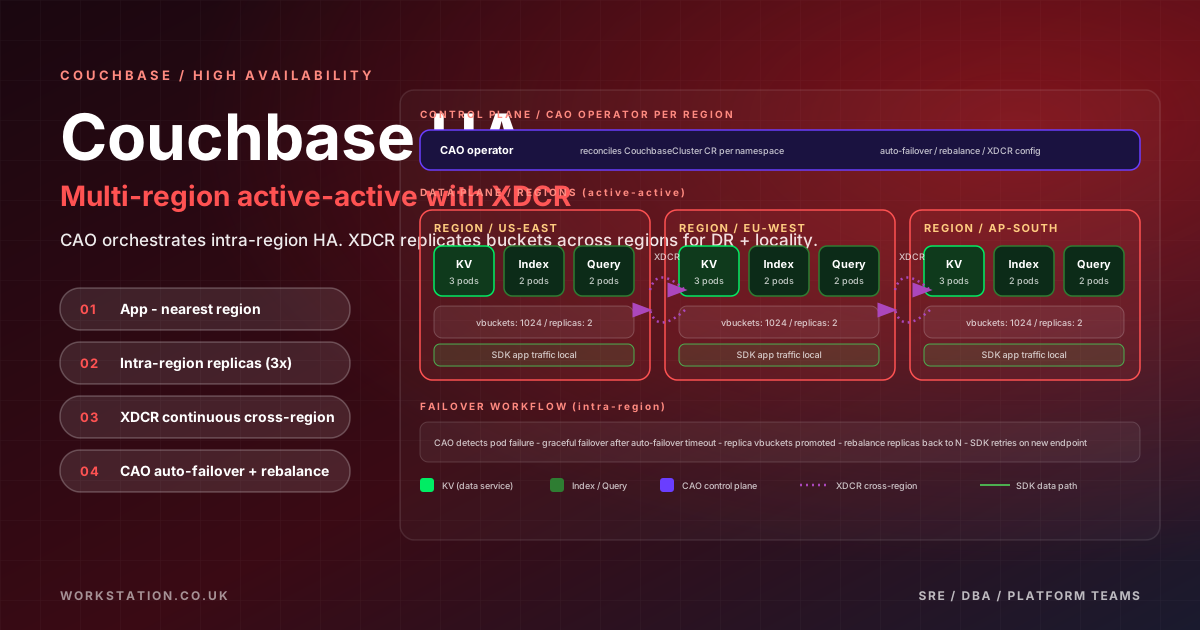
簡介:為什麼選擇 Couchbase 實現高可用性生產工作負載
Couchbase 伺服器是一款分散式、多模型 NoSQL 資料庫,專為需要任何規模的一致低延遲效能的互動式應用程式而設計。與事後才新增分散式功能的資料庫不同,Couchbase 從一開始就圍繞無共享、點對點拓撲進行架構設計,其中每個節點都是平等的,並且使用稱為vBuckets的確定性雜湊機制在叢集中自動對資料進行分片。這種架構選擇消除了資料層的單點故障,並無需更改應用程式即可實現水平擴充套件。
Couchbase 在高可用性領域中脫穎而出的是其跨資料中心複製 (XDCR)— 一種內建非同步複製引擎,可在地理分佈的叢集之間連續傳輸突變。結合自動故障轉移、機架/區域感知和豐富的整合服務(資料、索引、查詢、搜尋、分析和事件),Couchbase 提供了一個統一的平臺,可以充當現代應用程式的運算元據庫和分析引擎。
在本綜合指南中,我們將探討在高可用性生產環境中執行 Couchbase Server 的各個方面:使 HA 成為可能的內部架構、用於多區域部署的 XDCR 配置、Kubernetes 的 Couchbase Autonomous Operator、AWS EKS、Azure AKS 和 GCP GKE 的雲特定部署模式、使用 Rancher 和 Longhorn 的裸機 k3s 部署、備份和恢復策略、N1QL 查詢調優、安全強化、監控和帶有用於邊緣部署的同步閘道器的 Couchbase Mobile。最後,您將擁有在任何基礎設施上部署和操作生產級 Couchbase 叢集的實用知識。
Couchbase 伺服器架構:服務、vBuckets 和自動分片
在部署高可用性之前,瞭解 Couchbase 的內部架構至關重要。 Couchbase 使用多維擴充套件 (MDS)架構,其中不同的服務可以跨叢集節點獨立部署和擴充套件。這使運營商能夠對資源分配和效能隔離進行細粒度控制。
六大核心服務
Couchbase 伺服器提供六種整合服務,每種服務處理不同的工作負載型別:
- 資料服務 (KV)— 基於記憶體優先架構構建的核心鍵值引擎。它處理 CRUD 操作、管理 vBucket 分發並充當持久層。資料儲存在記憶體(託管快取)中並非同步持久化到磁碟。該服務必須在每個叢集中的至少一個節點上執行。
- 索引服務 (GSI)— 維護支援 N1QL 查詢的全域性二級索引。索引與資料分開儲存,允許獨立擴充套件。支援標準和記憶體最佳化的索引儲存模式。
- 查詢服務 (N1QL)— 針對叢集執行 N1QL(對於 JSON 為 SQL++)查詢。無狀態設計,使其易於水平擴充套件。與資料和索引服務協調來計劃和執行查詢。
- 搜尋服務 (FTS)— 提供由 Bleve 搜尋引擎支援的全文搜尋功能。支援模糊匹配、地理空間查詢、分面搜尋和自定義分析器。索引在搜尋節點之間進行分割槽和複製。
- 分析服務 (CBAS)— 使用基於 Apache Asterix 的並行處理引擎執行復雜的分析查詢。對自己的資料副本進行操作,確保分析工作負載不會影響操作延遲。
- 事件服務— 執行伺服器端 JavaScript 功能以響應資料突變。無需外部基礎設施即可實現實時資料豐富、轉換、級聯刪除和整合觸發器。
vBucket 分配和自動分片
Couchbase 使用1024 vBuckets(虛擬儲存桶)在叢集中分發資料。每個文件都使用文件金鑰模 1024 的 CRC32 雜湊對映到 vBucket。叢集對映(由每個節點維護並由每個 SDK 客戶端快取)將每個 vBucket 對映到特定節點。這種確定性對映意味著客戶端始終準確地知道哪個節點儲存任何給定文件,從而實現亞毫秒級延遲的單跳讀取和寫入。
當新增或刪除節點時,Couchbase 透過稱為重新平衡的過程自動重新分配 vBuckets。在重新平衡期間,叢集在節點之間移動 vBucket,同時保持完全執行。 重新平衡經過精心安排,以始終維持配置的副本數量,並且客戶端透過叢集對映更新無縫重定向到新的 vBucket 位置。
叢集內複製和自動故障轉移
每個 vBucket 都有一個活動副本和分佈在不同節點上的最多三個副本副本。當客戶端寫入文件時,寫入會轉到負責節點上的活動 vBucket。然後,資料服務透過內部DCP(資料庫更改協議)流將突變複製到其他節點上的副本 vBuckets。預設情況下,Couchbase 配置一個副本,但對於生產 HA 部署,建議配置兩個副本:
# Configure bucket with 2 replicas via CLI
/opt/couchbase/bin/couchbase-cli bucket-create \
  --cluster localhost:8091 \
  --username Administrator \
  --password password \
  --bucket production-data \
  --bucket-type couchbase \
  --bucket-ramsize 4096 \
  --bucket-replica 2 \
  --bucket-priority high \
  --bucket-eviction-policy valueOnly \
  --enable-flush 0 \
  --compression-mode active \
  --max-ttl 0 \
--durability-min-level majorityAndPersistActive自動故障轉移是 Couchbase 自動檢測節點故障並從中恢復的機制。當節點變得無響應時,叢集編排器會等待可配置的超時(最少 5 秒,建議生產環境為 30 秒),然後將倖存節點上的副本 vBuckets 提升為活動狀態。這種情況無需任何應用程式端干預即可發生 - SDK 客戶端收到更新的叢集對映並立即將請求路由到新的活動 vBuckets。
# Configure auto-failover settings
/opt/couchbase/bin/couchbase-cli setting-autofailover \
  --cluster localhost:8091 \
  --username Administrator \
  --password password \
  --enable-auto-failover 1 \
  --auto-failover-timeout 30 \
  --max-failovers 3 \
  --enable-failover-of-server-groups 1 \
  --failover-on-data-disk-issues 1 \
  --failover-data-disk-period 120 \
  --can-abort-rebalance 1
關鍵自動故障轉移引數:
- 自動故障轉移超時— 觸發故障轉移之前等待的秒數。較低的值會減少停機時間,但會增加誤報風險。 30 秒是建議的生產設定。
- 最大故障轉移數— 需要手動干預之前連續自動故障轉移的最大數量。對於 5 節點叢集,設定為 3(以維持仲裁)。
- 啟用伺服器組故障轉移— 啟用整個伺服器組(機架/區域)的故障轉移,這對於區域感知部署至關重要。
- 資料磁碟問題故障轉移— 當資料服務檢測到永久性磁碟 I/O 錯誤時觸發故障轉移。
XDCR:跨資料中心複製
XDCR是Couchbase的旗艦多區域複製技術。與傳統 RDBMS 系統中的資料庫級複製不同,XDCR 在儲存桶級別上執行,並在獨立的 Couchbase 叢集之間傳輸單個文件突變。每個叢集都保持完全自治 - 它可以獨立接受讀取和寫入,這使得 XDCR 非常適合使用者需要從任何地理位置進行低延遲訪問的主動-主動多區域部署。
單向與雙向 XDCR
單向 XDCR將突變從源簇單向複製到目標簇。這適用於災難恢復場景、遠端區域的只讀副本或將資料從操作叢集饋送到分析叢集。
雙向 XDCR在兩個叢集之間建立雙向複製連結,從而實現兩個叢集都接受寫入的主動-主動部署。這是最強大的配置,但需要仔細的衝突解決規劃。
設定 XDCR 複製
配置 XDCR 涉及建立遠端叢集引用,然後在儲存桶級別定義複製連結。以下是完整雙向設定的 CLI 命令和 REST API 呼叫:
# Step 1: Create remote cluster reference on the US-EAST cluster
/opt/couchbase/bin/couchbase-cli xdcr-setup \
  --cluster cb-us-east.example.com:8091 \
  --username Administrator \
  --password password \
  --create \
  --xdcr-cluster-name eu-west-cluster \
  --xdcr-hostname cb-eu-west.example.com:8091 \
  --xdcr-username Administrator \
  --xdcr-password password \
  --xdcr-demand-encryption 1 \
  --xdcr-encryption-type full \
  --xdcr-certificate /path/to/eu-west-ca.pem

# Step 2: Create replication from US-EAST to EU-WEST for the 'app' bucket
/opt/couchbase/bin/couchbase-cli xdcr-replicate \
  --cluster cb-us-east.example.com:8091 \
  --username Administrator \
  --password password \
  --create \
  --xdcr-cluster-name eu-west-cluster \
  --xdcr-from-bucket app \
  --xdcr-to-bucket app \
  --xdcr-replication-mode xmem \
  --enable-compression 1 \
  --filter-expression "" \
  --priority high \
  --network-usage-limit 0

# Step 3: Create the reverse replication on EU-WEST cluster (bidirectional)
/opt/couchbase/bin/couchbase-cli xdcr-setup \
  --cluster cb-eu-west.example.com:8091 \
  --username Administrator \
  --password password \
  --create \
  --xdcr-cluster-name us-east-cluster \
  --xdcr-hostname cb-us-east.example.com:8091 \
  --xdcr-username Administrator \
  --xdcr-password password \
  --xdcr-demand-encryption 1 \
  --xdcr-encryption-type full \
  --xdcr-certificate /path/to/us-east-ca.pem

/opt/couchbase/bin/couchbase-cli xdcr-replicate \
  --cluster cb-eu-west.example.com:8091 \
  --username Administrator \
  --password password \
  --create \
  --xdcr-cluster-name us-east-cluster \
  --xdcr-from-bucket app \
  --xdcr-to-bucket app \
  --xdcr-replication-mode xmem \
  --enable-compression 1
衝突解決策略
在雙向 XDCR 中,同一文件可以在不同叢集上同時修改,從而產生衝突。 Couchbase提供多種衝突解決策略:
- 基於時間戳(LWW — 最後寫入獲勝)— 具有最新時間戳的突變獲勝。這是預設設定,適用於大多數用例。需要所有叢集之間的 NTP 同步(偏差在 5 秒以內)。在建立儲存桶時設定,以後無法更改。
- 基於序列號的— 使用內部序列號(版本 ID)來確定獲勝者。修訂次數較高的突變獲勝。當時間戳同步不可靠時很有用。
- 自定義衝突解決(企業版)— Couchbase 企業版支援執行伺服器端 JavaScript 的自定義合併功能,以解決與應用程式特定邏輯的衝突。 這支援合併來自不同區域的購物車專案或應用特定於域的衝突解決規則等場景。
# Create a bucket with timestamp-based conflict resolution
curl -X POST http://localhost:8091/pools/default/buckets \
  -u Administrator:password \
  -d name=app \
  -d ramQuota=4096 \
  -d replicaNumber=2 \
  -d bucketType=couchbase \
  -d conflictResolutionType=lww \
  -d compressionMode=active \
  -d durabilityMinLevel=majorityAndPersistActive

# XDCR advanced settings via REST API
curl -X POST http://localhost:8091/settings/replications/<replication-id> \
  -u Administrator:password \
  -d optimisticReplicationThreshold=256 \
  -d sourceNozzlePerNode=4 \
  -d targetNozzlePerNode=4 \
  -d checkpointInterval=600 \
  -d batchCount=500 \
  -d batchSize=2048 \
  -d failureRestartInterval=10 \
  -d docBatchSizeKb=2048 \
  -d networkUsageLimit=0 \
  -d priority=High
XDCR 濾波
XDCR 支援過濾,因此您只能複製文件的子集。過濾器對文件鍵使用正規表示式,還可以根據文件過期或刪除進行過濾:
# Replicate only documents with keys starting with 'user::'
/opt/couchbase/bin/couchbase-cli xdcr-replicate \
  --cluster localhost:8091 \
  --username Administrator \
  --password password \
  --create \
  --xdcr-cluster-name remote-cluster \
  --xdcr-from-bucket app \
  --xdcr-to-bucket app-users \
  --filter-expression "^user::" \
  --filter-skip-restream 0

# Replicate documents matching a complex pattern
# (orders from 2026 with specific type)
--filter-expression "REGEXP_CONTAINS(META().id, '^order::2026') AND type='premium'"
Couchbase 用於 Kubernetes 的自主操作員
Couchbase 自主操作器 (CAO)是企業級 Kubernetes 操作器,可自動執行 Couchbase 伺服器叢集的部署、管理、擴充套件和恢復。與簡單的 StatefulSet 部署不同,Autonomous Operator 瞭解 Couchbase 的內部拓撲 - 它管理重新平衡操作、協調滾動升級、處理伺服器組感知,並與 Kubernetes 排程原語整合以確保 Couchbase Pod 的最佳放置。
CouchbaseCluster CRD 規格
CouchbaseCluster CRD 是宣告 Couchbase 部署所需狀態的中央配置。自治操作員將其協調為 StatefulSets、Services、PVC、Secrets 和 RBAC 資源。以下是可投入生產的 CRD:
apiVersion: couchbase.com/v2
kind: CouchbaseCluster
metadata:
  name: cb-production
  namespace: couchbase
spec:
  image: couchbase/server:7.6.1-enterprise
  antiAffinity: true
  platform: aws
  cluster:
    autoFailoverTimeout: 30s
    autoFailoverMaxCount: 3
    autoFailoverOnDataDiskIssues: true
    autoFailoverOnDataDiskIssuesTimePeriod: 120s
    autoFailoverServerGroup: true
    clusterName: cb-production
    dataServiceMemoryQuota: 8Gi
    indexServiceMemoryQuota: 4Gi
    searchServiceMemoryQuota: 2Gi
    analyticsServiceMemoryQuota: 4Gi
    eventingServiceMemoryQuota: 2Gi
    indexStorageSetting: memory_optimized
    autoCompaction:
      databaseFragmentationThreshold:
        percent: 30
        size: 1Gi
      viewFragmentationThreshold:
        percent: 30
        size: 1Gi
      parallelCompaction: false
      timeWindow:
        start: "02:00"
        end: "06:00"
        abortCompactionOutsideWindow: true
  security:
    adminSecret: cb-admin-credentials
    rbac:
      managed: true
      selector:
        matchLabels:
          cluster: cb-production
    ldap:
      hosts:
      - ldap.example.com
      port: 636
      encryption: TLS
  networking:
    tls:
      static:
        serverSecret: couchbase-server-tls
        operatorSecret: couchbase-operator-tls
    exposeAdminConsole: true
    adminConsoleServices:
    - data
    adminConsoleServiceType: NodePort
    exposedFeatures:
    - client
    - xdcr
    exposedFeatureServiceType: NodePort
  buckets:
    managed: true
    selector:
      matchLabels:
        cluster: cb-production
  servers:
  - name: data-zone-a
    size: 2
    services:
    - data
    - index
    serverGroups:
    - zone-a
    pod:
      metadata:
        labels:
          couchbase-service: data-index
        annotations:
          prometheus.io/scrape: "true"
          prometheus.io/port: "9091"
      spec:
        nodeSelector:
          topology.kubernetes.io/zone: us-east-1a
        tolerations:
        - key: couchbase
          operator: Equal
          value: "true"
          effect: NoSchedule
        resources:
          requests:
            cpu: "4"
            memory: 16Gi
          limits:
            cpu: "8"
            memory: 20Gi
    volumeMounts:
      default: couchbase-data
      data: couchbase-data
      index: couchbase-index
  - name: data-zone-b
    size: 2
    services:
    - data
    - index
    serverGroups:
    - zone-b
    pod:
      spec:
        nodeSelector:
          topology.kubernetes.io/zone: us-east-1b
        tolerations:
        - key: couchbase
          operator: Equal
          value: "true"
          effect: NoSchedule
        resources:
          requests:
            cpu: "4"
            memory: 16Gi
          limits:
            cpu: "8"
            memory: 20Gi
    volumeMounts:
      default: couchbase-data
      data: couchbase-data
      index: couchbase-index
  - name: query-search
    size: 2
    services:
    - query
    - search
    serverGroups:
    - zone-a
    - zone-b
    pod:
      spec:
        resources:
          requests:
            cpu: "4"
            memory: 8Gi
          limits:
            cpu: "8"
            memory: 12Gi
    volumeMounts:
      default: couchbase-default
  - name: analytics-eventing
    size: 2
    services:
    - analytics
    - eventing
    serverGroups:
    - zone-c
    pod:
      spec:
        nodeSelector:
          topology.kubernetes.io/zone: us-east-1c
        resources:
          requests:
            cpu: "8"
            memory: 32Gi
          limits:
            cpu: "16"
            memory: 40Gi
    volumeMounts:
      default: couchbase-analytics
      analytics:
      - couchbase-analytics
  serverGroups:
  - zone-a
  - zone-b
  - zone-c
  volumeClaimTemplates:
  - metadata:
      name: couchbase-data
    spec:
      storageClassName: ebs-gp3-couchbase
      resources:
        requests:
          storage: 100Gi
  - metadata:
      name: couchbase-index
    spec:
      storageClassName: ebs-gp3-couchbase
      resources:
        requests:
          storage: 50Gi
  - metadata:
      name: couchbase-default
    spec:
      storageClassName: ebs-gp3-couchbase
      resources:
        requests:
          storage: 20Gi
  - metadata:
      name: couchbase-analytics
    spec:
      storageClassName: ebs-gp3-couchbase
      resources:
        requests:
storage: 200Gi操作員安裝
# Add Couchbase Helm repository
helm repo add couchbase https://couchbase-partners.github.io/helm-charts/
helm repo update

# Install the Couchbase Autonomous Operator
helm install couchbase-operator couchbase/couchbase-operator \
  --namespace couchbase \
  --create-namespace \
  --set operator.image.repository=couchbase/operator \
  --set operator.image.tag=2.7.1 \
  --set admissionController.enabled=true

# Create the admin credentials secret
kubectl create secret generic cb-admin-credentials \
  --namespace couchbase \
  --from-literal=username=Administrator \
  --from-literal=password=$(openssl rand -base64 24)

# Deploy the CouchbaseCluster CRD
kubectl apply -f couchbase-cluster.yaml

# Verify deployment
kubectl get couchbaseclusters -n couchbase
kubectl get pods -n couchbase -l app=couchbase
kubectl get svc -n couchbase
伺服器組和機架/區域感知
伺服器組是 Couchbase 的機制,用於確保活動 vBuckets 及其副本放置在不同的故障域(可用區、機架或資料中心)中。配置伺服器組時,Couchbase 保證同一 vBucket 的活動和副本對不會駐留在同一伺服器組中。這意味著完全的區域故障不會導致資料丟失。
Autonomous Operator 將伺服器組對映到 Kubernetes 節點拓撲標籤,自動在正確的區域中排程 Pod。與 Pod 反關聯性規則相結合,這可確保 Couchbase Pod 分佈在物理基礎設施上,以實現最大的彈性。
AWS EKS 部署
Amazon EKS 需要特定配置才能實現最佳 Couchbase 效能。關鍵考慮因素是儲存(用於吞吐量的 EBS gp3)、例項型別(用於資料節點的記憶體最佳化 r6i/r7i)和網路(用於 Pod 級網路的 VPC CNI)。
# EBS gp3 StorageClass optimized for Couchbase
apiVersion: storage.k8s.io/v1
kind: StorageClass
metadata:
  name: ebs-gp3-couchbase
provisioner: ebs.csi.aws.com
parameters:
  type: gp3
  iops: "6000"
  throughput: "500"
  encrypted: "true"
  kmsKeyId: "arn:aws:kms:us-east-1:123456789:key/mrk-abcdef"
reclaimPolicy: Retain
volumeBindingMode: WaitForFirstConsumer
allowVolumeExpansion: true

---
# Recommended EKS node groups for Couchbase
# Data nodes:     r6i.2xlarge (8 vCPU, 64 GiB) or r7i.2xlarge
# Index/Query:    m6i.2xlarge (8 vCPU, 32 GiB)
# Analytics:      r6i.4xlarge (16 vCPU, 128 GiB)
# Eventing:       m6i.xlarge  (4 vCPU, 16 GiB)

# EKS managed node group with taints for Couchbase
apiVersion: eksctl.io/v1alpha5
kind: ClusterConfig
metadata:
  name: couchbase-eks
  region: us-east-1
managedNodeGroups:
- name: cb-data
  instanceType: r6i.2xlarge
  desiredCapacity: 4
  minSize: 4
  maxSize: 8
  volumeSize: 200
  volumeType: gp3
  volumeIOPS: 6000
  volumeThroughput: 500
  availabilityZones: ["us-east-1a", "us-east-1b"]
  labels:
    workload: couchbase-data
  taints:
  - key: couchbase
    value: "true"
    effect: NoSchedule
  iam:
    attachPolicyARNs:
    - arn:aws:iam::policy/AmazonEBSCSIDriverPolicy
- name: cb-query
  instanceType: m6i.2xlarge
  desiredCapacity: 2
  minSize: 2
  maxSize: 4
  availabilityZones: ["us-east-1a", "us-east-1b"]
  labels:
    workload: couchbase-query
Azure AKS 部署
Azure AKS 使用 Premium SSD v2 或 Ultra Disk 來滿足 Couchbase 的 I/O 需求,並使用 Azure Private Link 來實現區域之間的安全 XDCR 連線。
# Azure Premium SSD v2 StorageClass
apiVersion: storage.k8s.io/v1
kind: StorageClass
metadata:
  name: azure-premium-couchbase
provisioner: disk.csi.azure.com
parameters:
  skuName: PremiumV2_LRS
  DiskIOPSReadWrite: "6000"
  DiskMBpsReadWrite: "500"
  cachingMode: None
reclaimPolicy: Retain
volumeBindingMode: WaitForFirstConsumer
allowVolumeExpansion: true

---
# Ultra Disk StorageClass for high-performance workloads
apiVersion: storage.k8s.io/v1
kind: StorageClass
metadata:
  name: azure-ultra-couchbase
provisioner: disk.csi.azure.com
parameters:
  skuName: UltraSSD_LRS
  DiskIOPSReadWrite: "10000"
  DiskMBpsReadWrite: "1000"
  cachingMode: None
reclaimPolicy: Retain
volumeBindingMode: WaitForFirstConsumer
allowVolumeExpansion: true

---
# AKS recommended VM sizes:
# Data nodes:      Standard_E8s_v5  (8 vCPU, 64 GiB)
# Index/Query:     Standard_D8s_v5  (8 vCPU, 32 GiB)
# Analytics:       Standard_E16s_v5 (16 vCPU, 128 GiB)
GCP GKE 部署
Google Kubernetes 引擎使用 SSD 持久磁碟和工作負載身份來安全訪問 Google Cloud Storage 進行備份。
# GKE SSD Persistent Disk StorageClass
apiVersion: storage.k8s.io/v1
kind: StorageClass
metadata:
  name: ssd-couchbase
provisioner: pd.csi.storage.gke.io
parameters:
  type: pd-ssd
  provisioned-iops-on-create: "6000"
  provisioned-throughput-on-create: "500"
reclaimPolicy: Retain
volumeBindingMode: WaitForFirstConsumer
allowVolumeExpansion: true

---
# GKE Hyperdisk Balanced for cost-effective performance
apiVersion: storage.k8s.io/v1
kind: StorageClass
metadata:
  name: hyperdisk-couchbase
provisioner: pd.csi.storage.gke.io
parameters:
  type: hyperdisk-balanced
  provisioned-iops-on-create: "6000"
  provisioned-throughput-on-create: "500"
reclaimPolicy: Retain
volumeBindingMode: WaitForFirstConsumer
allowVolumeExpansion: true

---
# GKE recommended machine types:
# Data nodes:      n2-highmem-8   (8 vCPU, 64 GB)
# Index/Query:     n2-standard-8  (8 vCPU, 32 GB)
# Analytics:       n2-highmem-16  (16 vCPU, 128 GB)
裸機 k3s/帶 Longhorn
的 Rancher對於需要完全基礎設施控制而又不被雲供應商鎖定的組織來說,具有 Rancher 管理和 Longhorn 分散式儲存的裸機 k3s 為 Couchbase HA 提供了良好的基礎。這種架構在受監管的行業、邊緣計算場景和成本敏感的環境中很受歡迎。
# k3s bare metal setup for Couchbase

# Install k3s on master nodes (HA with embedded etcd)
curl -sfL https://get.k3s.io | sh -s - server \
  --cluster-init \
  --disable traefik \
  --disable servicelb \
  --write-kubeconfig-mode 644 \
  --node-taint couchbase=true:NoSchedule \
  --node-label topology.kubernetes.io/zone=rack-1

# Join additional server nodes
curl -sfL https://get.k3s.io | sh -s - server \
  --server https://master-1:6443 \
  --token $(cat /var/lib/rancher/k3s/server/node-token) \
  --node-taint couchbase=true:NoSchedule \
  --node-label topology.kubernetes.io/zone=rack-2

# Join agent nodes
curl -sfL https://get.k3s.io | sh -s - agent \
  --server https://master-1:6443 \
  --token $(cat /var/lib/rancher/k3s/server/node-token) \
  --node-taint couchbase=true:NoSchedule \
  --node-label topology.kubernetes.io/zone=rack-3

# Install Longhorn for distributed storage
helm repo add longhorn https://charts.longhorn.io
helm install longhorn longhorn/longhorn \
  --namespace longhorn-system \
  --create-namespace \
  --set defaultSettings.defaultReplicaCount=3 \
  --set defaultSettings.defaultDataPath=/mnt/longhorn \
  --set defaultSettings.guaranteedInstanceManagerCPU=12

# Create Longhorn StorageClass for Couchbase
kubectl apply -f - <
使用 cbbackupmgr 進行備份和恢復
Couchbase 提供cbbackupmgr,這是一款企業備份工具,支援完整備份、增量備份和差異備份,並具有可選的壓縮和加密功能。對於生產 HA 部署,強大的備份策略將 Couchbase 級備份與雲快照功能相結合。
備份配置
# Initialize a backup repository
/opt/couchbase/bin/cbbackupmgr config \
  --archive /backup/couchbase \
  --repo production-backup \
  --include-data production-data \
  --include-data user-profiles \
  --exclude-data _system

# Run a full backup
/opt/couchbase/bin/cbbackupmgr backup \
  --archive /backup/couchbase \
  --repo production-backup \
  --cluster couchbase://localhost \
  --username Administrator \
  --password "$CB_PASSWORD" \
  --threads 4 \
  --no-progress-bar

# Run an incremental backup (only mutations since last backup)
/opt/couchbase/bin/cbbackupmgr backup \
  --archive /backup/couchbase \
  --repo production-backup \
  --cluster couchbase://localhost \
  --username Administrator \
  --password "$CB_PASSWORD" \
  --threads 4

# List available backups
/opt/couchbase/bin/cbbackupmgr list \
  --archive /backup/couchbase \
  --repo production-backup

# Restore from a specific backup
/opt/couchbase/bin/cbbackupmgr restore \
  --archive /backup/couchbase \
  --repo production-backup \
  --cluster couchbase://target-cluster:8091 \
  --username Administrator \
  --password "$CB_PASSWORD" \
  --start 2026-04-12T00_00_00 \
  --end 2026-04-12T14_30_00 \
  --threads 4
Kubernetes
自動備份指令碼#!/bin/bash
# couchbase-backup.sh — Automated backup to S3-compatible storage
set -euo pipefail
CLUSTER_HOST="cb-production-srv.couchbase.svc.cluster.local"
BACKUP_DIR="/backup/couchbase"
REPO_NAME="prod-$(date +%Y%m%d)"
S3_BUCKET="s3://couchbase-backups/production"
RETENTION_DAYS=14
log() { echo "[$(date +'%Y-%m-%d %H:%M:%S')] $*"; }
log "Starting Couchbase backup for cluster: $CLUSTER_HOST"
if [ ! -d "$BACKUP_DIR/$REPO_NAME" ]; then
log "Configuring new backup repository: $REPO_NAME"
cbbackupmgr config \
--archive "$BACKUP_DIR" \
--repo "$REPO_NAME" \
--include-data production-data \
--include-data user-profiles
fi
log "Running incremental backup..."
cbbackupmgr backup \
--archive "$BACKUP_DIR" \
--repo "$REPO_NAME" \
--cluster "couchbase://$CLUSTER_HOST" \
--username "$CB_USERNAME" \
--password "$CB_PASSWORD" \
--threads 4 \
--no-progress-bar
BACKUP_SIZE=$(du -sh "$BACKUP_DIR/$REPO_NAME" | cut -f1)
log "Backup complete. Size: $BACKUP_SIZE"
log "Syncing to S3: $S3_BUCKET/$REPO_NAME"
aws s3 sync "$BACKUP_DIR/$REPO_NAME" "$S3_BUCKET/$REPO_NAME" \
--storage-class STANDARD_IA \
--sse aws:kms
log "Cleaning up backups older than $RETENTION_DAYS days..."
find "$BACKUP_DIR" -maxdepth 1 -name "prod-*" -mtime +"$RETENTION_DAYS" -exec rm -rf {} \;
log "Backup pipeline complete."Couchbase備份 CRD(運營商管理)
自治操作員提供用於自動備份管理的 CRD:
apiVersion: couchbase.com/v2
kind: CouchbaseBackup
metadata:
  name: cb-daily-backup
  namespace: couchbase
spec:
  strategy: full_incremental
  full:
    schedule: "0 2 * * 0"   # Full backup every Sunday at 2 AM
  incremental:
    schedule: "0 2 * * 1-6" # Incremental Mon-Sat at 2 AM
  successfulJobsHistoryLimit: 5
  failedJobsHistoryLimit: 3
  backOffLimit: 3
  logRetention: 168h
  size: 100Gi
  s3bucket: s3://couchbase-backups/production
---
apiVersion: couchbase.com/v2
kind: CouchbaseBackupRestore
metadata:
  name: cb-restore-pitr
  namespace: couchbase
spec:
  backup: cb-daily-backup
  repo: "20260412"
  start:
    int: 1
  end:
    int: 5
  backOffLimit: 3
N1QL 查詢效能調整
N1QL(JSON 的 SQL++)是 Couchbase 的查詢語言。調整 N1QL 效能需要了解查詢規劃器、索引設計和伺服器端最佳化。
索引策略:GSI 和 FTS
-- Global Secondary Index (GSI) for common query patterns

-- Composite index for user lookups
CREATE INDEX idx_users_email_status
  ON `user-profiles`(email, status)
  WHERE type = 'user'
  WITH {"num_replica": 1, "defer_build": false};

-- Covering index (includes all queried fields to avoid fetch)
CREATE INDEX idx_orders_covering
  ON `production-data`(customer_id, order_date, total_amount, status)
  WHERE type = 'order'
  WITH {"num_replica": 1};

-- Array index for nested documents
CREATE INDEX idx_order_items
  ON `production-data`(DISTINCT ARRAY item.product_id FOR item IN items END)
  WHERE type = 'order'
  WITH {"num_replica": 1};

-- Partial index for active records only
CREATE INDEX idx_active_sessions
  ON `production-data`(user_id, created_at)
  WHERE type = 'session' AND status = 'active'
  WITH {"num_replica": 1};

-- Adaptive index for dynamic query patterns
CREATE INDEX idx_adaptive_products
  ON `production-data`(DISTINCT PAIRS(self))
  WHERE type = 'product'
  WITH {"num_replica": 1};

-- Check index status
SELECT name, state, num_docs_indexed, num_docs_pending
FROM system:indexes
WHERE keyspace_id = 'production-data';

-- Analyze query execution plan
EXPLAIN SELECT u.name, u.email, COUNT(o.id) AS order_count
FROM `user-profiles` u
JOIN `production-data` o ON o.customer_id = u.id
WHERE u.status = 'active' AND o.type = 'order'
GROUP BY u.name, u.email
ORDER BY order_count DESC
LIMIT 100;

-- Use ADVISE to get index recommendations
ADVISE SELECT * FROM `production-data`
WHERE type = 'order'
  AND customer_id = 'cust-12345'
  AND order_date BETWEEN '2026-01-01' AND '2026-04-12'
ORDER BY order_date DESC;
查詢最佳化技巧
-- Use PREPARE for frequently executed queries (cached plan)
PREPARE get_user_orders AS
SELECT o.id, o.order_date, o.total_amount, o.status
FROM `production-data` o
WHERE o.type = 'order'
  AND o.customer_id = $customer_id
ORDER BY o.order_date DESC
LIMIT $page_size OFFSET $page_offset;

-- Execute prepared statement
EXECUTE get_user_orders
USING {"customer_id": "cust-12345", "page_size": 20, "page_offset": 0};

-- Use META().id for direct key-value lookups (fastest path)
SELECT META().id, *
FROM `production-data`
USE KEYS ["order::2026-001", "order::2026-002", "order::2026-003"];

-- Correlated subquery with USE KEYS for joins
SELECT u.name,
  (SELECT o.id, o.total_amount
   FROM `production-data` o
   USE KEYS u.order_ids
   WHERE o.status = 'completed') AS completed_orders
FROM `user-profiles` u
WHERE META(u).id = 'user::12345';

-- Use INFER to understand document schema
INFER `production-data` WITH {"sample_size": 10000, "similarity_metric": 0.6};
記憶體管理和儲存桶配置
Couchbase 的記憶體優先架構意味著 RAM 分配直接影響效能。每個服務都有自己的記憶體配額,桶共享資料服務配額。適當的大小可以防止快取驅逐而降低延遲。
# Configure cluster-level memory quotas
/opt/couchbase/bin/couchbase-cli setting-cluster \
  --cluster localhost:8091 \
  --username Administrator \
  --password password \
  --cluster-ramsize 8192 \
  --cluster-index-ramsize 4096 \
  --cluster-fts-ramsize 2048 \
  --cluster-eventing-ramsize 2048 \
  --cluster-analytics-ramsize 4096

# Memory allocation guidelines:
# Data Service:      60% of available node RAM
# Index Service:     20% of available node RAM
# Search Service:    10% of available node RAM
# OS/overhead:       10% reserved

# Bucket memory sizing formula:
# Required RAM = (avg_doc_size * num_docs * 2.5) / num_data_nodes
# The 2.5 multiplier accounts for:
#   - Metadata overhead (~56 bytes per document)
#   - Internal fragmentation
#   - Replica copies in memory

# Create an optimized production bucket
curl -X POST http://localhost:8091/pools/default/buckets \
  -u Administrator:password \
  -d name=production-data \
  -d ramQuota=4096 \
  -d bucketType=couchbase \
  -d replicaNumber=2 \
  -d threadsNumber=8 \
  -d evictionPolicy=valueOnly \
  -d compressionMode=active \
  -d maxTTL=0 \
  -d conflictResolutionType=lww \
  -d flushEnabled=0 \
  -d durabilityMinLevel=majorityAndPersistActive

# Eviction policies:
# valueOnly  - Evicts document values but keeps metadata in RAM
#              Best for workloads where key access patterns are predictable
# fullEviction - Evicts both values and metadata
#                Best for very large datasets that exceed available RAM
# noEviction - (Ephemeral buckets only) Rejects writes when RAM is full
#              Best for caching use cases
TLS 加密和 RBAC
在生產中保護 Couchbase 需要對傳輸中的資料進行加密 (TLS)、基於角色的細粒度訪問控制 (RBAC) 和稽核日誌記錄。
# Enable TLS for all Couchbase services
/opt/couchbase/bin/couchbase-cli ssl-manage \
  --cluster localhost:8091 \
  --username Administrator \
  --password password \
  --set-node-certificate

# Enforce minimum TLS version
/opt/couchbase/bin/couchbase-cli setting-security \
  --cluster localhost:8091 \
  --username Administrator \
  --password password \
  --set \
  --tls-min-version tlsv1.2 \
  --tls-honor-cipher-order 1 \
  --hsts-max-age 31536000 \
  --hsts-preload-enabled 1

# Create application-specific RBAC users
/opt/couchbase/bin/couchbase-cli user-manage \
  --cluster localhost:8091 \
  --username Administrator \
  --password password \
  --set \
  --rbac-username app-service \
  --rbac-password "$(openssl rand -base64 32)" \
  --rbac-name "Application Service Account" \
  --roles 'data_reader[production-data],data_writer[production-data],query_select[production-data],query_insert[production-data],query_update[production-data],query_delete[production-data]' \
  --auth-domain local

# Create a read-only analytics user
/opt/couchbase/bin/couchbase-cli user-manage \
  --cluster localhost:8091 \
  --username Administrator \
  --password password \
  --set \
  --rbac-username analytics-reader \
  --rbac-password "$(openssl rand -base64 32)" \
  --roles 'data_reader[production-data],query_select[production-data],analytics_reader[production-data]' \
  --auth-domain local

# Enable audit logging
/opt/couchbase/bin/couchbase-cli setting-audit \
  --cluster localhost:8091 \
  --username Administrator \
  --password password \
  --set \
  --audit-enabled 1 \
  --audit-log-path /opt/couchbase/var/lib/couchbase/logs \
  --audit-log-rotate-interval 86400 \
  --audit-log-rotate-size 20971520
Kubernetes TLS 與證書管理器
# Certificate for Couchbase server TLS
apiVersion: cert-manager.io/v1
kind: Certificate
metadata:
  name: couchbase-server-tls
  namespace: couchbase
spec:
  secretName: couchbase-server-tls
  duration: 8760h   # 1 year
  renewBefore: 720h  # 30 days before expiry
  privateKey:
    algorithm: RSA
    size: 4096
  usages:
  - server auth
  - client auth
  dnsNames:
  - "*.cb-production.couchbase.svc.cluster.local"
  - "*.cb-production.couchbase.svc"
  - "cb-production-srv.couchbase.svc.cluster.local"
  - "localhost"
  issuerRef:
    name: couchbase-ca-issuer
    kind: ClusterIssuer
使用 Prometheus 匯出器進行監控
Couchbase 透過其 REST API 公開豐富的指標。couchbase-exporter將這些轉換為 Prometheus 格式以進行全面監控。
# Deploy Couchbase Prometheus Exporter
apiVersion: apps/v1
kind: Deployment
metadata:
  name: couchbase-exporter
  namespace: couchbase
spec:
  replicas: 1
  selector:
    matchLabels:
      app: couchbase-exporter
  template:
    metadata:
      labels:
        app: couchbase-exporter
      annotations:
        prometheus.io/scrape: "true"
        prometheus.io/port: "9091"
    spec:
      containers:
      - name: exporter
        image: couchbase/exporter:1.0.9
        args:
        - --couchbase-address=cb-production-srv.couchbase.svc.cluster.local
        - --couchbase-port=8091
        - --couchbase-username=$(CB_USERNAME)
        - --couchbase-password=$(CB_PASSWORD)
        - --server-address=0.0.0.0:9091
        - --per-node-refresh=5
        env:
        - name: CB_USERNAME
          valueFrom:
            secretKeyRef:
              name: cb-admin-credentials
              key: username
        - name: CB_PASSWORD
          valueFrom:
            secretKeyRef:
              name: cb-admin-credentials
              key: password
        ports:
        - containerPort: 9091
          name: metrics
        resources:
          requests:
            cpu: 100m
            memory: 128Mi
          limits:
            cpu: 500m
            memory: 256Mi
---
apiVersion: monitoring.coreos.com/v1
kind: ServiceMonitor
metadata:
  name: couchbase-monitor
  namespace: couchbase
spec:
  selector:
    matchLabels:
      app: couchbase-exporter
  endpoints:
  - port: metrics
    interval: 15s
    path: /metrics
用於監控
的關鍵 Couchbase 指標- cb_bucket_ops_per_sec— 每個儲存桶每秒的總運算元。確定正常吞吐量的基線並對異常情況發出警報。
- cb_bucket_mem_used_bytes— 儲存桶記憶體使用情況。當接近 RAM 配額時發出警報,以防止驅逐。
- cb_bucket_cache_miss_ratio— 未命中快取且需要磁碟獲取的請求比率。應保持在 2% 以下以獲得最佳效能。
- cb_bucket_disk_queue_items— 磁碟寫入佇列深度。佇列不斷增長表明磁碟 I/O 無法跟上寫入吞吐量。
- cb_xdcr_changes_left— 等待 XDCR 複製的突變數量。表示跨區域複製滯後。
- cb_xdcr_docs_writing— 每秒透過 XDCR 複製的文件。
- cb_node_cpu_utilization_percent— 每個節點 CPU 使用情況。 Couchbase 是 CPU 的壓縮和索引密集型產品。
- cb_bucket_vbucket_active_num— 每個節點的活動 vBucket 數量。資料節點之間應該大致均勻。
- cb_index_num_docs_pending— 文件等待索引更新。表示索引構建滯後。
- cb_n1ql_requests_per_sec— N1QL 查詢吞吐量。結合平均延遲,可以識別查詢效能問題。
Prometheus 警報規則
apiVersion: monitoring.coreos.com/v1
kind: PrometheusRule
metadata:
  name: couchbase-alerts
  namespace: couchbase
spec:
  groups:
  - name: couchbase.rules
    rules:
    - alert: CouchbaseNodeDown
      expr: cb_node_healthy == 0
      for: 1m
      labels:
        severity: critical
      annotations:
        summary: "Couchbase node {{ $labels.node }} is unhealthy"
    - alert: CouchbaseHighCacheMissRate
      expr: cb_bucket_cache_miss_ratio > 0.05
      for: 5m
      labels:
        severity: warning
      annotations:
        summary: "Cache miss rate {{ $value | humanizePercentage }} on bucket {{ $labels.bucket }}"
    - alert: CouchbaseXDCRLag
      expr: cb_xdcr_changes_left > 10000
      for: 10m
      labels:
        severity: warning
      annotations:
        summary: "XDCR replication lag: {{ $value }} pending mutations"
    - alert: CouchbaseDiskQueueGrowing
      expr: rate(cb_bucket_disk_queue_items[5m]) > 100
      for: 10m
      labels:
        severity: warning
      annotations:
        summary: "Disk queue growing on bucket {{ $labels.bucket }}"
    - alert: CouchbaseMemoryPressure
      expr: cb_bucket_mem_used_bytes / cb_bucket_mem_quota_bytes > 0.9
      for: 5m
      labels:
        severity: critical
      annotations:
summary: "Memory usage at {{ $value | humanizePercentage }} for bucket {{ $labels.bucket }}"SDK 連線字串配置
Couchbase SDK 具有拓撲感知能力 - 它們維護內部叢集對映並將操作直接路由到正確的節點。正確的 SDK 配置對於 HA 至關重要,可確保快速故障轉移檢測和針對瞬態錯誤的自動重試。
// Node.js SDK configuration for HA
const couchbase = require('couchbase');

const clusterConnStr = 'couchbases://cb-node1.example.com,cb-node2.example.com,cb-node3.example.com';

const cluster = await couchbase.connect(clusterConnStr, {
  username: process.env.CB_USERNAME,
  password: process.env.CB_PASSWORD,
  timeouts: {
    kvTimeout: 2500,           // Key-value operation timeout (ms)
    kvDurableTimeout: 10000,   // Durable write timeout
    queryTimeout: 75000,       // N1QL query timeout
    searchTimeout: 75000,      // FTS search timeout
    analyticsTimeout: 75000,   // Analytics query timeout
    connectTimeout: 10000,     // Initial connection timeout
    managementTimeout: 75000   // Management API timeout
  },
  security: {
    trustStorePath: '/etc/couchbase/ca.pem'
  },
  transactions: {
    durabilityLevel: couchbase.DurabilityLevel.MajorityAndPersistToActive,
    timeout: 15000
  }
});

const bucket = cluster.bucket('production-data');
const collection = bucket.defaultCollection();

// Durable write with observe-based durability
await collection.upsert('order::2026-001', orderDocument, {
  durabilityLevel: couchbase.DurabilityLevel.MajorityAndPersistToActive,
  timeout: 10000
});

// Read with replica fallback for HA
try {
  const result = await collection.get('user::12345');
} catch (err) {
  if (err instanceof couchbase.errors.TimeoutError) {
    const replicaResult = await collection.getAnyReplica('user::12345');
  }
}
# Java SDK configuration for HA
import com.couchbase.client.java.*;
import com.couchbase.client.java.env.*;
import java.time.Duration;
ClusterEnvironment env = ClusterEnvironment.builder()
.timeoutConfig(TimeoutConfig.builder()
.kvTimeout(Duration.ofMillis(2500))
.kvDurableTimeout(Duration.ofSeconds(10))
.queryTimeout(Duration.ofSeconds(75))
.connectTimeout(Duration.ofSeconds(10))
.build())
.ioConfig(IoConfig.builder()
.numKvConnections(4)
.enableMutationTokens(true)
.enableDnsSrv(true)
.build())
.securityConfig(SecurityConfig.builder()
.enableTls(true)
.trustCertificate(Paths.get("/etc/couchbase/ca.pem"))
.build())
.build();
Cluster cluster = Cluster.connect(
"couchbases://cb-node1.example.com,cb-node2.example.com",
ClusterOptions.clusterOptions("username", "password")
.environment(env)
);Kubernetes 用於 SDK 連線的 DNS 服務
# When using the Autonomous Operator, connect via the headless service:
# couchbase://cb-production-srv.couchbase.svc.cluster.local
#
# The operator creates these services:
# cb-production-srv      - Headless service for SDK auto-discovery
# cb-production-ui       - Web Console (port 8091/18091)
# cb-production-cloud    - External connectivity (NodePort/LoadBalancer)
#
# For external SDK access (outside Kubernetes), use:
# - NodePort with explicit node addresses
# - LoadBalancer with MetalLB (bare metal)
# - Ingress with TCP passthrough for port 11210 (SDK) and 11207 (SDK TLS)
Couchbase 用於邊緣部署的移動和同步閘道器
Couchbase Mobile 將 Couchbase 生態系統擴充套件到邊緣裝置和移動應用。Couchbase Lite嵌入在iOS、Android和IoT裝置上執行,而同步閘道器充當Couchbase Lite和Couchbase伺服器之間的同步中介軟體。
// Sync Gateway configuration for production
{
  "interface": ":4984",
  "adminInterface": "127.0.0.1:4985",
  "logging": {
    "console": {
      "log_level": "info",
      "log_keys": ["HTTP", "Sync", "Auth", "Changes"]
    }
  },
  "databases": {
    "mobile-app": {
      "server": "couchbases://cb-production-srv.couchbase.svc.cluster.local",
      "bucket": "production-data",
      "username": "sync-gateway",
      "password": "${SG_PASSWORD}",
      "enable_shared_bucket_access": true,
      "import_docs": true,
      "num_index_replicas": 1,
      "delta_sync": {
        "enabled": true,
        "rev_max_age_seconds": 86400
      },
      "cache": {
        "channel_cache": {
          "max_number": 50000,
          "compact_high_watermark_pct": 80,
          "compact_low_watermark_pct": 60
        },
        "rev_cache": {
          "size": 5000,
          "shard_count": 16
        }
      },
      "users": {
        "GUEST": {"disabled": true}
      },
      "sync": "function(doc, oldDoc) { if (doc.type === 'user-data') { channel(doc.channels); requireAccess(doc.channels); } else { channel('public'); } }"
    }
  }
}

# Deploy Sync Gateway on Kubernetes
apiVersion: apps/v1
kind: Deployment
metadata:
  name: sync-gateway
  namespace: couchbase
spec:
  replicas: 3
  selector:
    matchLabels:
      app: sync-gateway
  template:
    metadata:
      labels:
        app: sync-gateway
    spec:
      containers:
      - name: sync-gateway
        image: couchbase/sync-gateway:3.1.4-enterprise
        args: ["/etc/sync-gateway/config.json"]
        ports:
        - containerPort: 4984
          name: public
        - containerPort: 4985
          name: admin
        resources:
          requests:
            cpu: "2"
            memory: 4Gi
          limits:
            cpu: "4"
            memory: 8Gi
        volumeMounts:
        - name: config
          mountPath: /etc/sync-gateway
      volumes:
      - name: config
        configMap:
          name: sync-gateway-config
容量規劃和規模調整
正確的容量規劃對於 Couchbase 效能和成本最佳化至關重要。 下表提供了基於工作負載層的規模調整指南:
| 工作負載層 | 資料節點 | 索引/查詢 | 每個節點的 RAM | 儲存 | 吞吐量 |
|---|---|---|---|---|---|
| 開發 | 1(所有服務) | 與 | 並置4 GB | 20 GB SSD | <1k ops/s |
| 小批次生產 | 3 資料 | 2 查詢+索引 | 16 GB | 100 GB SSD | 10k 操作/秒 |
| 中等量產 | 5 資料 | 3 查詢+索引 | 32 GB | 500 GB SSD | 50k 操作/秒 |
| 大批次生產 | 7-10 資料 | 4+ 查詢+索引 | 64 GB | 1 TB NVMe | 200k+ 操作/秒 |
| 企業/全球 | 10+ 資料(多區域) | 6+ 查詢+索引 | 128 GB | 2+ TB NVMe | 500k+ 操作/秒 |
尺碼公式
# Data Service RAM sizing
# Required RAM per node = (num_documents * (doc_metadata_size + avg_value_size)) / num_data_nodes * (1 + num_replicas)
# doc_metadata_size = 56 bytes (fixed overhead per document)
# Include 25% headroom for fragmentation and growth

# Example: 100M documents, 1KB avg size, 3 data nodes, 1 replica
# RAM = (100,000,000 * (56 + 1024)) / 3 * 2 = ~72 GB per node
# With 25% headroom: ~90 GB per node

# Index Service RAM sizing (memory-optimized)
# RAM = total_index_size * 3 (for build/merge overhead)
# Use system:indexes to check current index sizes

# Disk sizing
# Disk = (num_documents * avg_doc_size * (1 + num_replicas)) * 3 (compaction headroom)
# Use SSD/NVMe with provisioned IOPS for predictable performance
災難恢復和故障轉移程式
全面的災難恢復計劃可確保基礎設施故障超出自動故障轉移範圍時的業務連續性。
單節點故障(自動)
# Auto-failover handles single node failures automatically.
# Verify failover occurred:
/opt/couchbase/bin/couchbase-cli server-list \
  --cluster localhost:8091 \
  --username Administrator \
  --password password

# After replacing the failed node, add and rebalance:
/opt/couchbase/bin/couchbase-cli server-add \
  --cluster localhost:8091 \
  --username Administrator \
  --password password \
  --server-add new-node.example.com:8091 \
  --server-add-username Administrator \
  --server-add-password password \
  --services data,index

/opt/couchbase/bin/couchbase-cli rebalance \
  --cluster localhost:8091 \
  --username Administrator \
  --password password
完全叢集故障(手動)
# Scenario: Primary region (US-EAST) completely lost

# Step 1: Verify XDCR target cluster (EU-WEST) has latest data
# Check XDCR replication status before failure
curl -s http://eu-west-node:8091/pools/default/remoteClusters \
  -u Administrator:password | jq .

# Step 2: Pause XDCR replications pointing to the failed cluster
/opt/couchbase/bin/couchbase-cli xdcr-replicate \
  --cluster cb-eu-west.example.com:8091 \
  --username Administrator \
  --password password \
  --pause \
  --xdcr-replicator <replication-id>

# Step 3: Update application connection strings to EU-WEST cluster
# (via DNS update, service mesh, or environment variable change)

# Step 4: Scale up EU-WEST cluster if needed to handle full production load
# In Kubernetes, update the CouchbaseCluster CRD:
kubectl patch couchbasecluster cb-eu-west -n couchbase --type merge \
  -p '{"spec":{"servers":[{"name":"data-zone-a","size":4}]}}'

# Step 5: After US-EAST cluster is restored, re-establish XDCR
# and perform a full resync from EU-WEST back to US-EAST
平穩的故障轉移和恢復
# Graceful failover (for maintenance, drains data before removal)
/opt/couchbase/bin/couchbase-cli failover \
  --cluster localhost:8091 \
  --username Administrator \
  --password password \
  --server-failover node-to-remove.example.com:8091

# Recovery (re-add the node after maintenance)
/opt/couchbase/bin/couchbase-cli recovery \
  --cluster localhost:8091 \
  --username Administrator \
  --password password \
  --server-recovery node-to-recover.example.com:8091 \
  --recovery-type delta

# Delta recovery re-synchronizes only the changed data,
# which is much faster than full recovery.
# Full recovery rebuilds the node from scratch.

# Rebalance to complete the recovery
/opt/couchbase/bin/couchbase-cli rebalance \
  --cluster localhost:8091 \
  --username Administrator \
  --password password
Helm 完整生產部署的價值
下面是一個全面的 Helm 值檔案,用於在生產環境中使用 Autonomous Operator 部署 Couchbase:
# helm-values-production.yaml
couchbase-operator:
  operator:
    image:
      repository: couchbase/operator
      tag: 2.7.1
    resources:
      requests:
        cpu: 500m
        memory: 512Mi
      limits:
        cpu: "1"
        memory: 1Gi
  admissionController:
    enabled: true
    resources:
      requests:
        cpu: 100m
        memory: 128Mi

cluster:
  image: couchbase/server:7.6.1-enterprise
  antiAffinity: true
  autoFailoverTimeout: 30s
  autoFailoverMaxCount: 3
  autoFailoverOnDataDiskIssues: true
  autoFailoverServerGroup: true
  security:
    adminSecret: cb-admin-credentials
  networking:
    tls:
      static:
        serverSecret: couchbase-server-tls
        operatorSecret: couchbase-operator-tls
    exposeAdminConsole: true
    adminConsoleServiceType: NodePort
  buckets:
    managed: true
  servers:
    data:
      size: 4
      services:
      - data
      - index
      serverGroups:
      - zone-a
      - zone-b
      resources:
        requests:
          cpu: "4"
          memory: 16Gi
        limits:
          cpu: "8"
          memory: 20Gi
      volumeMounts:
        default: couchbase-data
        data: couchbase-data
        index: couchbase-index
    query:
      size: 2
      services:
      - query
      - search
      resources:
        requests:
          cpu: "4"
          memory: 8Gi
        limits:
          cpu: "8"
          memory: 12Gi
      volumeMounts:
        default: couchbase-default
    analytics:
      size: 2
      services:
      - analytics
      - eventing
      serverGroups:
      - zone-c
      resources:
        requests:
          cpu: "8"
          memory: 32Gi
        limits:
          cpu: "16"
          memory: 40Gi
      volumeMounts:
        default: couchbase-analytics
        analytics:
        - couchbase-analytics
  serverGroups:
  - zone-a
  - zone-b
  - zone-c
  volumeClaimTemplates:
  - metadata:
      name: couchbase-data
    spec:
      storageClassName: ebs-gp3-couchbase
      resources:
        requests:
          storage: 100Gi
  - metadata:
      name: couchbase-index
    spec:
      storageClassName: ebs-gp3-couchbase
      resources:
        requests:
          storage: 50Gi
  - metadata:
      name: couchbase-default
    spec:
      storageClassName: ebs-gp3-couchbase
      resources:
        requests:
          storage: 20Gi
  - metadata:
      name: couchbase-analytics
    spec:
      storageClassName: ebs-gp3-couchbase
      resources:
        requests:
          storage: 200Gi
結論
Couchbase 伺服器的架構圍繞基於 vBucket 的分片、記憶體優先資料訪問和整合多模型服務構建,為高可用性生產部署提供了獨特的強大基礎。叢集內複製與自動故障轉移的結合可確保透明地處理單節點故障,而 XDCR 將這種彈性擴充套件到全球應用程式的跨地理區域。
Kubernetes 的 Couchbase 自主操作員將複雜的手動操作轉變為宣告式、自我修復部署。伺服器組提供機架/區域感知,操作員在擴充套件事件期間管理重新平衡操作,整合備份 CRD 自動執行災難恢復準備。
本指南的要點:
- 利用多維擴充套件— 將資料、索引、查詢、搜尋、分析和事件服務分離到專用節點池上,以實現獨立擴充套件和資源隔離。
- 配置 XDCR 以實現多區域彈性— 具有基於時間戳的衝突解決功能的雙向 XDCR 支援跨 AWS、Azure 和 GCP 的主動-主動部署。始終確保 NTP 同步。
- 使用伺服器組進行區域感知— 將伺服器組對映到可用區域或機架,以保證活動 vBucket 和副本 vBucket 位於不同的故障域中。
- 仔細調整記憶體大小— Couchbase 的效能與 RAM 中容納的工作集大小直接相關。使用大小調整公式並監控快取未命中率。
- 實施全面監控— 從第一天起就部署 Prometheus 匯出器。 XDCR 複製延遲、快取未命中率、磁碟佇列深度和節點執行狀況是您的關鍵訊號。
- 使用 cbbackupmgr 自動備份— 將完整備份和增量備份與雲快照相結合。定期測試恢復過程。
- 透過 TLS 和 RBAC 實現安全— 啟用節點到節點和客戶端到節點 TLS 加密。為每個應用程式服務帳戶使用細粒度的 RBAC 角色。
- 為 HA配置 SDK — 使用多個引導節點、配置適當的超時、實施副本讀取作為回退,並利用關鍵資料的持久寫入。
- 災難恢復規劃— 記錄並演練單節點、多節點和完整叢集故障場景的故障轉移過程。 XDCR 備用叢集應隨時準備好升級。
有了這個全面的基礎,您就可以在任何基礎設施的高可用性生產環境中部署和操作 Couchbase 伺服器——從 AWS、Azure 和 GCP 上的託管 Kubernetes 到 Rancher 管理的裸機 k3s 叢集。 Couchbase 的本機分散式架構與 Kubernetes 編排相結合,提供了一個滿足現代全球分散式應用程式需求的資料庫平臺。